
Form 568 at a glance
What it is: California Form 568 is the Limited Liability Company Return of Income for taxable year 2025.
Who signs: Sign Here: the signature of an authorized member or manager, with the date.
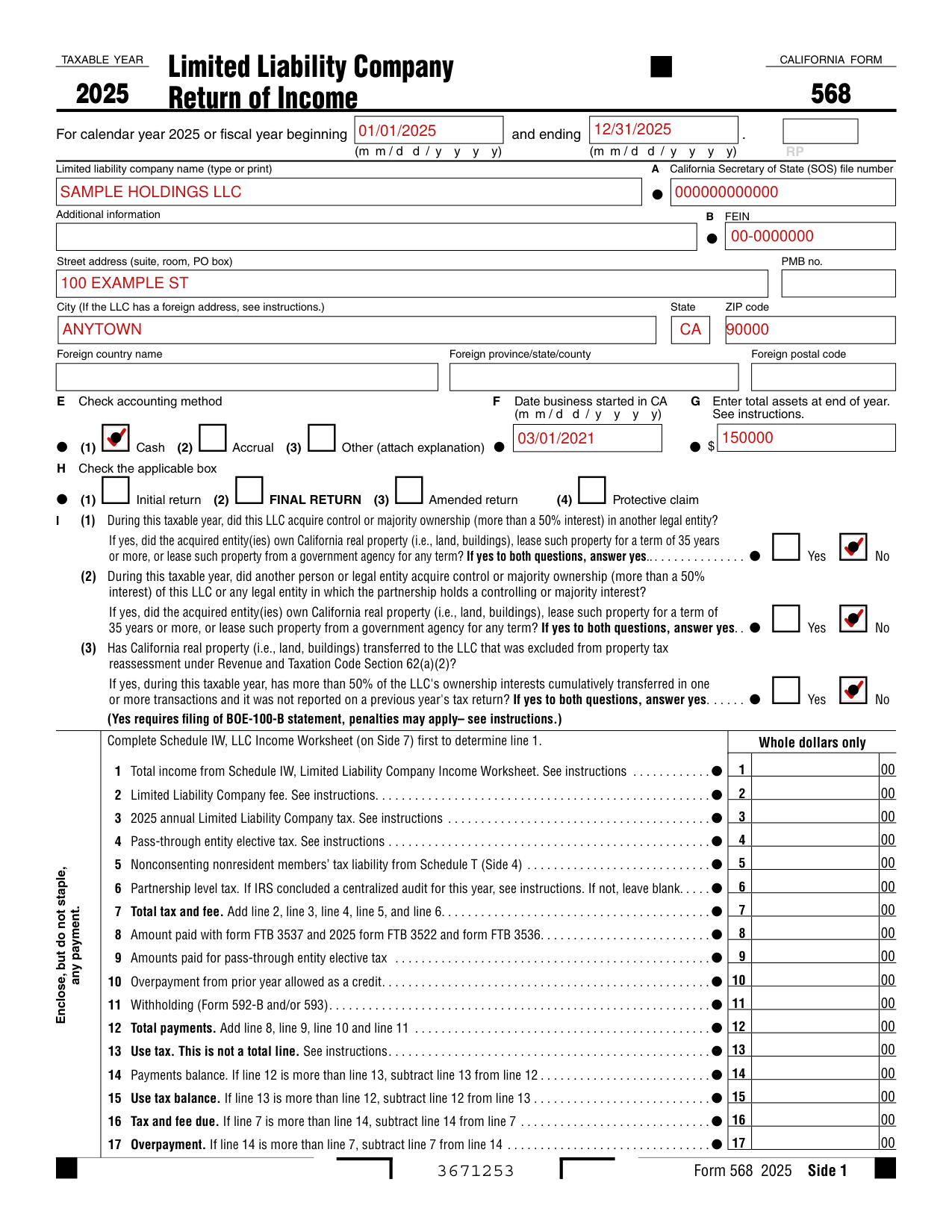
A filled-in Form 568 example: an LLC fills out Side 1 of Form 568
How to fill out Form 568, box by box
Limited liability company name, address and FEIN
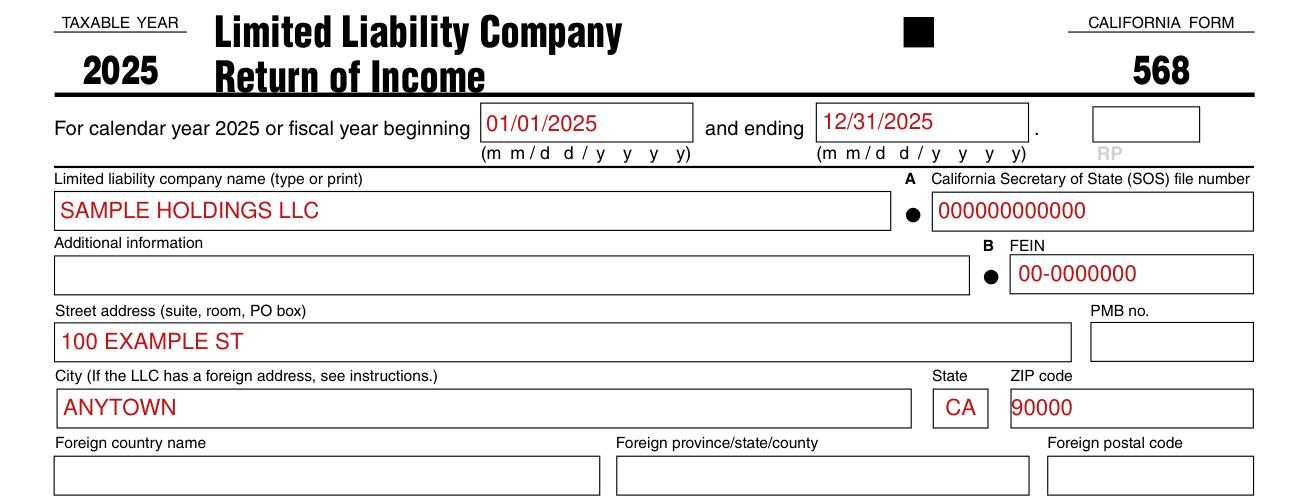
For calendar year 2025 or fiscal year, enter the beginning in the first box and the ending in the second box.
Type or print the limited liability company name, then enter the California Secretary of State (SOS) file number, the additional information and the FEIN.
Enter the street address (suite, room, PO box), PMB no., city, state and ZIP code. If the LLC has a foreign address, see instructions, and enter the foreign country name, foreign province/state/county and foreign postal code.
Accounting method, date business started in CA, total assets and applicable box

Check the accounting method: (1) Cash (2) Accrual (3) Other (attach explanation). Enter the date business started in CA.
Enter total assets at end of year. See instructions.
Check the applicable box: (1) Initial return (2) Final return (3) Amended return (4) Protective claim.
Schedule O, Amounts from Liquidation used to Capitalize a Limited Liability Company: complete only if initial return box is checked on Side 1, Question H.
Questions about control or majority ownership
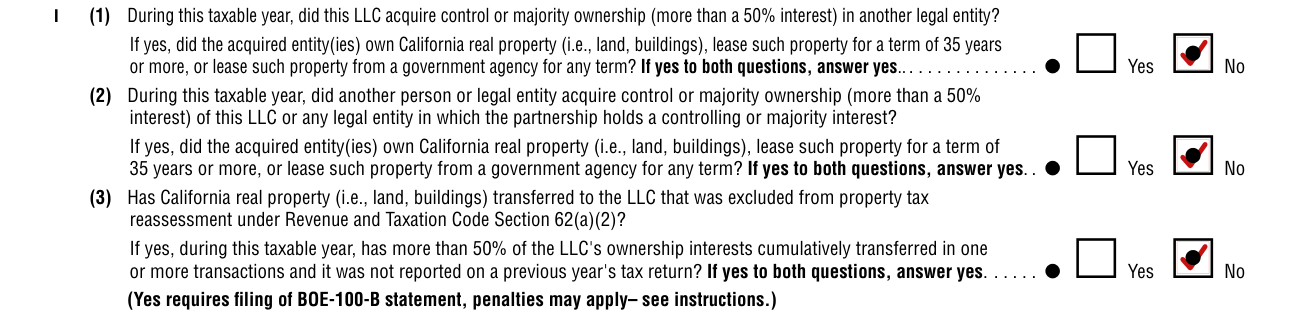
Line I(1): During this taxable year, did this LLC acquire control or majority ownership (more than a 50% interest) in another legal entity? Line I(2): During this taxable year, did another person or legal entity acquire control or majority ownership (more than a 50% interest) of this LLC or any legal entity in which the partnership holds a controlling or majority interest? For each of Line I(1) and Line I(2), if yes, did the acquired entity(ies) own California real property (i.e., land, buildings), lease such property for a term of 35 years or more, or lease such property from a government agency for any term? If yes to both questions, answer yes. Check Yes or No for each.
Line I(3): Has California real property (i.e., land, buildings) transferred to the LLC that was excluded from property tax reassessment under Revenue and Taxation Code Section 62(a)(2)? If yes, during this taxable year, has more than 50% of the LLC's ownership interests cumulatively transferred in one or more transactions and it was not reported on a previous year's tax return? If yes to both questions, answer yes. (Yes requires filing of BOE-100-B statement, penalties may apply, see instructions.) Check Yes or No.
Lines 1 to 7: tax and fee
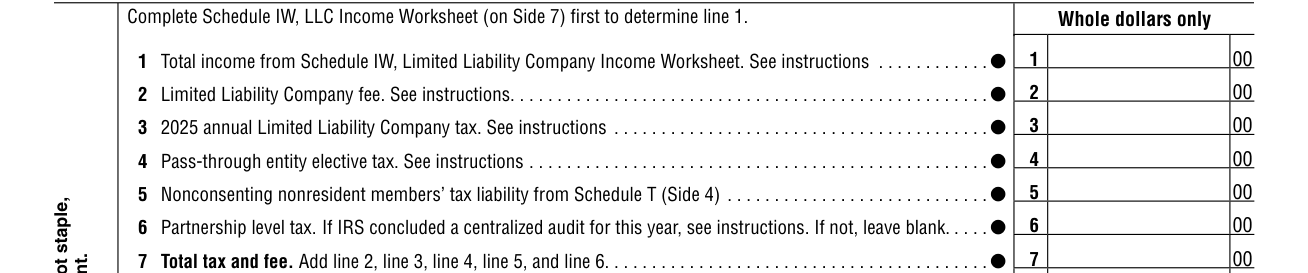
Complete Schedule IW, LLC Income Worksheet (on Side 7) first to determine line 1. Whole dollars only.
Line 1: Total income from Schedule IW, Limited Liability Company Income Worksheet. See instructions.
Line 2: Limited Liability Company fee. See instructions.
Line 3: 2025 annual Limited Liability Company tax. See instructions.
Line 4: Pass-through entity elective tax. See instructions.
Line 5: Nonconsenting nonresident members' tax liability from Schedule T (Side 4).
Line 6, Partnership level tax: If IRS concluded a centralized audit for this year, see instructions. If not, leave blank.
Line 7, Total tax and fee: Add line 2, line 3, line 4, line 5, and line 6.
Lines 8 to 17: payments, use tax and overpayment
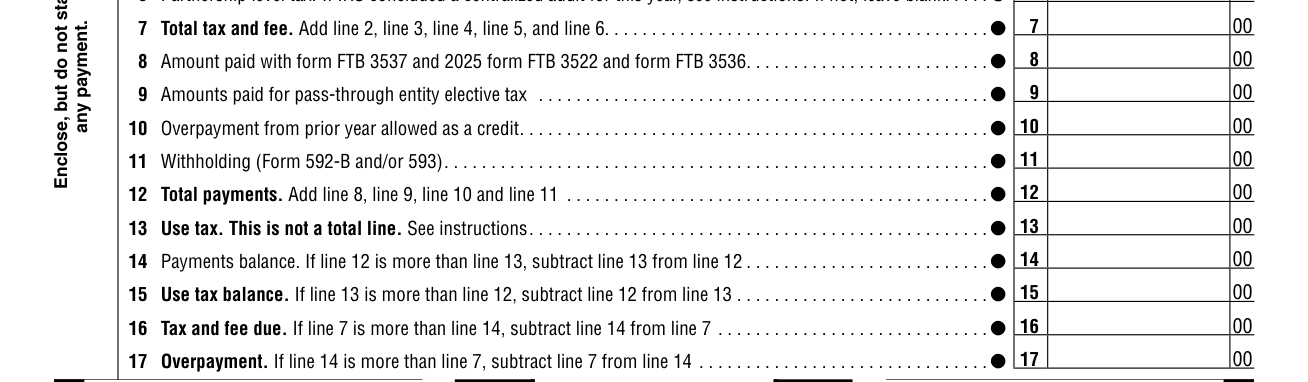
Line 8: Amount paid with form FTB 3537 and 2025 form FTB 3522 and form FTB 3536.
Line 9: Amounts paid for pass-through entity elective tax.
Line 10: Overpayment from prior year allowed as a credit.
Line 11: Withholding (Form 592-B and/or 593).
Line 12, Total payments: Add line 8, line 9, line 10 and line 11.
Line 13, Use tax: This is not a total line. See instructions.
Line 14, Payments balance: If line 12 is more than line 13, subtract line 13 from line 12.
Line 15, Use tax balance: If line 13 is more than line 12, subtract line 12 from line 13.
Line 16, Tax and fee due: If line 7 is more than line 14, subtract line 14 from line 7.
Line 17, Overpayment: If line 14 is more than line 7, subtract line 7 from line 14.
Lines 18 to 21: credit, refund, penalties and interest, total amount due
Line 18: Amount of line 17 to be credited to 2026 tax or fee.
Line 19, Refund: If the total of line 18 is less than line 17, subtract the total from line 17.
Line 20, Penalties and interest: See instructions.
Line 21, Total amount due: Add line 15, line 16, line 18, and line 20, then subtract line 17 from the result.
Principal business activity code and number of members
Line J: Enter the principal business activity code (Do not leave blank), the business activity and the product or service.
Line K: Enter the maximum number of members in the LLC at any time during the year. For multiple member LLCs, attach a California Schedule K-1 (568) for each of these members.
Disregarded business entity
Line U(1): Is this LLC a business entity disregarded for tax purposes? Check Yes or No.
Line U(2): If "Yes," see instructions and complete Side 1, Side 2, Side 3, Schedule B, Side 5, and Side 7, if applicable. Are there credits or credit carryovers attributable to the disregarded entity? Check Yes or No.
Line U(3): If "Yes" to U(1), does the disregarded entity have total income derived from or attributable to California that is less than the LLC's total income from all sources? Check Yes or No.
Single Member LLC Information and Consent
Single Member LLC Information and Consent: Complete only if the LLC is disregarded.
What type of entity is the ultimate owner of this SMLLC? See instructions. Check only one box: (1) Individual, (2) C Corporation, (3) Pass-Through (S corporation, partnership, LLC classified as a partnership), (4) Estate/Trust or (5) Exempt Organization.
By signing the Member's Consent Statement, the member consents to the jurisdiction of the State of California to tax the member's LLC income and agrees to file returns and pay tax as may be required by the Franchise Tax Board. Enter the Signature and Date.
Sign Here: declaration, signature and date
Sign Here: the signature of an authorized member or manager, with the date.
By signing, you declare under penalties of perjury that you have examined this return, including accompanying schedules and statements, and to the best of your knowledge and belief, it is true, correct, and complete.
Declaration of preparer (other than taxpayer) is based on all information of which preparer has any knowledge.
Paid Preparer's Use Only: enter the preparer's name, signature, PTIN, firm's name (or yours, if self-employed) and address, firm's FEIN, telephone and date, and check if self employed.
May the FTB discuss this return with the paid preparer (see instructions)? Check Yes or No.
Schedule B Income and Deductions
Schedule B Income and Deductions, caution: Include only trade or business income and expenses on line 1a through line 22. See the instructions for more information.
Schedule IW, LLC Income Worksheet
Schedule IW Limited Liability Company (LLC) Income Worksheet: Enter your California income amounts on the worksheet. All amounts entered must be assigned for California law differences.
Use only amounts that are from sources derived from or attributable to California when completing lines 1-17 of this worksheet.
If your business is both within and outside of California, see Schedule IW instructions to assign the correct amounts to California. If the LLC is wholly within California, the total income amount is assigned to California and is entered beginning with line 1a.
Do not enter amounts on this worksheet that have already been reported by another LLC to determine its fee.
Line 17, Total California income: Add lines 7, 8c, 9c, 10, 11, 12, 13, 14, 15, and 16. Line 17 may not be a negative number. Enter the total on line 17 and on Form 568, Side 1, line 1. If less than zero enter -0-.
More rules for Form 568
Enclose, but do not staple, any payment.
Sources
[1] Form 568 (2025), Limited Liability Company Return of Income, Franchise Tax Board (the Official source link on this page).
