
Calhr 774 Form PDF Details

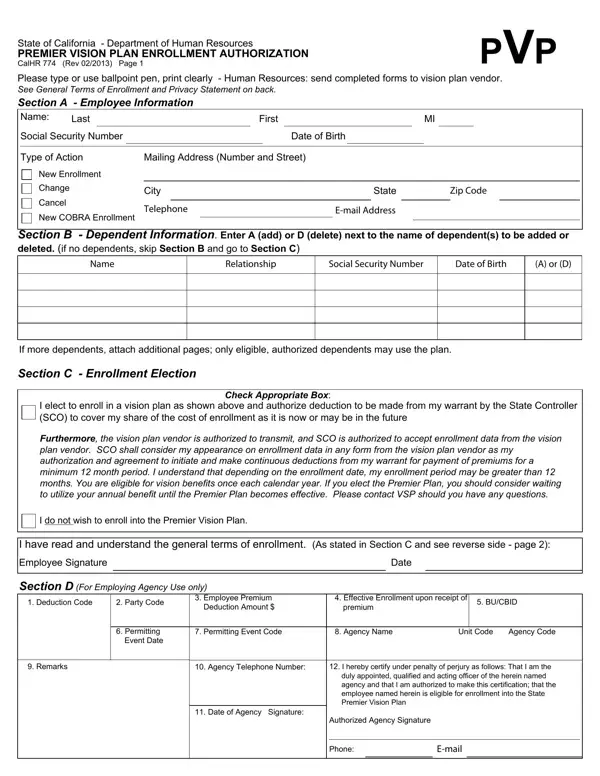
The State of California, through its Department of Human Resources, offers government employees a range of benefits, including the Premier Vision Plan (PVP). The enrollment authorization for this program is used to activate vision insurance coverage and to manage any changes to that coverage over time. Completing this document in ink or typewritten format ensures each section is legible and ready for processing by your agency's personnel office.

The document is divided into several sections, each with a specific purpose. The first section captures employee identification details, including your name, Social Security Number, and employing agency. The dependent section applies when you are adding or removing family members from the vision plan. The election section is where you indicate your choice: enrolling in, changing, or canceling Premier Vision Plan coverage. A privacy notice explains how the State Controller's Office and the plan vendor process your personal data in accordance with California privacy regulations.

Authorization for payroll deductions is a key requirement of this enrollment document. By signing, you direct your agency to withhold your share of the vision plan premium from each paycheck. Your Social Security Number serves a dual role: it identifies you to the State Controller's Office and links your record to the vision plan vendor. The enrollment authorization, revised in February 2013, reflects California's commitment to providing its employees with structured access to comprehensive vision care.

QuestionAnswer
Form NameCalhr 774 Form
Form Length2 pages
Fillable?No
Fillable fields0
Avg. time to fill out30 sec
Other namescal hr 774 form, calhr form 744, forms calhr 774, alhr 774

How to Edit Calhr 774 Form Online for Free

The CalHR 774 Premier Vision Plan Enrollment Authorization is the official PDF form that California state employees use to enroll in, modify, or cancel their vision insurance coverage. Completing each section correctly ensures your enrollment is processed on time and your coverage begins without delay.

Who Needs to Complete This Form?

This enrollment form is required for any California state employee who wants to:

  • Enroll in the Premier Vision Plan for the first time
  • Add or remove dependents from an existing vision plan enrollment
  • Change their coverage tier (for example, from Employee Only to Employee and Family)
  • Cancel their Premier Vision Plan coverage during an open enrollment period or after a qualifying life event

All permanent full-time and part-time California state employees are eligible. Seasonal and temporary workers should check with their agency's HR office to confirm eligibility before submitting.

What to Gather Before You Start

Having the following details on hand will help you complete the form in one sitting and reduce the chance of errors that delay processing:

  • Full legal name, date of birth, and Social Security Number
  • Employing agency name and employee ID or badge number
  • Home mailing address and contact phone number
  • Names, dates of birth, and Social Security Numbers for each dependent you want to add
  • Your current enrollment status (new enrollment, change, or cancellation)
  • The coverage tier you want to select: Employee Only, Employee Plus One, or Employee and Family

How to Fill Out Each Section

Section 1: Employee Information

Print your legal name exactly as it appears on your government-issued identification. Enter your Social Security Number, date of birth, home address, and the name of your California state employing agency. If your agency has issued an employee identification number, include it in the provided field. Use block letters or a typewriter for legibility.

Section 2: Dependent Information

Complete this section for each dependent you want to add to or remove from your vision plan. List each dependent's full name, date of birth, and relationship to you. Eligible dependents generally include a legal spouse, a registered domestic partner, and unmarried children up to the age limit stated in the current plan year guide. If you are removing a dependent, record the reason and the date the change takes effect.

Section 3: Enrollment Election

Indicate whether you are enrolling for the first time, changing your current coverage level, or canceling your Premier Vision Plan enrollment. Mark the coverage tier that fits your situation. New California state employees must submit this PDF form within the initial enrollment window, which is typically 60 days from the first day of employment or from the date you become eligible.

Section 4: Payroll Deduction Authorization

Sign this section to authorize your agency to deduct your premium share from each paycheck. The deduction amount depends on the coverage tier you selected. Pre-tax deduction may be available under your agency's flexible spending plan. Once your enrollment is confirmed, coverage generally runs for the full plan year. Changes outside of open enrollment require a qualifying life event such as marriage, birth of a child, or loss of other coverage.

Section 5: Privacy Notice and Certification

Read the privacy notice on the reverse side of the document before signing. It explains how your Social Security Number and other personal data are handled by the State Controller's Office and the vision plan vendor. Sign and date the form to certify that all information is accurate and complete. An unsigned form will be returned without processing.

Common Errors That Delay Processing

  • Missing signature or date. The enrollment form is not valid without a signature in Section 5. Always complete this step before submitting.
  • Incorrect Social Security Number. Verify every digit before handing in the document. A wrong number creates errors in payroll and delays your coverage start date.
  • Omitting dependent birth dates. Every dependent listed must have a complete and accurate date of birth. Partial entries are rejected during review.
  • Submitting outside the enrollment window. Late forms are generally held until the next open enrollment period. Check your eligibility dates with your HR office before submitting.
  • Using correction fluid. If you write something incorrectly, obtain a fresh PDF form and start over. Alterations with white-out may cause the document to be rejected by the processing unit.

How to Submit the Completed Form

Hand the completed enrollment authorization to your agency's human resources or personnel office. Do not send it directly to the vision plan vendor or to the State Controller's Office. Your HR office reviews the form, enters it into the payroll system, and forwards the enrollment order to the appropriate unit for processing. Keep a copy of the signed document for your records.

If you mail the form, use a delivery method that provides proof of receipt. For in-person submissions, ask for a date-stamped copy as confirmation. Coverage typically becomes effective at the start of the pay period following successful processing, though your agency's HR office can confirm the exact effective date for your enrollment.

Frequently Asked Questions

When can I enroll in the Premier Vision Plan?

You can enroll when you first become eligible (generally within 60 days of your hire date or a qualifying life event) and during the annual open enrollment period. Outside these windows, you can only make changes if you experience a qualifying life event such as marriage, divorce, birth of a child, adoption, or loss of other vision coverage.

Is there a cost to fill out or submit this PDF form?

No. The CalHR 774 document is a free government form issued by the California Department of Human Resources. You can download the PDF at no charge and fill it out here on FormsPal without creating an account.

What does the Premier Vision Plan cover?

The Premier Vision Plan provides California state employees and their eligible dependents with coverage for routine eye exams, prescription lenses, and frames through a network of vision care providers. Out-of-network services may be reimbursed at a lower rate. Contact your HR office or the vision plan vendor for a current summary of benefits and network details.

Do I need to resubmit the enrollment form every year?

No. Your Premier Vision Plan enrollment continues automatically each plan year. You only need to complete a new form when you want to change your coverage tier, add or remove dependents, or cancel your enrollment entirely.

Can I add a domestic partner as a dependent?

Yes. Eligible domestic partners may be added as dependents on your vision plan enrollment. Note that the employer's contribution toward domestic partner coverage may be treated as taxable income under federal law. Check with your HR office for the current rules and any additional forms that may be required.

What if I have a qualifying life event outside open enrollment?

A qualifying life event gives you a limited window (usually 30 to 60 days from the event date) to make changes to your vision plan enrollment without waiting for the next annual open enrollment period. Notify your HR office as soon as the event occurs and submit the completed PDF form within the allowed timeframe.

Related Forms for California State Employees

California state employees may need these related forms in addition to the vision plan enrollment authorization:

  • Vision Benefits Claim Form - submit a claim for vision care services received through your plan
  • CalHR 754 Form - another benefits document issued by the California Department of Human Resources
  • CalHR 695 Form - a California Department of Human Resources form for employee records and verification
  • Employment Forms - a full collection of employment-related documents, templates, and HR forms