
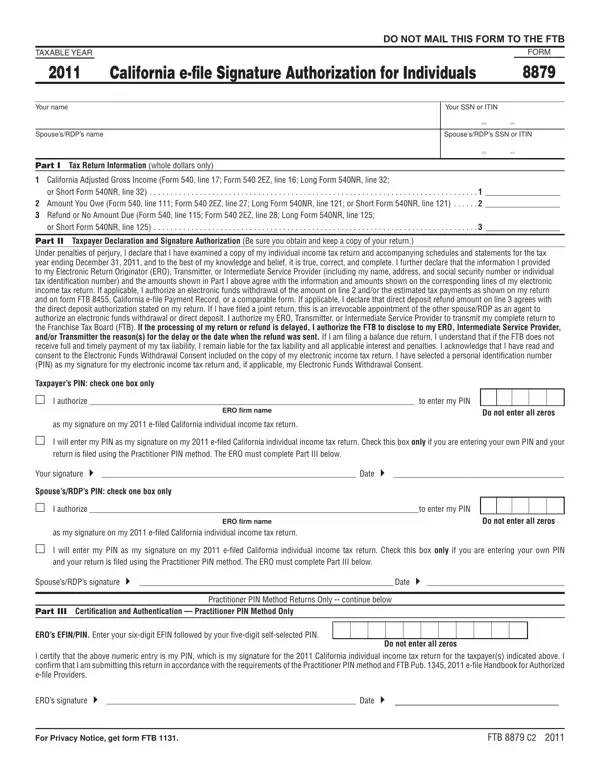
With the online PDF tool by FormsPal, you'll be able to fill out or change California Form 8879 right here. FormsPal is dedicated to giving you the absolute best experience with our editor by continuously presenting new features and enhancements. With these updates, using our tool becomes easier than ever before! Here is what you'd have to do to start:
Step 1: Hit the orange "Get Form" button above. It will open up our editor so that you can start filling out your form.
Step 2: With the help of this handy PDF file editor, you may accomplish more than merely fill out forms. Express yourself and make your docs look professional with customized text put in, or fine-tune the original content to excellence - all comes along with an ability to add your own images and sign the document off.
This document will need you to provide specific information; to guarantee consistency, you should bear in mind the recommendations just below:
1. To get started, when filling out the California Form 8879, start with the part with the next blanks:
2. After completing the previous section, go to the subsequent step and enter the essential particulars in these blank fields - Taxpayers PIN check one box only m, as my signature on my efiled, I will enter my PIN as my, Your signature Date , SpousesRDPs PIN check one box only, I authorize to enter my PIN, ERO firm name, Do not enter all zeros, as my signature on my efiled, I will enter my PIN as my, SpousesRDPs signature Date , Part III Certiication and, Practitioner PIN Method Returns, EROs EFINPIN Enter your sixdigit, and Do not enter all zeros.
It's very easy to get it wrong when filling out the EROs EFINPIN Enter your sixdigit, so be sure to look again before you'll submit it.
Step 3: Reread what you have inserted in the blank fields and click on the "Done" button. Join us now and immediately gain access to California Form 8879, all set for download. Each and every edit you make is conveniently kept , letting you edit the file later when required. Here at FormsPal, we do our utmost to be certain that all your details are kept secure.
Tips for Filling Out California Form 8879
Double-check your adjusted gross income (AGI) before signing. The AGI on Form 8879 must exactly match the AGI shown on your California Form 540 or 540NR. Any discrepancy can delay your e-filing or trigger a rejection from the FTB.
Your PIN must be five digits and cannot be all zeros. Choose a number you will remember, since your ERO will need you to confirm it matches what is entered on the form. Write it down in a secure location before handing the signed form to your tax preparer.
If you are filing a joint return, both you and your spouse or RDP must each select a separate five-digit PIN. Both PINs must appear on the form before your ERO transmits the return. Missing a PIN is one of the most common reasons Form 8879 has to be corrected and re-signed.
Common Questions About California Form 8879
Do I submit Form 8879 to the FTB? No. You do not mail or submit Form 8879 to the Franchise Tax Board. Your ERO retains the signed form for three years. The FTB does not require a copy of the form itself. Your ERO's submission of your return serves as confirmation that the authorization exists.
Can I use Form 8879 for a federal return? No. California Form 8879 covers your California state return only. For your federal return, your ERO will use the separate IRS Form 8879. Both forms may be signed at the same time, but they are distinct documents processed by different agencies.
What if I make an error after signing? If you discover an error after signing Form 8879 but before your ERO transmits the return, ask your ERO to correct the return. You will need to sign an updated Form 8879 reflecting the correct figures. If the return has already been transmitted, your ERO will need to file an amended return using California Form 540X.
