
Camelback Employment Application Form PDF Details

The Camelback Employment Application is the official form for people who want to work at Camelback Mountain Resort. The resort is located in Tannersville, Pennsylvania, and is one of the largest ski and waterpark destinations in the northeastern United States. It operates under several brands, including Camelbeach Waterpark and CBK Mountain Adventures. The resort hires for seasonal and year-round positions across many departments, including ski instruction, food service, guest services, and maintenance.

This two-page form gathers the information a hiring manager needs to evaluate each applicant. Before filling it out, have the following details ready:

A section of the form asks about criminal history. A past conviction does not automatically disqualify a candidate. Camelback follows Equal Opportunity Employment guidelines and inclusive hiring practices.

At the end of the form, applicants sign a declaration confirming all answers are accurate. Camelback Mountain Resort can end employment if false information is later discovered.

Looking for a different form? Browse related options such as the general employment application, the Adams employment application form, or the hotel job application form.

QuestionAnswer
Form NameCamelback Employment Application Form
OrganizationCamelback Mountain Resort
LocationTannersville, Pennsylvania
Form Length2 pages
Fillable?No
Fillable fields0
Avg. time to fill out30 sec
Other namesCamelback job application, Camelbeach application, CBKMA form

How to Edit Camelback Employment Application Form Online for Free

You can fill out the Camelback Employment Application form online using FormsPal's free PDF editor. Follow the steps below to complete and download your finished application.

Step 1: Open the PDF Editor

Click the "Get Form" button at the top of this page. The editor opens in your browser. No software download is needed. You can type in fields, add a signature, and make corrections directly on the form.

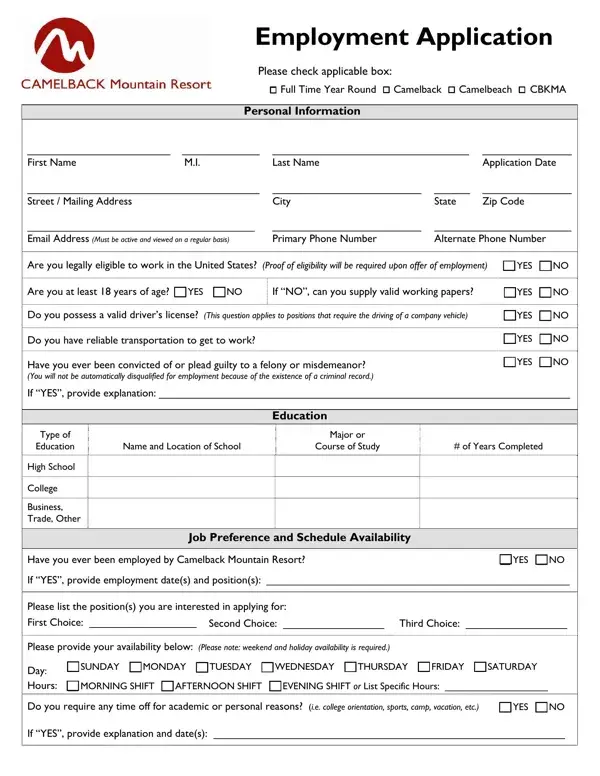
Step 2: Complete Your Personal Information

Start at the top of page one. Enter your full name, home address, phone number, and date of birth. The form also asks whether you are legally authorized to work in the United States. Fill in every blank in this section before you continue.

Personal information fields on the Camelback Employment Application form

Next, fill in your education details and job preferences. You will need the following:

  • Type of schooling (High School, College, or Business/Trade)
  • Name and location of each school attended
  • Field of study and number of years completed
  • Your first, second, and third job preference
  • Your weekly availability, including specific days and hours
Education and job preference section of the Camelback Employment Application form

Check the Business/Trade education field carefully before you move on. It is a common area where applicants make errors.

Step 3: Add Your Employment History

List each previous job in the employment history section. For each position, provide the company name and address, your job title, start and end dates, your pay rate, and your supervisor's name and phone number. Indicate whether Camelback may contact that employer. If this is your first job, mark that section accordingly.

Employment history and skills section of the Camelback Employment Application form

Step 4: Add References and Complete the Final Sections

List at least two personal references. These must be people who know you well but are not related to you. For each reference, include their name, mailing address, phone number, and how many years you have known them.

A short section asks how you heard about the job opening. Options include TV, newspaper, or the internet. Read each question carefully and answer every part.

References and equal opportunity section of the Camelback Employment Application form

The final part includes a declaration. It states that all the information you provided is true and complete. Read this section before you sign. The Camelback Mountain Resort mailing address appears at the bottom of the form.

Declaration and signature section of the Camelback Employment Application form

Step 5: Review and Download Your Completed Form

Go through every section one more time to catch any mistakes. When everything looks correct, click "Done." You can then download the PDF to your device, send it by email, or print a hard copy. Sign up for a free FormsPal account to save your form and return to it at any time. FormsPal does not sell or share any information you enter.

Looking for another job application? Try the Chick-fil-A job application, the ARCO employment application, or browse our full list of employment application forms.