
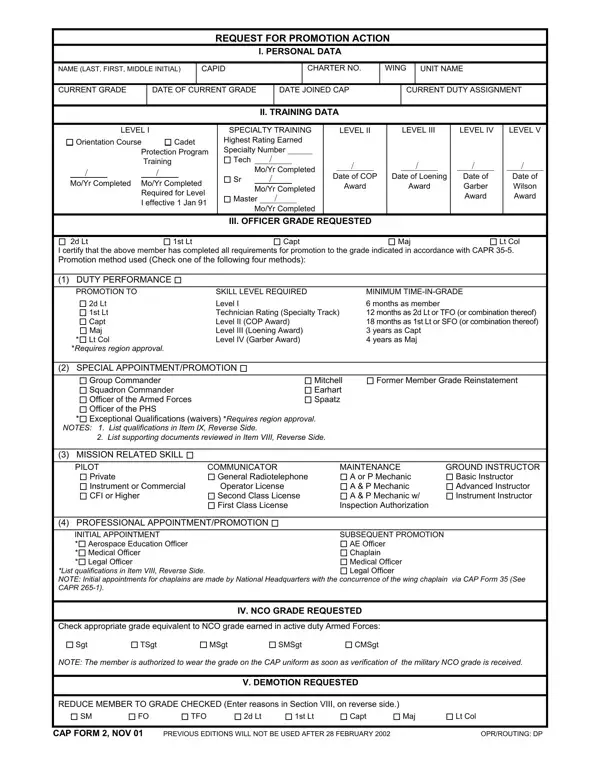

CAP Form 2 at a glance
What it is: CAP Form 2 (AUG 14) is the REQUEST FOR PROMOTION ACTION.
Who signs: Under VII, REQUESTED BY CC: NAME/RANK OF FLIGHT OR SQDN CMDR, FLT OR SQ and DATE.
A filled-in CAP Form 2 example: a duty performance promotion to 2d Lt
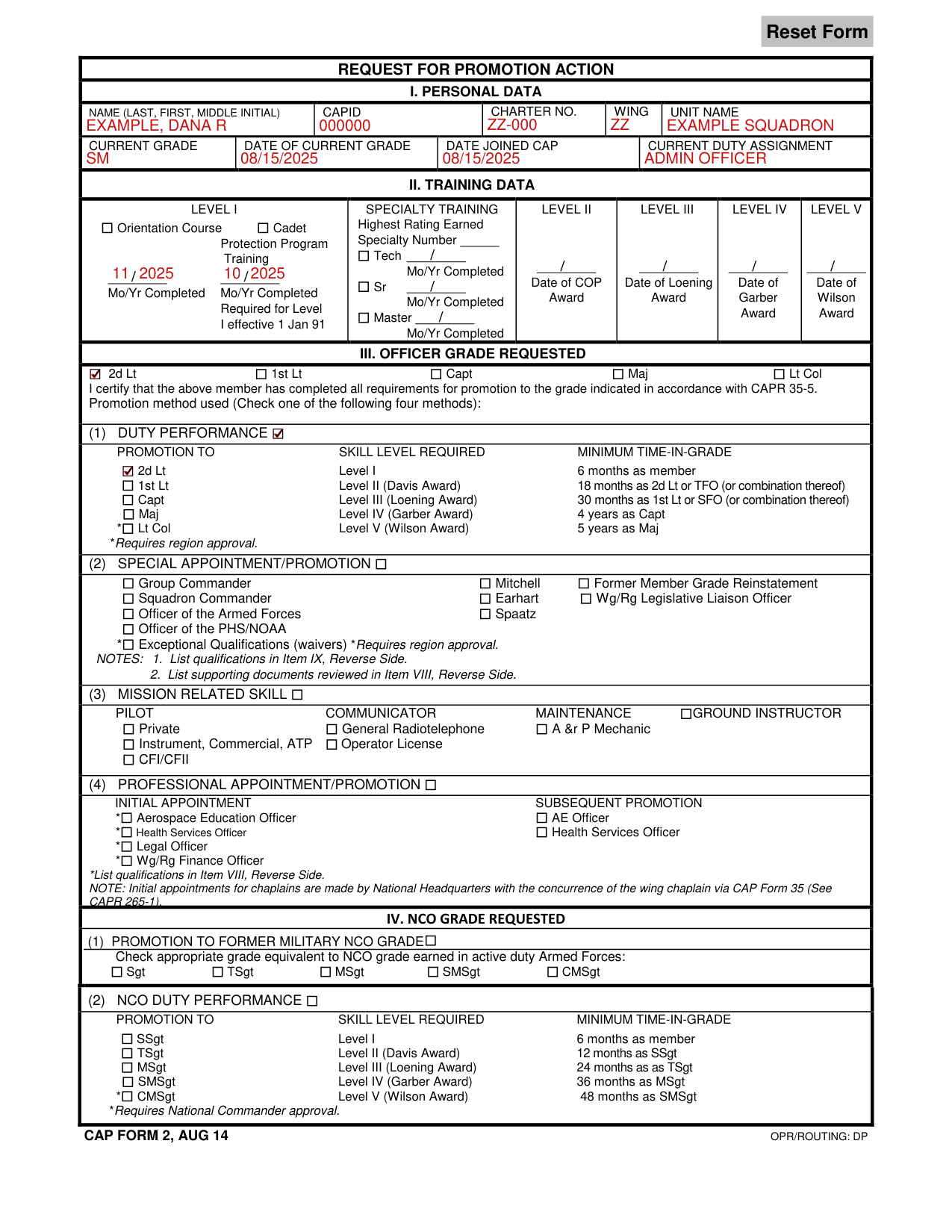
How to fill out CAP Form 2, box by box
Personal data

Under I. PERSONAL DATA, enter NAME (LAST, FIRST, MIDDLE INITIAL), CAPID, CHARTER NO., WING and UNIT NAME.
Enter CURRENT GRADE, DATE OF CURRENT GRADE, DATE JOINED CAP and CURRENT DUTY ASSIGNMENT.
Training data

Under II. TRAINING DATA, complete all applicable blocks.
Under LEVEL I, enter Mo/Yr Completed for the Orientation Course and for Cadet Protection Program Training (Required for Level I effective 1 Jan 91).
Under LEVEL II, LEVEL III, LEVEL IV and LEVEL V, enter Mo/Yr Completed.
Enter the Date of COP Award, the Date of Loening Award, the Date of Garber Award and the Date of Wilson Award.
Under SPECIALTY TRAINING, enter the Highest Rating Earned (Tech, Sr or Master, each with Mo/Yr Completed) and the Specialty Number.
All training (Levels I thru V) must be validated by DPR and the accompanying award must appear in the member's master file at National Headquarters prior to promotion. Promotions will not be processed until this has been accomplished.
Officer grade requested

Under III. OFFICER GRADE REQUESTED, indicate the grade requested: 2d Lt, 1st Lt, Capt, Maj or Lt Col. Certify that the member has completed all requirements for promotion to the grade indicated in accordance with CAPR 35-5. Promotion method used (Check one of the following four methods).
Common mistake: Check only one promotion method. For example, a member being promoted under the duty performance method should not also check mission-related skills.
Duty performance

Check the appropriate promotion method block, (1) DUTY PERFORMANCE: ensure that the member has the minimum skill level (and accompanying training awards) and necessary time-in-grade for the grade recommended. PROMOTION TO SKILL LEVEL REQUIRED and MINIMUM TIME-IN-GRADE: 2d Lt, Level I, 6 months as member (*Requires region approval); 1st Lt, Level II (Davis Award), 18 months as 2d Lt or TFO (or combination thereof) (*Requires region approval); Capt, Level III (Loening Award), 30 months as 1st Lt or SFO (or combination thereof) (*Requires region approval); Maj, Level IV (Garber Award), 4 years as Capt; Lt Col, Level V (Wilson Award), 5 years as Maj (*Requires region approval).
Action by regional headquarters and below
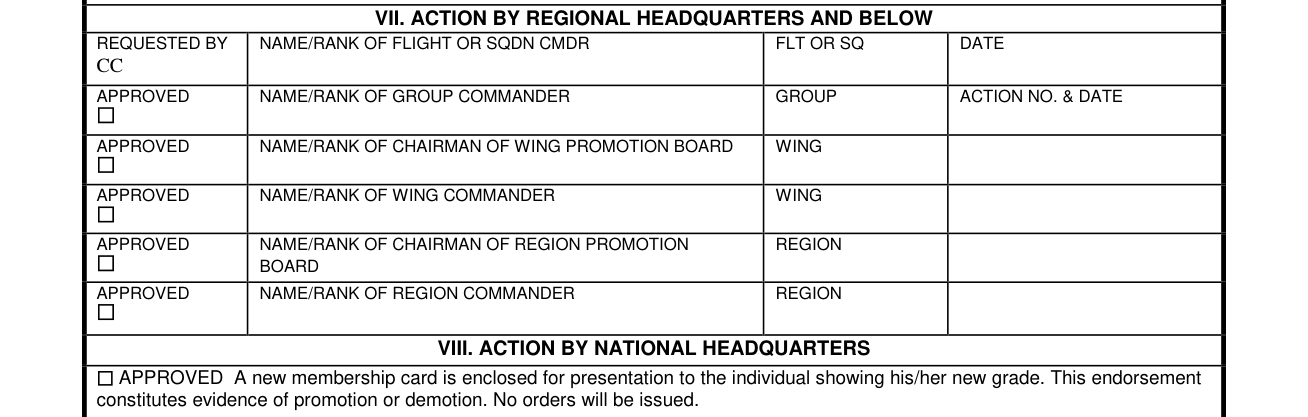
APPROVED: NAME/RANK OF GROUP COMMANDER (GROUP, ACTION NO. & DATE); APPROVED: NAME/RANK OF CHAIRMAN OF WING PROMOTION BOARD (WING); APPROVED: NAME/RANK OF WING COMMANDER (WING); APPROVED: NAME/RANK OF CHAIRMAN OF REGION PROMOTION BOARD (REGION); APPROVED: NAME/RANK OF REGION COMMANDER (REGION).
More rules for CAP Form 2
VIII. ACTION BY NATIONAL HEADQUARTERS: APPROVED A new membership card is enclosed for presentation to the individual showing his/her new grade. This endorsement constitutes evidence of promotion or demotion. No orders will be issued. DISAPPROVED Reasons are stated in the attached letter.
Other requests on this form
Special appointment or promotion
Check the appropriate promotion method block, (2) SPECIAL APPOINTMENT/PROMOTION lists * Group Commander, Mitchell, Former Member Grade Reinstatement, * Squadron Commander, Earhart, Wg/Rg Legislative Liaison Officer, * Officer of the Armed Forces, Spaatz, * Officer of the PHS/NOAA and * Exceptional Qualifications (waivers). *Requires region approval. NOTES: 1. List qualifications in Item IX, Reverse Side.
Exceptional qualifications promotions (waivers) require a detailed letter of justification and approval of the region commander, regardless of grade being recommended.
Former members who are being recommended for grade reinstatement must meet the current training criteria for the grade requested.
2. List supporting documents reviewed in Item VIII, Reverse Side.
Professional appointment or promotion
(4) PROFESSIONAL APPOINTMENT/PROMOTION lists INITIAL APPOINTMENT and SUBSEQUENT PROMOTION for Aerospace Education Officer, Health Services Officer, Legal Officer and Wg/Rg Finance Officer. *List qualifications in Item VIII, Reverse Side. NOTE: Initial appointments for chaplains are made by National Headquarters with the concurrence of the wing chaplain via CAP Form 35 (See CAPR 265-1).
Aerospace education and health services officers are not subject to training requirements after Level I, but time-in-grade is required for promotion after the initial appointment unless higher professional qualifications are obtained which meet the initial appointment criteria for grade recommended.
NCO grade requested
Under IV. NCO GRADE REQUESTED, (1) PROMOTION TO FORMER MILITARY NCO GRADE: check appropriate grade equivalent to NCO grade earned in active duty Armed Forces: ** Sgt, TSgt, MSgt, SMSgt or CMSgt. (2) NCO DUTY PERFORMANCE: SSgt, Level I, 6 months as member; TSgt, Level II (Davis Award), 12 months as SSgt; MSgt, Level III (Loening Award), 24 months as TSgt; SMSgt, Level IV (Garber Award), 36 months as MSgt; CMSgt, Level V (Wilson Award), 48 months as SMSgt. *Requires National Commander approval.
Flight officer grade requested
Flight officer promotions are restricted to senior members not yet 21 years of age.
Under VI. FLIGHT OFFICER GRADE REQUESTED, check appropriate grade and promotion method.
DUTY PERFORMANCE: FO, Level I and 3 months as member; TFO, Tech rating (Specialty Track) and 6 months as FO; SFO, Level II and 12 months as TFO.
FORMER CADET: FO, Mitchell Award; TFO, Earhart Award; SFO, Spaatz Award.
Approval by the appropriate commander constitutes evidence of promotion. This promotion does not require action by National Headquarters.
The wing commander may approve these promotions or promoting authority may be delegated to the group or squadron commander.
Demotion requested
V. DEMOTION REQUESTED: REDUCE MEMBER TO GRADE CHECKED: SM, FO, TFO, 2d Lt, 1st Lt, Capt, Maj, Lt Col. (Enter reasons in Section VIII, on reverse side.)
Recommendations for demotion will follow the same administrative procedures as promotions to include consideration by the appropriate promotion board. Final action rests with the promoting authority (see paragraphs 9 and 10, CAPR 35-5.)
Sources
[1] CAP Form 2 (AUG 14), Request for Promotion Action, Civil Air Patrol (the Official source link on this page).