

Form CFS 718-B-DC at a glance
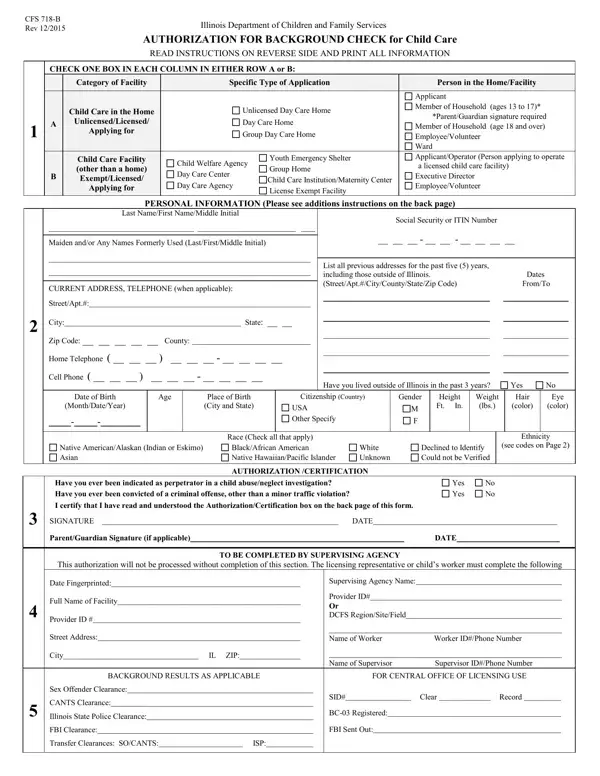
What it is: Form CFS 718-B-DC is the Illinois Department of Children and Family Services Authorization for Background Check for Day Care.
Who signs: Sign pages 1, 3 and 4.
Where and when to file: The Authorization for Background Check must be submitted to the licensing worker for completion of Section 4 and for forwarding to the DCFS pertinent Background Check Unit.
This form must be completed by every person age 13 or older as part of an application to operate or reside in a day care home or group day care home, and all employees/volunteers at a day care facility regardless of age.
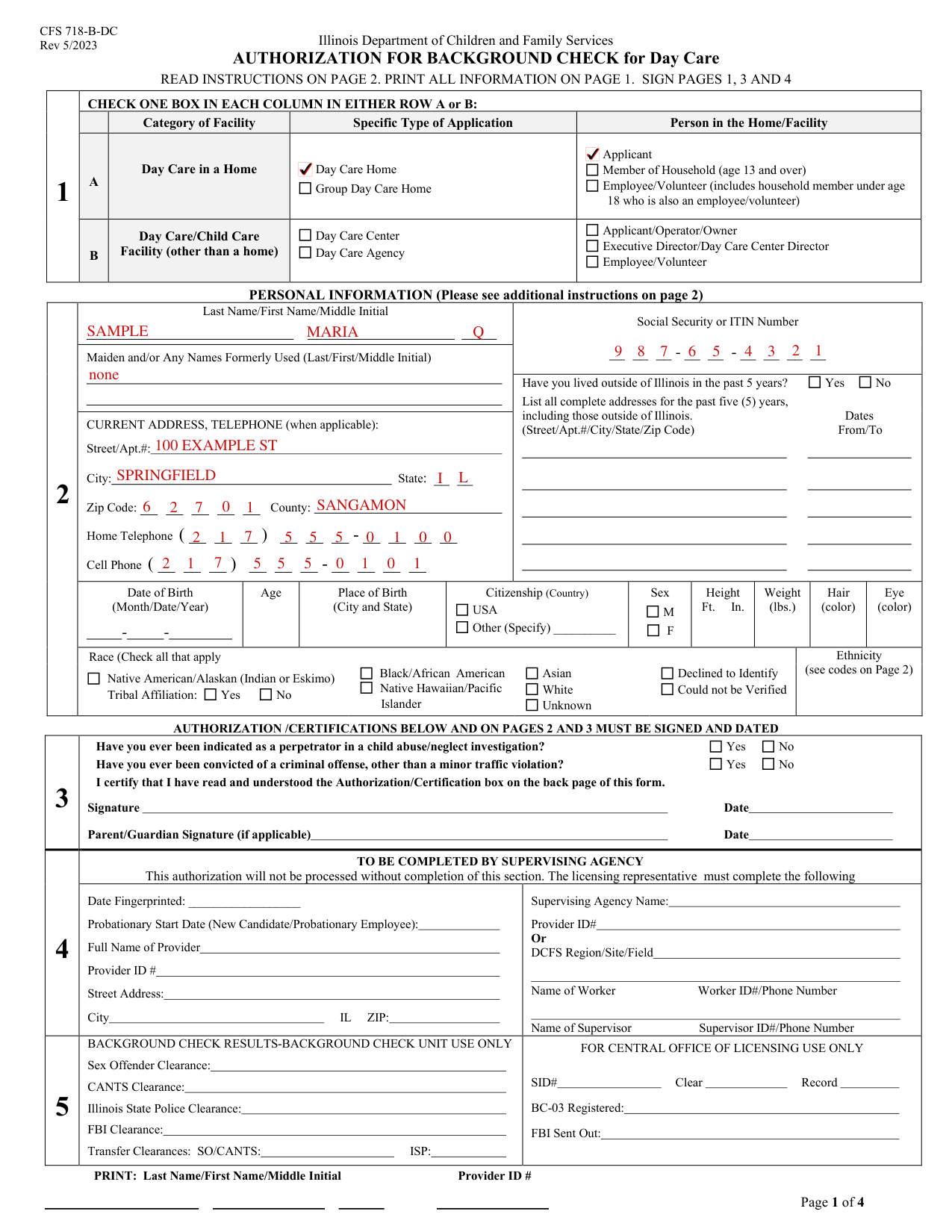
A filled-in Form CFS 718-B-DC example: a day care home applicant
How to fill out Form CFS 718-B-DC, box by box
Category of Facility
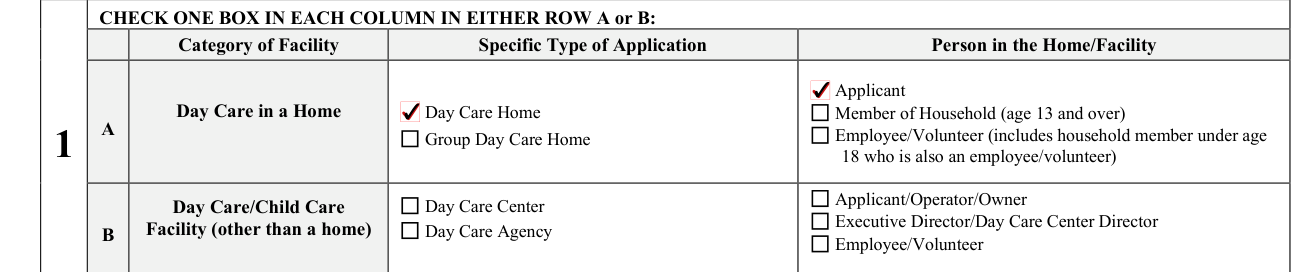
Check one box in each column in either row A or B. The columns are Category of Facility, Specific Type of Application and Person in the Home/Facility.
Day Care in a Home: check Day Care Home or Group Day Care Home, and check Applicant, Member of Household (age 13 and over) or Employee/Volunteer (includes household member under age 18 who is also an employee/volunteer).
Day Care/Child Care Facility (other than a home): check Day Care Center or Day Care Agency, and check Applicant/Operator/Owner, Executive Director/Day Care Center Director or Employee/Volunteer.
Last Name/First Name/Middle Initial

Enter your Last Name/First Name/Middle Initial.
Social Security or ITIN Number

Enter the Social Security or ITIN Number. This form will not be processed without a complete Social Security, Individual Taxpayer Identification (ITIN) number or Department assigned number.
Maiden and/or Any Names Formerly Used

Enter Maiden and/or Any Names Formerly Used (Last/First/Middle Initial). Current and all former names used by the individual must be included. If no other names, write “none.”
CURRENT ADDRESS, TELEPHONE (when applicable)

Under CURRENT ADDRESS, TELEPHONE (when applicable), enter Street/Apt.#, City, State, Zip Code, County, Home Telephone and Cell Phone.
More rules for Form CFS 718-B-DC
Have you lived outside of Illinois in the past 5 years? Yes No. List all complete addresses for the past five (5) years, including those outside of Illinois, with Dates From/To. Address: Current and all addresses, including county, where the person has lived in the past five years (Indicate if outside of Illinois).
Enter Date of Birth (Month/Date/Year), Age, Place of Birth (City and State), Citizenship (Country) USA or Other (Specify), Sex, Height Ft. In., Weight (lbs.), Hair (color) and Eye (color).
Race (Check all that apply): Black/African American, Native Hawaiian/Pacific Islander, Asian, White, Unknown, Declined to Identify, Could not be Verified, or Native American/Alaskan (Indian or Eskimo) with Tribal Affiliation: Yes No. Race: Enter all race codes that apply. NA = Native American/Alaskan (Indian or Eskimo) AS = Asian BL = Black/African American PI = Native Hawaiian/Pacific Islander WH = White UK = Unknown DI = Declined to Identify CV = Could not be Verified
Ethnicity: Enter the primary Ethnicity NH = Not Hispanic (NONE) HS = Hispanic South American HM = Hispanic Mexican HP = Hispanic Puerto Rican HD = Hispanic Spanish Descent HC = Hispanic Cuban HA = Hispanic Central American HN = Hispanic Dominican HO = Hispanic Other UK = Unknown DI = Declined to Identify CV = Could not be Verified
Have you ever been indicated as a perpetrator in a child abuse/neglect investigation? Yes No Have you ever been convicted of a criminal offense, other than a minor traffic violation? Yes No
Providing your fingerprints and associated information is voluntary; however, failure to do so may affect completion or approval of your application.
Individuals authorizing background checks have a right to receive a copy of this form.
Household members and probationary employees
Household members 13 through 17 years of age
Authorization for household members 13 through 17 years of age must be obtained to conduct a search of pertinent child abuse/neglect databases and sex offender registries only and are not subject to fingerprinting, unless they are an employee/volunteer of a day care home, group day care home, or day care center.
Probationary employment status
Probationary Employment status includes: Employees; Volunteers who may be left alone with children.
A probationary employee or volunteer may begin employment once an initial background check clearance is received. Persons in probationary employment status and volunteers shall not begin employment or volunteer services until notified by the employer of receipt of an initial background check clearance.
An initial background check includes a fingerprint clearance from the state in which the employee or volunteer resides, or a fingerprint clearance from the FBI.
A probationary employee or volunteer with an initial background check clearance must be under the supervision of an employee with a full comprehensive background check clearance (within the past five years) at all times.
A probationary employee or volunteer shall not be left alone with any child served by the licensed facility until notified by the employer that a full comprehensive background check clearance has been received.
*** Licensed Day Care Facilities Only: Assistants are not allowed to be alone with children served by the licensed facility, even when they have full background clearances, unless specified by Rule.
Certification: I have read, understand, and shall follow stipulations set forth as a probationary employee or volunteer: Signature, Date, Name (Print), and Parent/Guardian Signature (if applicable) and Date.
Before you go
Every person subject to a background check must complete the first three sections identifying the type of facility and what role they will have at the facility and all personal information. All identifying information must be accurate and complete.
Common questions about Form CFS 718-B-DC
Who signs it?
Sign pages 1, 3 and 4. The NOTICE of PROBATIONARY EMPLOYMENT STATUS AT A DAY CARE FACILITY on page 3, the ISP/FBI PRIVACY ACT STATEMENT, and the AUTHORIZATION/CERTIFICATION on page 4 of this form must be signed and dated by the individual having a Background Check completed. The Parent or Guardian's signature is required if background check is for a minor.
What am I certifying when I sign?
I further certify that the information provided on this form is true and correct. I acknowledge that falsification of any information provided on this form and/or the results of the background check may be full and sufficient grounds to deny the application for licensure. By signing you certify that you have read and understood the Authorization/Certification box on the back page of this form. Signature Date Parent/Guardian Signature (if applicable) Date
Sources
[1] Form CFS 718-B-DC (Rev 5/2023), Authorization for Background Check for Day Care, Illinois Department of Children and Family Services (the Official source link on this page).