

Form CG-1258 at a glance
What it is: Form CG-1258 (07/23) is the Department of Homeland Security U.S. Coast Guard application for initial, exchange, or replacement of certificate of documentation; redocumentation.
Where and when to file: Electronic Filing at nvdc.pdf.filing@uscg.mil.
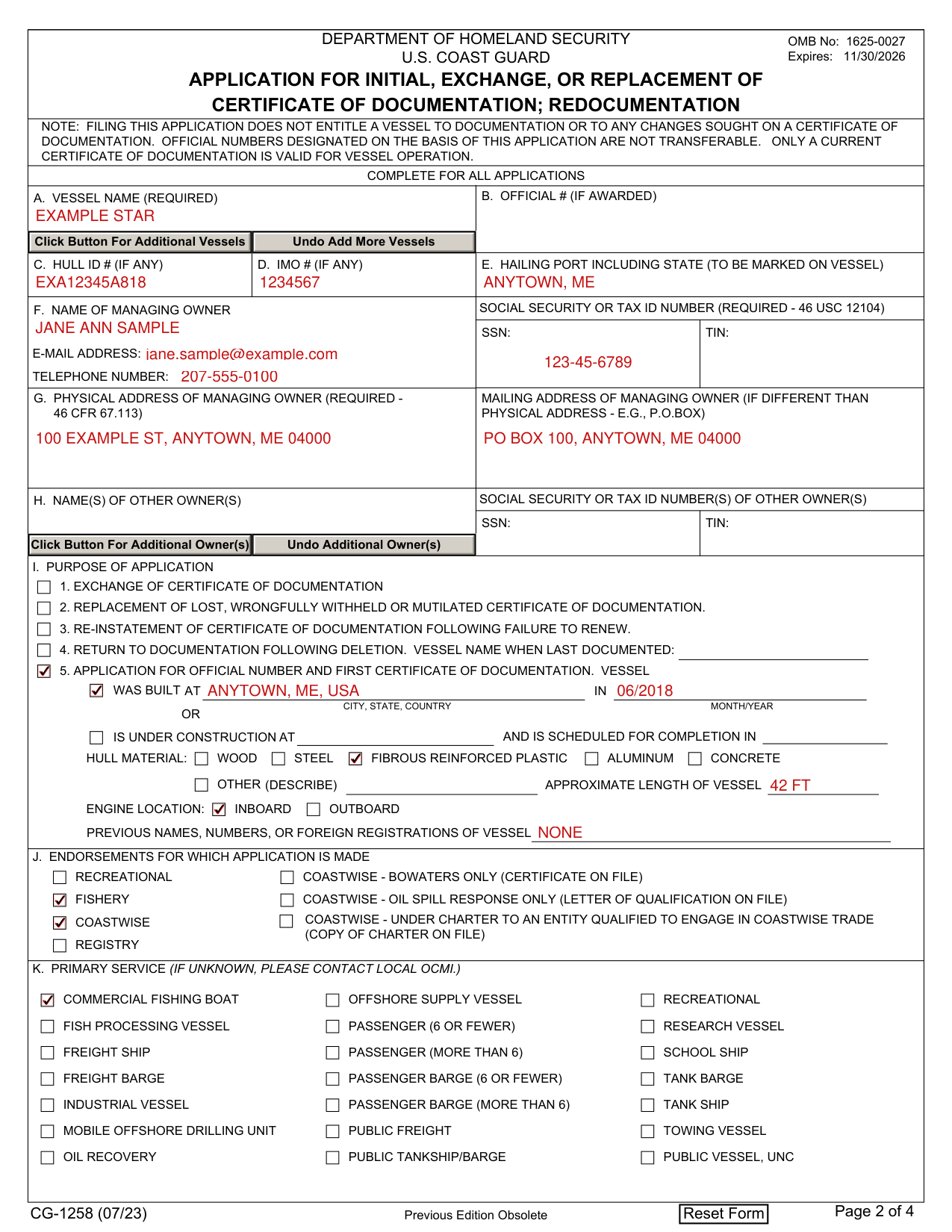
A filled-in Form CG-1258 example: first documentation of a fishing boat
How to fill out Form CG-1258, box by box
A to E, vessel name, official number, hull ID, IMO and hailing port

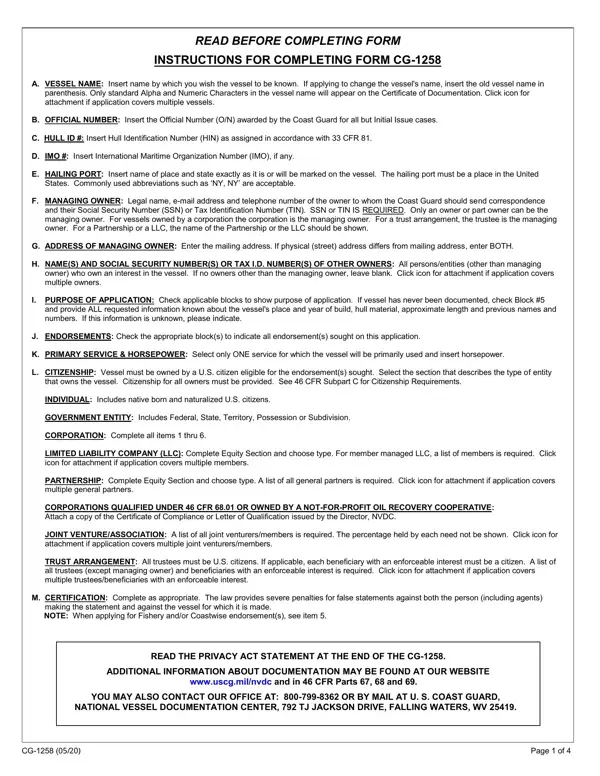
A. Vessel name: Insert name by which you wish the vessel to be known. If applying to change the vessel's name, insert the old vessel name in parenthesis.
Only standard Alpha and Numeric Characters in the vessel name will appear on the Certificate of Documentation. Click button for attachment if application covers multiple vessels.
B. Official number: Insert the Official Number (O/N) awarded by the Coast Guard for all but Initial Issue cases. C. Hull ID #: Insert Hull Identification Number (HIN) as assigned in accordance with 33 CFR 181. D. IMO #: Insert International Maritime Organization Number (IMO), if any.
E. Hailing port: Insert name of place and state exactly as it is or will be marked on the vessel. The hailing port must be a place in the United States. Commonly used abbreviations such as 'NY, NY' are acceptable.
F and G, the managing owner
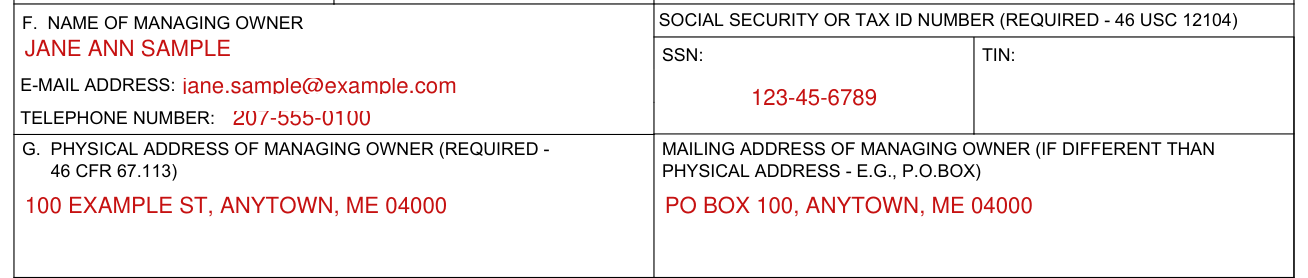
F. Managing owner: Legal name, e-mail address and telephone number of the owner to whom the Coast Guard should send correspondence and their Social Security Number (SSN) or Tax Identification Number (TIN). SSN or TIN IS REQUIRED.
Only an owner or part owner can be the managing owner. For vessels owned by a corporation, the corporation is the managing owner. For a trust arrangement, the trustee is the managing owner. For a Partnership or a LLC, the name of the Partnership or the LLC should be shown.
G. Address of managing owner: Enter the mailing address. If physical (street) address differs from mailing address, enter BOTH.
H, name(s) of other owner(s)

H. Name(s) and Social Security Number(s) or Tax I.D. Number(s) of other owners: All persons/entities (other than managing owner) who own an interest in the vessel. If no owners other than the managing owner, leave blank. Click button for attachment if application covers multiple owners.
I, purpose of application

I. Purpose of application: Check applicable block to show purpose of application.
1. Exchange of certificate of documentation. 2. Replacement of lost, wrongfully withheld or mutilated certificate of documentation. 3. Re-instatement of certificate of documentation following failure to renew. 4. Return to documentation following deletion. Vessel name when last documented. 5. Application for official number and first certificate of documentation.
I, block 5, a vessel never documented
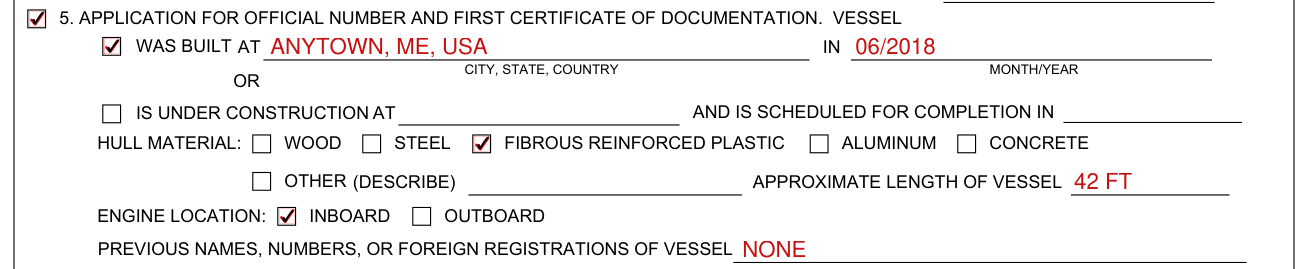
If vessel has never been documented, check Block #5 and provide ALL requested information known about the vessel's place and year of build, hull material, approximate length and previous names and numbers. If this information is unknown, please indicate.
Vessel was built at (city, state, country) in month/year, or is under construction at (city, state, country) and is scheduled for completion in month/year. Hull material: wood, steel, fibrous reinforced plastic, aluminum, concrete, other (describe). Approximate length of vessel. Engine location: inboard, outboard. Previous names, numbers, or foreign registrations of vessel.
J, endorsements for which application is made

J. Endorsements for which application is made: Check the appropriate block(s) to indicate all endorsement(s) sought on this application.
Recreational; Coastwise - Bowaters only (Certificate on file); Fishery; Coastwise - Oil Spill Response only (Letter of Qualification on file); Coastwise; Coastwise - Under Charter to an entity qualified to engage in coastwise trade (copy of charter on file); Registry.
K, primary service
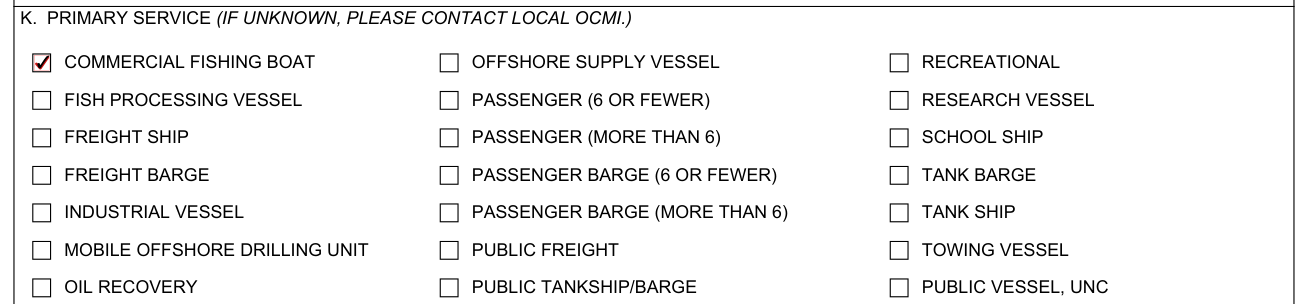
K. Primary service (if unknown, please contact local OCMI.): Select only ONE service for which the vessel will be primarily used.
L, citizenship of owner: individual or government entity

L. Citizenship of owner: Vessel must be owned by a U.S. citizen eligible for the endorsement(s) sought. Select the section that describes the type of entity that owns the vessel. Citizenship for all owners must be provided. See 46 CFR Subpart C for Citizenship Requirements.
Individual: Includes native born and naturalized U.S. citizens. Government entity: Includes Federal, State, Territory, Possession or Subdivision.
L, citizenship: corporation
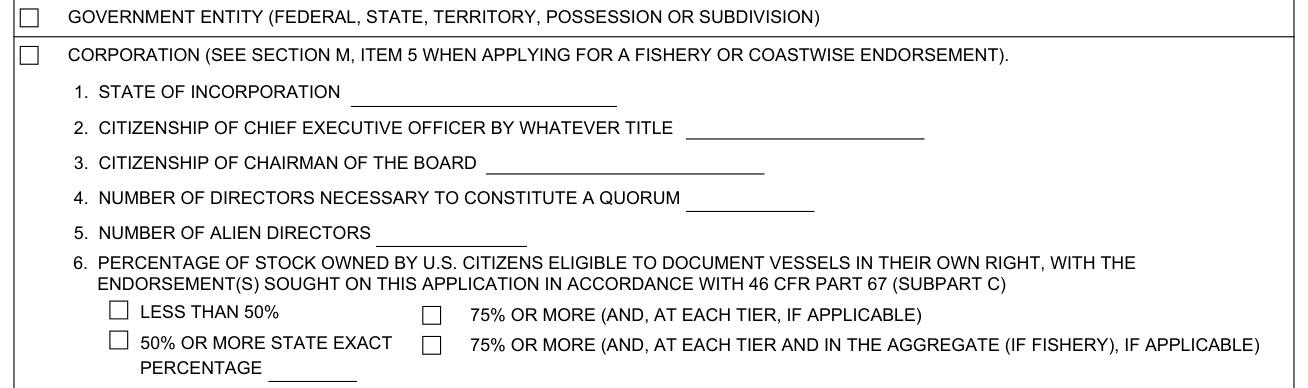
Corporation: Complete all items 1 thru 6. See Section M, item 5 when applying for a fishery or coastwise endorsement.
L, citizenship: limited liability company (LLC)
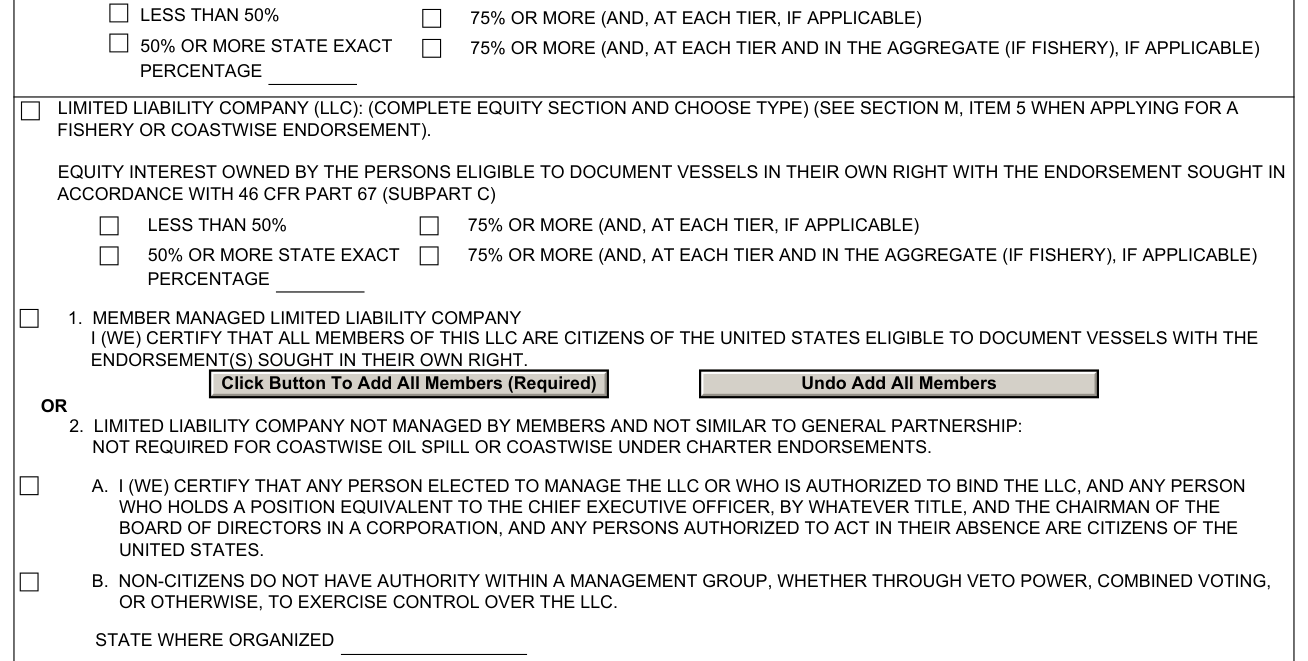
Limited liability company (LLC): Complete Equity Section and choose type. Equity interest owned by the persons eligible to document vessels in their own right with the endorsement sought in accordance with 46 CFR Part 67 (Subpart C). When applying for a fishery or coastwise endorsement, see Section M, item 5. For member managed LLC, a list of members is required. Click button for attachment if application covers multiple members.
Limited liability company not managed by members and not similar to general partnership: not required for coastwise oil spill or coastwise under charter endorsements. State where organized.
L, partnership
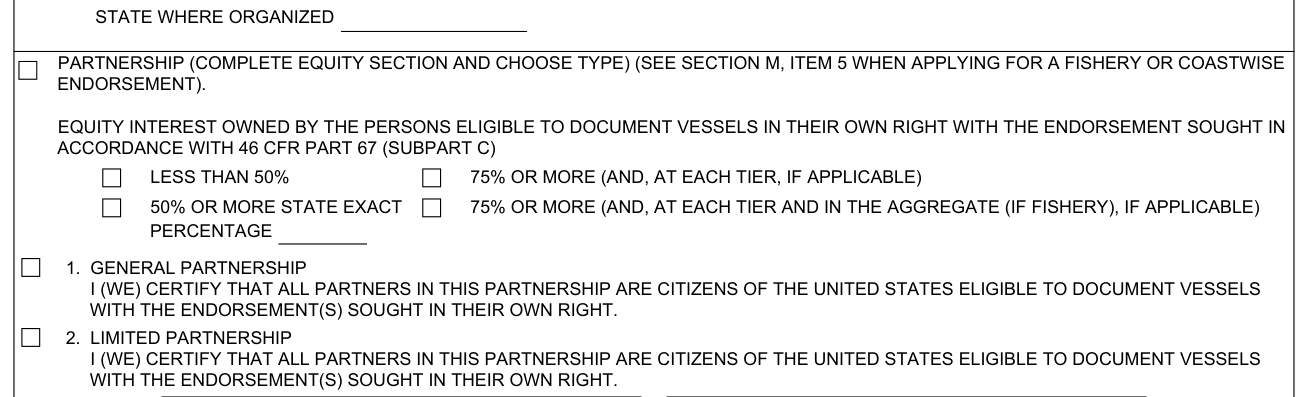
Partnership: Complete Equity Section and choose type. For a partnership applying for a fishery or coastwise endorsement, see Section M, item 5. A list of all general partners is required. Click button for attachment if application covers multiple general partners.
L, citizenship: qualified corporation, oil recovery cooperative and joint venture

Corporations qualified under 46 CFR 68.01 or owned by a not-for-profit oil recovery cooperative: Attach a copy of the Certificate of Compliance or Letter of Qualification issued by the Director, NVDC.
Joint venture/association: A list of all joint venturers/members is required. The percentage held by each need not be shown. Click button for attachment if application covers multiple joint venturers/members.
L, citizenship: trust arrangement
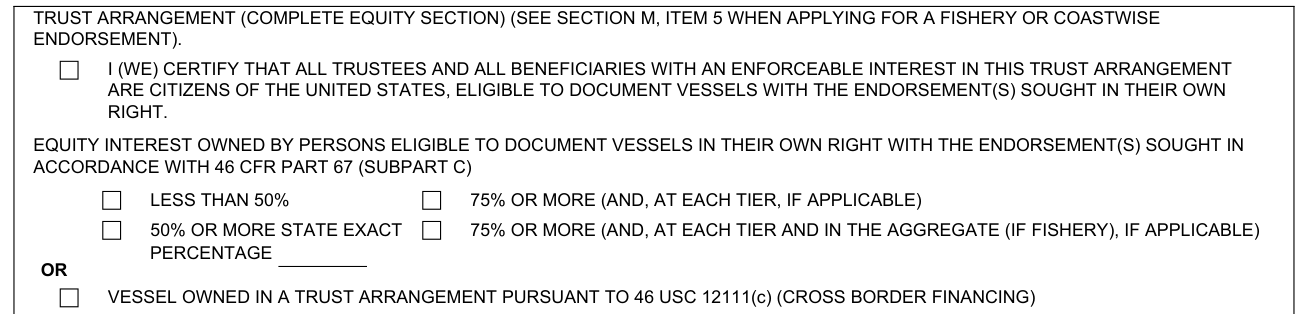
Trust arrangement: All trustees must be U.S. citizens. If applicable, each beneficiary with an enforceable interest must be a citizen. A list of all trustees (except managing owner) and beneficiaries with an enforceable interest is required. Click button for attachment if application covers multiple trustees/beneficiaries with an enforceable interest. A trust arrangement applying for a fishery or coastwise endorsement: see Section M, item 5.
M, I (we) certify that, items 1 to 4
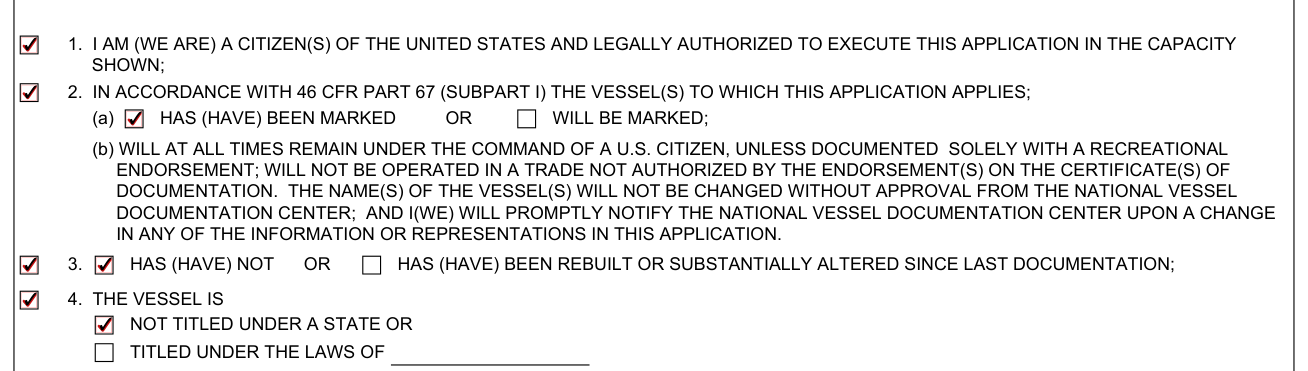
M. Certification: Complete as appropriate. The law provides severe penalties for false statements against both the person (including agents) making the statement and against the vessel for which it is made.
M. Certify that (answer all). 1. Citizen(s) of the United States and legally authorized to execute this application in the capacity shown. 2. In accordance with 46 CFR Part 67 (Subpart I) the vessel(s) to which this application applies: (a) has (have) been marked or will be marked;
3. Has (have) been rebuilt or substantially altered since last documentation; has (have) not. 4. The vessel is not titled under a state or titled under the laws of.
M, item 5, U.S. control certification

The following item is required for coastwise and/or fishery endorsements; however, it is not required for coastwise Bowater only, oil spill, or under charter endorsements. 5. U.S. control certification: There is no contract or understanding that provides more than 25% of the voting power in the partnership, limited liability company, corporation, or other owning entity either directly or indirectly on behalf of any person not a citizen of the United States.
M, signature, capacity, printed name and date

Enter the capacity (e.g., owner, agent, trustee, general partner, corporate officer, member), the printed or typed name, the signature and the signature date.
More rules for Form CG-1258
Only a current certificate of documentation is valid for vessel operation.
Official numbers designated on the basis of this application are not transferable.
Read the Privacy Act statement at the end of the CG-1258. Additional information about documentation may be found at www.uscg.mil/nvdc and in 46 CFR Parts 67, 68 and 69.
Common questions about Form CG-1258
What is a cg-1258?
Form CG-1258 (07/23) is the Department of Homeland Security U.S. Coast Guard application for initial, exchange, or replacement of certificate of documentation; redocumentation. Filing this application does not entitle a vessel to documentation or to any changes sought on a certificate of documentation.
What is the phone number for USCG vessel Documentation Services?
Contact the office at: 800-799-8362.
Where do I file it?
Contact the office by mail at U. S. Coast Guard, National Vessel Documentation Center, 792 TJ Jackson Drive, Falling Waters, WV 25419.
Are there fees?
Application fees are not refundable (46 CFR 67.500 (d)).
Is there a penalty?
Potential penalties for false statements or representations by owner or representative: civil, monetary, vessel forfeiture (46 USC 12151), fine and/or imprisonment (18 USC 1001).
Sources
[1] Form CG-1258 (07/23), Application for Initial, Exchange, or Replacement of Certificate of Documentation; Redocumentation, U.S. Coast Guard (the Official source link on this page).