
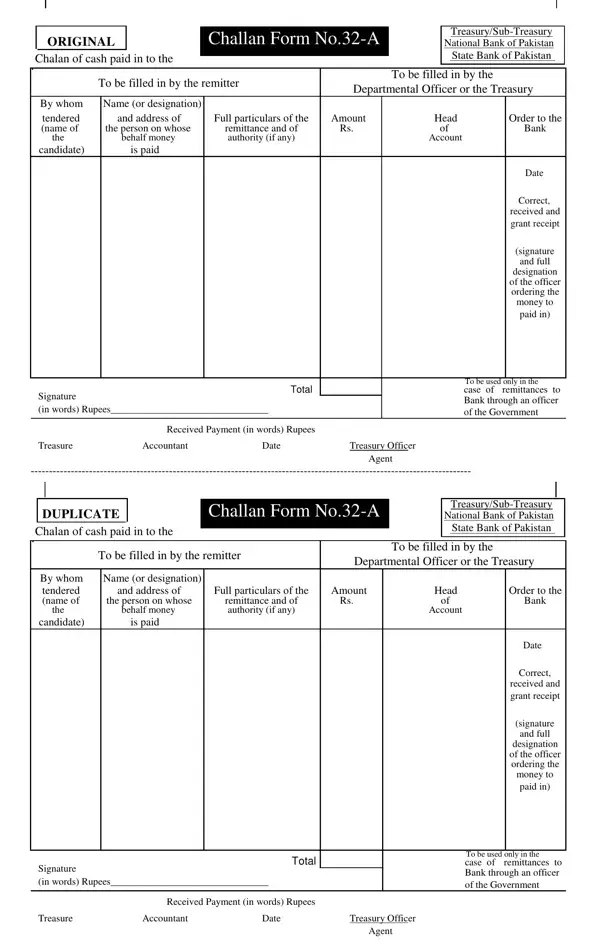
Challan Form No32-A is the official cash payment receipt form used for direct monetary transactions with Pakistan's Treasury, Sub-Treasury, National Bank of Pakistan (NBP), and State Bank of Pakistan (SBP). It creates a verifiable paper record for both the remitter and the receiving authority, covering income tax, court fees, license fees, stamp duties, and other government dues. The challan form no32 a is recognized as the standard payment instrument for all cash remittances made directly by the payer to the treasury or authorized bank branch.
The challan form no32 a is required by individuals, businesses, and organizations making direct cash payments to any government department in Pakistan. Common situations include:
For competitive examination fee submissions, the PPSC Challan Form follows a similar format tailored to PPSC requirements. If your payment will be made through a government officer on your behalf rather than directly by you, a different challan variant may apply.
The form has two main sections. The remitter section collects the following information:
The second section is reserved for the treasury officer or bank agent. After confirming receipt, they complete the endorsement fields, stamp both copies, and return the duplicate to the remitter. This endorsement is the official proof of payment.
Completed challan forms can be submitted at the following locations:
Always confirm with the relevant government department which specific bank or treasury branch is authorized to accept your type of payment. Some departments direct payments to specific NBP branches only.
The challan no32 a form includes a built-in duplicate section. After payment, the treasury or bank stamps both copies. The remitter keeps the duplicate as proof of payment. Store the receipt in a safe place as it may be required to claim the payment or resolve any disputes. Related treasury forms include the Challan Form 32-A for payments routed through a government officer or agent, the Bihar Treasury Code Form for state treasury transactions, and the Treasury Direct Account Authorization for direct debit arrangements with the treasury.
Avoiding these errors will prevent rejection of your challan form no32 a at the treasury counter:
Using the FormsPal online PDF editor to prepare your challan form no32 a before printing reduces the chance of these errors significantly, since you can review and correct every field before generating the final copy.
| Question | Answer |
|---|---|
| Form Name | Challan Form No32-A |
| Form Length | 2 pages |
| Fillable? | No |
| Fillable fields | 0 |
| Avg. time to fill out | 30 sec |
| Other names | 32a challan form, challan form 32a online, 32 a challan download, e stamp punjab challan 32a |