
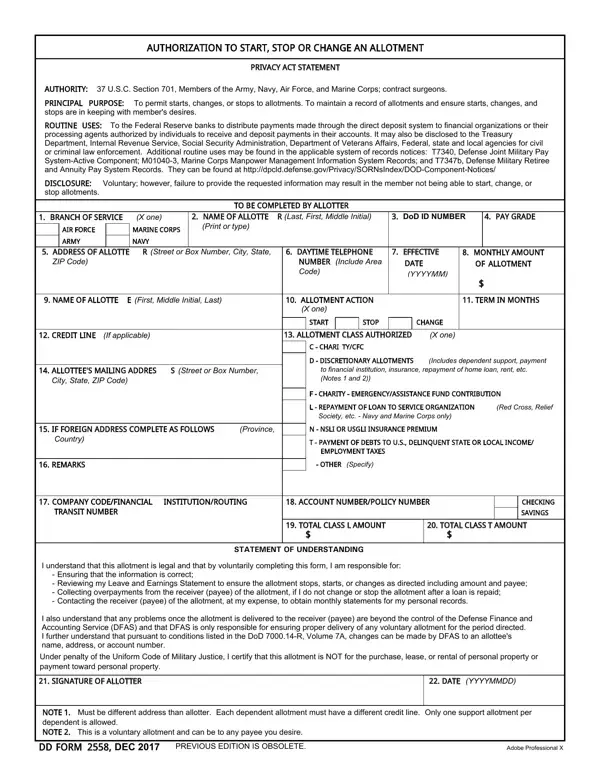
You can prepare the change allotment form without difficulty using our online PDF tool. The DD Form 2558, also called the Authorization to Start, Stop, or Change an Allotment for Active Duty Military Pay, is the standard document service members use to manage their military pay allotments. Our tool lets you fill in all required fields, add your signature, and download the completed authorization form in minutes.
How to Fill Out the Change Allotment Form Step by Step
Step 1: Click the "Get Form" button on this page to open the allotment form in our free PDF editor. All fields needed to complete the DD 2558 authorization will load automatically.
Step 2: Complete the personal information section at the top of the form. Enter your full name, Social Security Number, and pay grade. Service members must provide accurate identification so DFAS (Defense Finance and Accounting Service) can match the allotment authorization to the correct pay account.
Step 3: Indicate the type of allotment action. Select "Start," "Change," or "Stop" in the designated box. If you are starting or changing an allotment, fill in the monthly allotment amount and the receiving financial institution's ABA routing number and account number. Double-check both numbers before continuing.
Step 4: Complete the allottee information section. Enter the name, address, and financial institution details for the person or organization that will receive the allotment payments. Allotments may go directly to a bank account, credit union, or other authorized financial organization. Any error in the routing or account numbers may cause DFAS to delay or reject the allotment authorization.
Step 5: Sign and date the form in the certification section. Your signature confirms that the information in the change allotment authorization is accurate and that you understand the terms under 37 U.S.C. Section 701. Submit the completed forms to your unit finance office or upload them through your military pay portal.
Who Needs the DD Form 2558?
The DD Form 2558 change allotment authorization is required by active duty service members of the Army, Navy, Air Force, and Marine Corps who need to start, stop, or change an allotment from their military base pay. Contract surgeons and other uniformed personnel authorized under 37 U.S.C. Section 701 may also use this form to manage their allotment distributions.
Common reasons members fill out the change allotment form include: setting up a savings allotment to a personal bank account, authorizing a monthly payment toward a loan or insurance policy, establishing a family support allotment for a dependent, or stopping an allotment after it is no longer needed. Some members also use a direct deposit authorization alongside the allotment form to coordinate their pay distribution. You can find a direct deposit authorization form on FormsPal if you need to update your pay deposit information at the same time.
How Many Allotments Can You Have?
Active duty service members are generally permitted a limited number of discretionary allotments at one time. Non-discretionary allotments, such as those required by court order for child support or family support, do not count toward the discretionary limit and cannot be stopped voluntarily through the change allotment form alone.
Allotment amounts are deducted from your base pay each month by DFAS. If your base pay changes or you carry too many allotments, your finance officer may restrict new allotment authorizations until existing ones are resolved. Contact your unit finance office or log in to the myPay portal to review your current allotment authorization limits before submitting a new form.
Military members managing multiple financial obligations may also need to fill out a military dependent form to update benefit entitlements that interact with allotment distributions.
Frequently Asked Questions About the Change Allotment Form
What is the DD Form 2558 used for?
DD Form 2558 is the official allotment authorization form service members use to start, change, or stop a military pay allotment. It allows you to direct a fixed portion of your monthly military pay to a financial institution, a savings account, or another authorized recipient via the Federal Reserve payment network.
How long does it take DFAS to process the change allotment form?
Processing times vary by branch and DFAS workload. Most allotment changes take one to two full pay cycles to go into effect after you submit the form to your finance office. Submit the authorization form as early as possible if you need the change to take effect by a specific pay date.
Can I manage my allotment online without the paper form?
Some service members can start, stop, or change allotments directly through the myPay portal at DFAS without submitting a paper DD Form 2558. If your pay system is connected to myPay, log in to make changes online. Otherwise, complete the change allotment authorization form using the PDF tool above and submit it through your unit finance office.
What happens if I make an error on the allotment authorization?
If you enter an incorrect routing number or account number on the change allotment form, your allotment may be delayed or returned by DFAS. Review all financial institution details carefully before signing. If you discover an error after submission, contact your finance officer right away to submit a corrected authorization form.
Do I need a new form to stop an allotment?
Yes. To stop an existing allotment, fill out a new DD Form 2558 and indicate "Stop" in the allotment action section. Submit the form to your finance office the same way you would when starting or changing an allotment.
For other military pay and benefits forms, you can also review our military power of attorney form or the military dependent form to handle related financial and administrative paperwork.
