
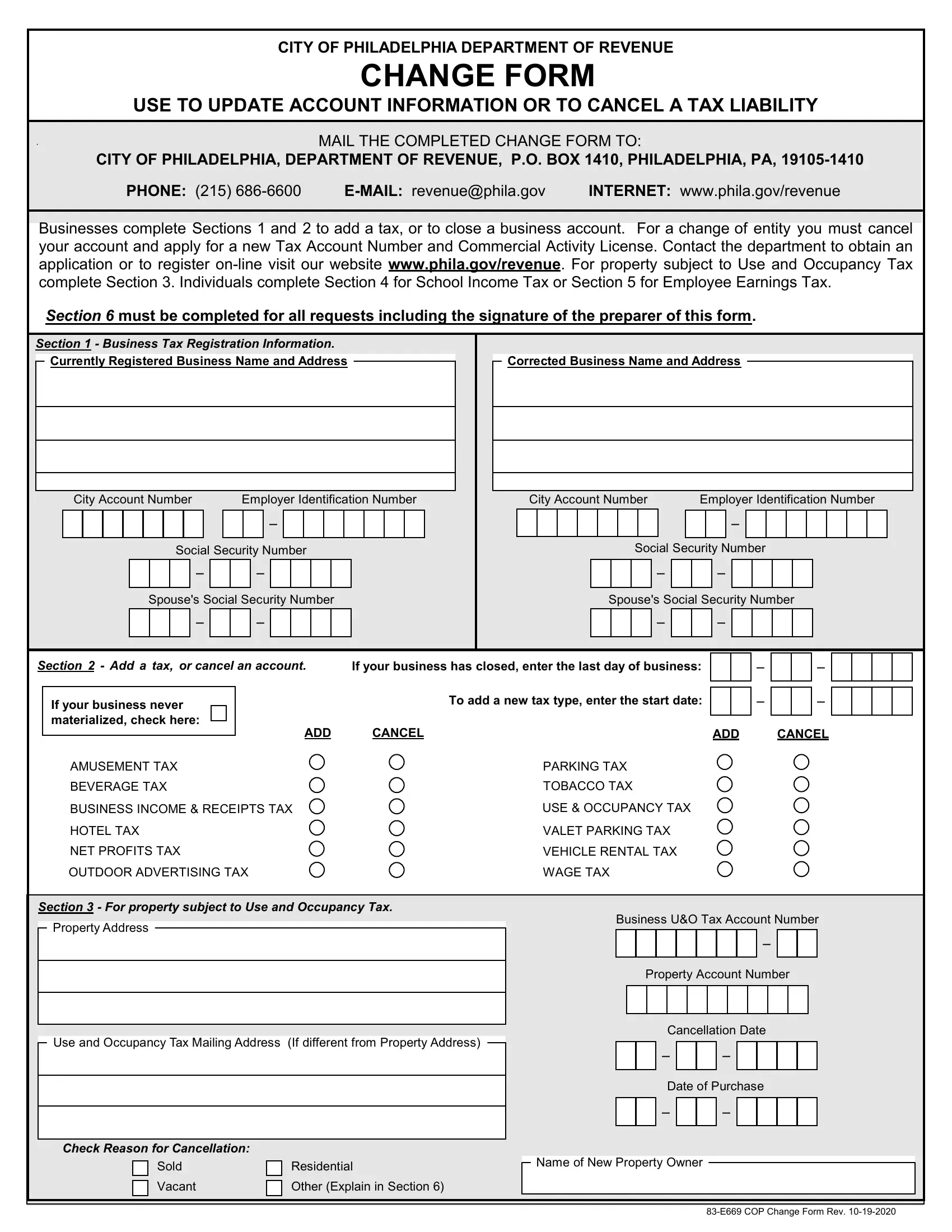
The City of Philadelphia Department of Revenue provides a comprehensive solution for residents and businesses to update account information or cancel tax liabilities with the Change Philadelphia form. This user-friendly form ensures that any changes related to tax accounts, whether for individuals or businesses, are processed smoothly and efficiently. The form covers a wide array of tax-related updates from business tax registration information adjustments, adding or cancelling a tax, to specifics on property subject to Use and Occupancy Tax, School Income Tax, and Employee Earnings Tax. For businesses looking to make changes such as adding a new tax type or closing a business account, sections 1 and 2 serve as the go-to resources. Moreover, individuals can easily correct information or report changes regarding School Income Tax or Employee Earnings Tax through sections 4 and 5, respectively. Completion of section 6 is mandatory for all requests, ensuring the form is prepared correctly with the signature of the preparer. The form underscores the city's commitment to maintaining accurate records, facilitating ease of communication between taxpayers and the Department of Revenue, which can be submitted through mail along with the convenience of online registration and resources available at the department's website.
| Question | Answer |
|---|---|
| Form Name | Change Form Philadelphia |
| Form Length | 2 pages |
| Fillable? | No |
| Fillable fields | 0 |
| Avg. time to fill out | 30 sec |
| Other names | CHANGE FORM - City of Philadelphia |
CITY OF PHILADELPHIA DEPARTMENT OF REVENUE
CHANGE FORM
USE TO UPDATE ACCOUNT INFORMATION OR TO CANCEL A TAX LIABILITY
MAIL THE COMPLETED CHANGE FORM TO:
CITY OF PHILADELPHIA, DEPARTMENT OF REVENUE, P.O. BOX 1410, PHILADELPHIA, PA,
PHONE: (215) |
INTERNET: www.phila.gov/revenue |
Businesses complete Sections 1 and 2 to add a tax, or to close a business account. For a change of entity you must cancel your account and apply for a new Tax Account Number and Commercial Activity License. Contact the department to obtain an application or to register
Section 6 must be completed for all requests including the signature of the preparer of this form.
Section 1 - Business Tax Registration Information.
Currently Registered Business Name and Address |
|
|
|
|
|
Corrected Business Name and Address |
|
|
|
City Account Number |
Employer Identification Number |
|
|
|
City Account Number |
Employer Identification Number |
|
||||||||||||||||||||||||||||||||
|
|
|
|
|
|
|
|
|
|
|
- |
|
|
|
|
|
|
|
|
|
|
|
|
|
|
|
|
|
|
|
|
- |
|
|
|
|
|
|
|
|
|
|
|
|
|
|
Social Security Number |
|
|
|
|
|
|
|
|
Social Security Number |
|
||||||||||||||||||||||||
- |
- |
- |
- |
|
Spouse's Social Security Number |
Spouse's Social Security Number |
|||
- |
- |
- |
- |
|
Section 2 - Add a tax, or cancel an account. |
If your business has closed, enter the last day of business: |
- |
- |
|
|
|
|||
If your business never |
|
To add a new tax type, enter the start date: |
- |
- |
materialized, check here: |
ADD |
CANCEL |
ADD |
CANCEL |
|
||||
AMUSEMENT TAX |
|
PARKING TAX |
|
|
BEVERAGE TAX |
|
TOBACCO TAX |
|
|
BUSINESS INCOME & RECEIPTS TAX |
USE & OCCUPANCY TAX |
|
|
|
HOTEL TAX |
|
VALET PARKING TAX |
|
|
NET PROFITS TAX |
|
VEHICLE RENTAL TAX |
|
|
OUTDOOR ADVERTISING TAX |
|
WAGE TAX |
|
|
Section 3 - For property subject to Use and Occupancy Tax.
Property Address
Use and Occupancy Tax Mailing Address (If different from Property Address)
Check Reason for Cancellation: |
|
|
||
|
|
Sold |
|
Residential |
|
|
|
||
|
|
Vacant |
|
Other (Explain in Section 6) |
|
|
|
||
Business U&O Tax Account Number
- |
Property Account Number
Cancellation Date
- -
Date of Purchase
- -
Name of New Property Owner