
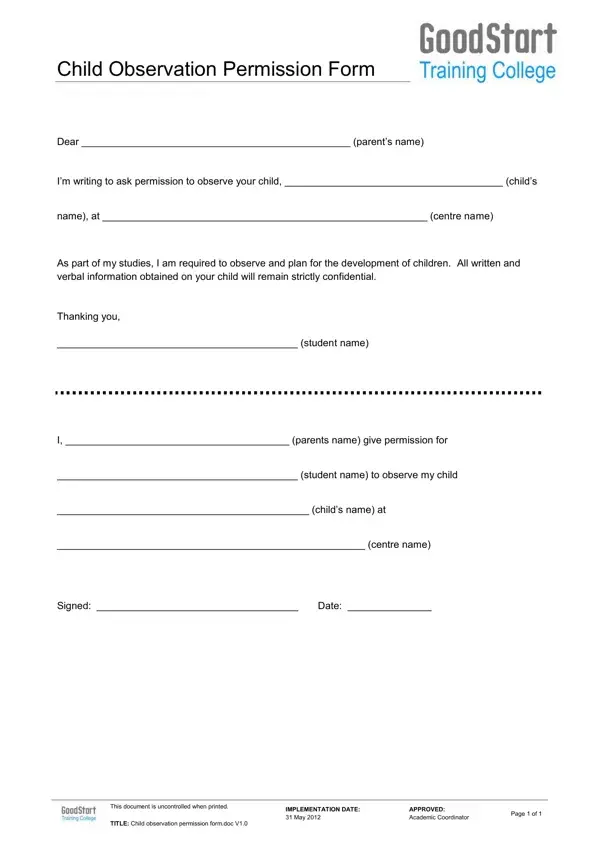
Using PDF documents online is definitely a piece of cake with our PDF editor. Anyone can fill out observation child form here and try out several other functions we offer. Our expert team is always working to enhance the editor and make it much easier for users with its cutting-edge functions. Enjoy an ever-improving experience now! If you are seeking to begin, here's what it will require:
Step 1: First, access the pdf tool by clicking the "Get Form Button" above on this page.
Step 2: Using our state-of-the-art PDF file editor, you can actually accomplish more than just fill out blanks. Express yourself and make your docs appear sublime with customized textual content added, or modify the original input to excellence - all that supported by an ability to insert stunning photos and sign the PDF off.
This document will require particular details to be filled out, hence make sure to take whatever time to fill in precisely what is expected:
1. It is recommended to complete the observation child form properly, so pay close attention when filling out the areas containing these specific blank fields:
2. The next stage would be to complete these particular blanks: student name to observe my child, childs name at, centre name, and Signed Date.
Regarding Signed Date and student name to observe my child, ensure that you don't make any mistakes in this current part. Both these are the most significant fields in this PDF.
Step 3: Check that your details are right and press "Done" to conclude the project. Right after getting afree trial account with us, you will be able to download observation child form or send it via email without delay. The form will also be at your disposal from your personal cabinet with your each modification. When you use FormsPal, you can certainly complete documents without having to be concerned about data leaks or records being shared. Our protected platform helps to ensure that your private details are kept safely.
Related Forms for Childcare and Education
If you work in early childhood education or a childcare setting, these templates may also be useful:
- Teacher Observation Form - document teacher performance during a formal classroom observation visit.
- Preschool Enrollment Intake Form - collect key child and family information when enrolling a new student in a preschool program.
- Daycare Registration Form - register new children and gather parental contact details for a childcare center.
- On-Task Observation Form - record whether a child is actively engaged during a specific classroom or learning activity.
- Parental Consent Form - a general-purpose consent template for educational activities that require parent or guardian approval.
Common Questions About This Child Observation Form
What is a child observation form used for?
A child observation form lets educators, caregivers, and student researchers record a child's behavior, development milestones, and learning progress during a specific observation session. The form also documents parental consent, which is required before any observation takes place in a school, preschool, or childcare setting.
Who needs to sign a child observation consent form?
The child's parent or legal guardian must sign the consent section before observations begin. In a school or childcare center, a supervising educator may also co-sign to confirm the observation plan has been reviewed and approved.
Can this form be used for preschool observations?
Yes. This child observation form is widely used by student teachers and educators conducting observations in preschool, kindergarten, and other early childhood learning environments. The template can be adapted for different age groups and specific developmental focuses.
How should completed child observation forms be stored?
Completed forms must be stored securely to protect the child's privacy. Keep physical copies in a locked file and store digital versions in a password-protected location. Only authorized educators or caregivers should have access to the observation records.
