Please rate Cigna Vision Claim Form

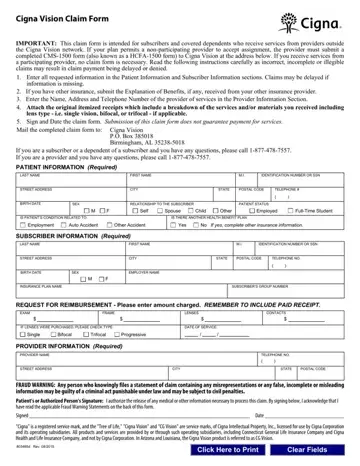
The Cigna Vision Claim Form is used by Cigna health plan members to get reimbursed for vision services from out-of-network providers. The form is 2 pages long. It covers services like eye exams, prescription eyeglasses, and contact lenses not available within the Cigna Vision network.
To submit a claim, complete all fields on the form. Include your patient information, subscriber details, and itemized receipts for each service or product. If you have additional insurance coverage, attach an Explanation of Benefits from that plan as well.
Non-participating providers must use a CMS-1500 form when submitting claims to Cigna. Mail your completed paperwork to the address listed on the form. Most vision claims are processed within 30 days of receipt.
Make sure every field is filled in clearly and completely. Incomplete or illegible forms can delay your reimbursement. Cigna includes fraud warnings for residents of multiple states. Submitting false information may result in legal penalties.
If your claim is denied, you have the right to appeal. Use the Cigna Appeal Form to request a review of the decision. You may need to provide additional documentation to support your case.
Looking for related vision forms? Try the Blue Vision Claim Form or the optical reimbursement form for additional coverage options.
| Question | Answer |
|---|---|
| Form Name | Cigna Vision Claim Form |
| Form Length | 2 pages |
| Fillable? | No |
| Fillable fields | 0 |
| Avg. time to fill out | 30 sec |
| Other names | cigna vision claim form 2019, cigna vsp com, cigna vision claim form, cigna vision claim online |
| Issued by | Cigna |
| Purpose | Out-of-network vision services reimbursement |
| Who uses it | Cigna vision plan members |
| Required attachments | Itemized receipts, Explanation of Benefits (if other insurance applies) |
Cigna Vision Claim Form isn’t the one you’re looking for?
Please rate Cigna Vision Claim Form
