
Cms 100 Application PDF Details

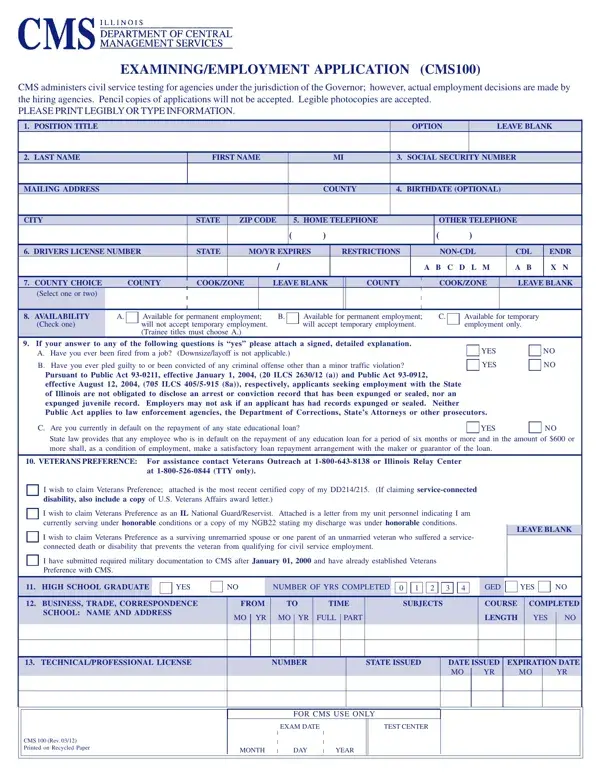
The CMS 100 Application form serves as the official Illinois state employment form for candidates applying to agencies under the Governor's jurisdiction. Managed by the Department of Central Management Services (CMS), this form facilitates civil service testing and connects qualified applicants with state hiring agencies across Illinois.

Applicants must provide personal information, job preferences, work availability, and any Veterans’ preference claim with supporting documentation. Educational history, professional certifications, and a full work history are required to demonstrate qualifications for the position. It is mandatory for applicants to acknowledge the accuracy of all information provided. Misrepresentations may result in disqualification or termination of employment.

All entries must be written legibly or typed clearly. Submit a complete and accurate application to avoid delays in processing. Do not leave required fields blank or use abbreviations for school names, employer names, or addresses.

What You Need Before You Begin

Before starting the illinois cms 100 application, gather the following: your Social Security number, a full employment history for the past ten years with employer names and addresses, college transcripts or diplomas, and any technical or professional licenses you hold. If you are claiming Veterans’ preference, include your military discharge papers and related service documentation.

Common Mistakes to Avoid on the CMS 100 Application

Abbreviating school names or employer addresses is one of the most common errors on the CMS 100 form. Write every name and address in full. Entering dates in the wrong format is another frequent issue. The form requires all dates in MMYYYY format throughout.

Leaving required fields blank or writing information that is illegible can delay your application or result in rejection. Do not fill out the “For CMS Use Only” section. Civil service testing staff complete those fields after processing your submission.

For related Illinois government forms, browse our employment application forms collection or view the Civil Service 55-B Form.

QuestionAnswer
Form NameCms 100 Application
Form Length8 pages
Fillable?No
Fillable fields0
Avg. time to fill out2 min
Other namescms 100 application, cms 100 employment application rev 9 2020, illinois cms 100 application, illinois cms 100

How to Edit Cms 100 Application Online for Free

Our team at FormsPal has prepared this step-by-step guide to help you complete the Illinois CMS 100 Employment Application accurately. No software download is required. The editor works directly in your browser.

Step 1: Open the CMS 100 Application

Click the orange “Get form now” button to open the illinois cms 100 application in the editor. The multifunctional toolbar lets you type, highlight, remove content, and complete every field directly on the form.

Step 2: Complete the Personal and Veterans’ Preference Sections

Enter your name, address, phone number, and Social Security number in the personal information section. Indicate your job preference and your availability for full-time or part-time work. In the Veterans’ preference section, you will see checkboxes for ‘I wish to claim Veterans’ preference’ and ‘I have submitted required military documentation.’ Mark the appropriate boxes and attach any supporting service records.

example of fields in cms 100 employment application

After completing the Veterans’ preference fields, review the signature section carefully. By signing, you confirm that all information in your application is accurate and complete. Do not leave the signature section blank.

cms 100 employment application Veterans preference and signature section fields to fill out

Step 3: Leave the CMS Use Only Section Blank

The “For CMS Use Only” area records the exam date, test center, and the month, day, and year of your civil service exam. Leave all of these fields completely blank. CMS staff fill them in after reviewing and processing your application.

cms 100 employment application For CMS Use Only, CMS Rev, Exam Date, Test Center, Month, Day, and Year blanks to complete

Step 4: Fill In Education, Licenses, and Work History

List all business or trade courses you have taken, including start and end dates in MMYYYY format, the subjects covered, the course length, and whether you completed each program. Enter each technical or professional license you hold with the license number, issuing state, date of issue, and expiration date. Provide the full names and mailing addresses of all colleges and schools you attended.

cms 100 employment application Business Trade Correspondence, From MMYYYY, To MMYYYY, Time FullPart, Subjects, Course Length, Completed YesNo, TECHNICALPROFESSIONAL LICENSE, TechnicalProfessional License, Number, State Issued, Date Issued MMYYYY, Expiration Date MMYYYY, EDUCATION REPORT LIST YOUR, and Name and Address of Colleges blanks to insert

Step 5: Enter Undergraduate and Graduate Education Details

Indicate whether each institution is undergraduate or graduate level. Do not abbreviate any school name or address. Enter your enrollment start and end dates in MMYYYY format. Include the CMS revision number in the designated field at the bottom of the education section.

cms 100 employment application Indicate UndergraduateUGraduateG, Do Not Abbreviate, Do Not Abbreviate, From MMYYYY, To MMYYYY, and CMS Rev fields to insert

Step 6: Download and Submit Your Application

Click the “Done” button to save your completed cms 100 application. Download, print, or email the finished form to any device or email address. Make several copies of the completed illinois cms 100 application before submitting it to the relevant state agency.

Frequently Asked Questions

Who needs to submit the CMS 100 Application? Anyone applying for a civil service position at an Illinois state agency under the Governor’s jurisdiction must complete this form before testing.

Where do I submit the completed form? Submit the completed CMS 100 form to the Illinois Department of Central Management Services testing office or directly to the hiring agency listed in the job announcement.

How long does it take to complete? Most applicants finish the form in 15 to 30 minutes. Having your employment history, education records, and license information ready will speed up the process.

Need a similar form? View the Ohio Civil Service Application or browse all employment application forms on our site.

Please rate Cms 100 Application

1 Votes
If you believe this page is infringing on your copyright, please familiarize yourself with and follow our DMCA notice and takedown process - click here to proceed .