
Form CMS-802 at a glance
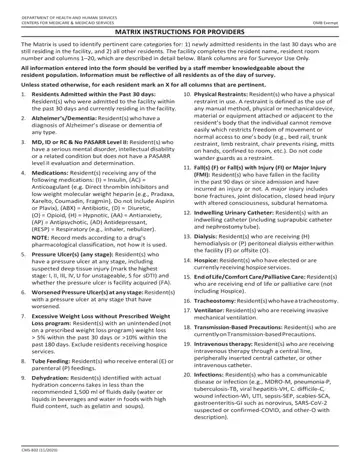
What it is: The Matrix is used to identify pertinent care categories for: 1) newly admitted residents in the last 30 days who are still residing in the facility, and 2) all other residents.
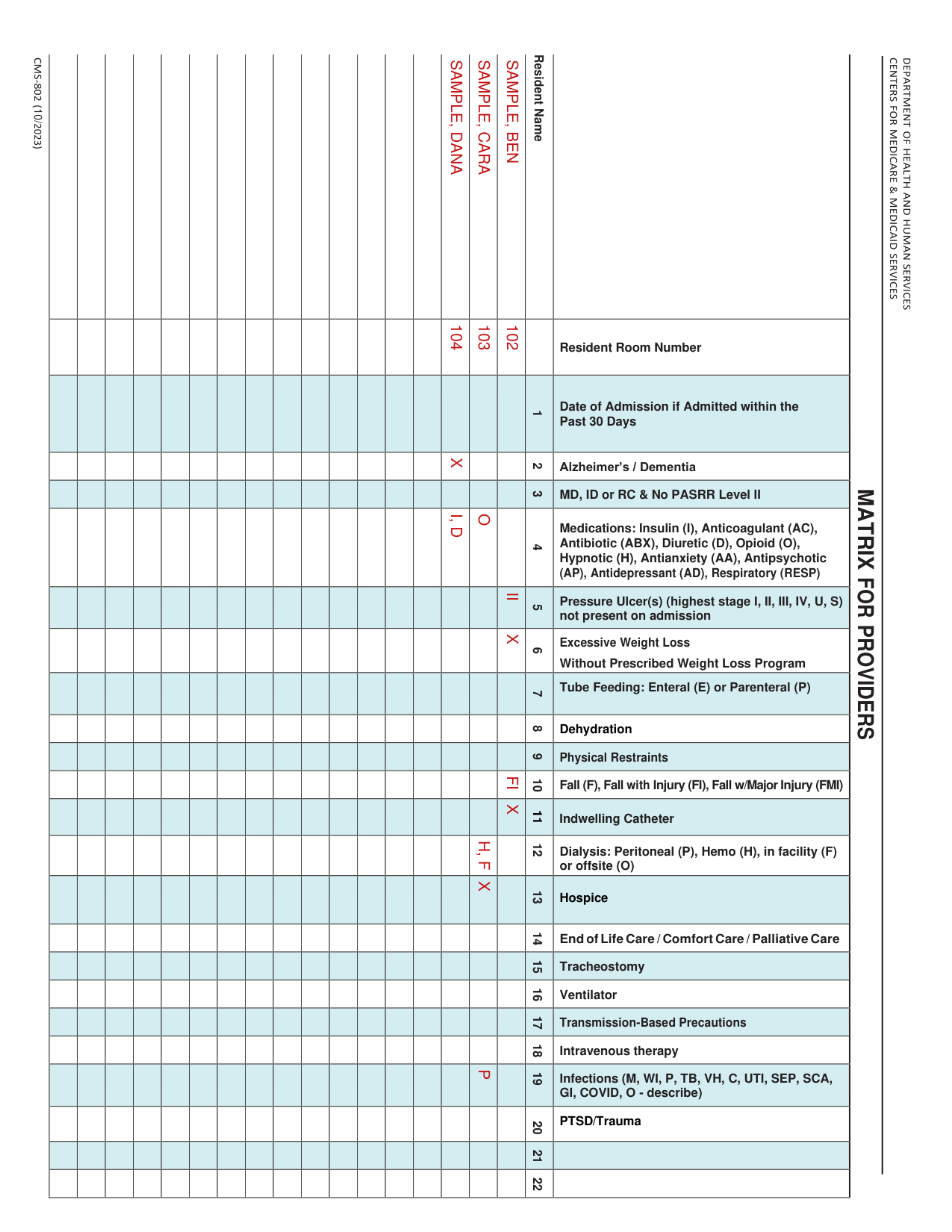
A filled-in Form CMS-802 example: a facility lists three residents
How to fill out Form CMS-802, box by box
Tap a group of boxes to open it, and a picture to see it full size.
Resident name, room number and marking the columns
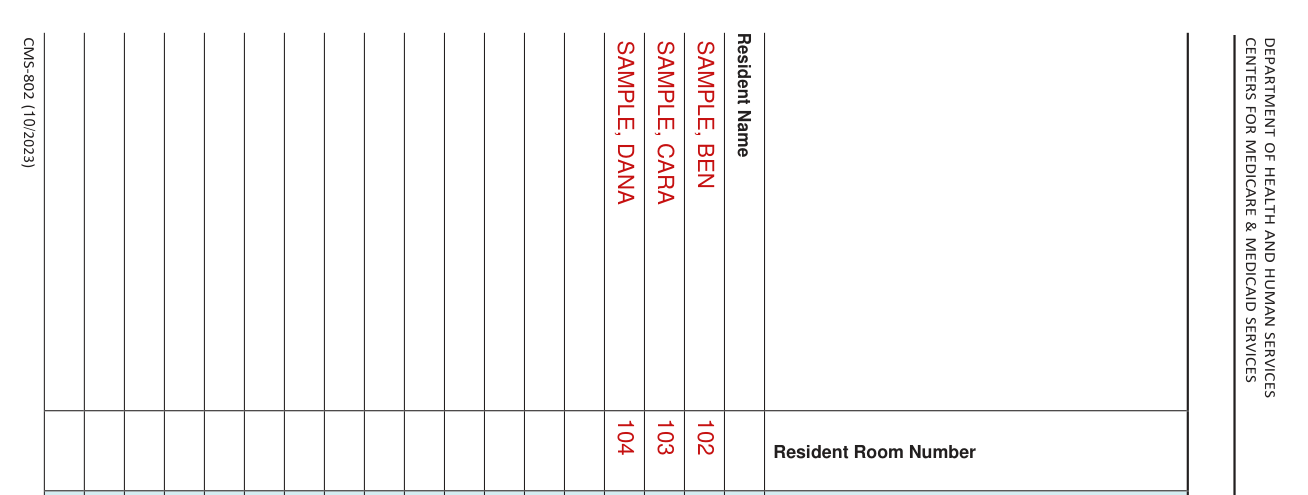
The facility completes the resident name, resident room number and columns 1-20.
Unless stated otherwise, for each resident mark an X for all columns that are pertinent.
Blank columns are for Surveyor Use Only, and on the matrix 21 and 22 are blank.
Columns 1 to 3
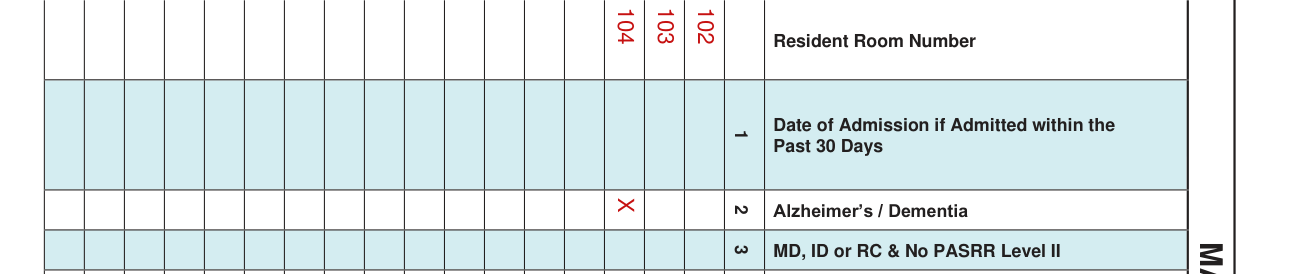
Column 1, Date of Admission if Admitted within the Past 30 Days: write the date for Resident(s) who were admitted to the facility within the past 30 days and currently residing in the facility.
Column 2, Alzheimer's/Dementia: Resident(s) who have a diagnosis of Alzheimer's disease or dementia of any type.
Column 3, MD, ID or RC & No PASRR Level II: Resident(s) who have a serious mental disorder, intellectual disability or a related condition but does not have a PASRR level II evaluation and determination.
Column 4, medications

Column 4, Medications: Resident(s) receiving any of the following medications: (I) = Insulin, (AC) = Anticoagulant, (ABX) = Antibiotic, (D) = Diuretic, (O) = Opioid, (H) = Hypnotic, (AA) = Antianxiety, (AP) = Antipsychotic, (AD) Antidepressant, (RESP) = Respiratory (e.g., inhaler, nebulizer).
Common mistake: For the Medications column: (AC) = Anticoagulant (e.g., Direct thrombin inhibitors and low weight molecular weight heparin [e.g., Pradaxa, Xarelto, Coumadin, Fragmin]. Do not include Aspirin or Plavix).
Common mistake: For the Medications column, record meds according to a drug's pharmacological classification, not how it is used.
Columns 5 and 6, pressure ulcers and weight loss

Column 5, Pressure Ulcer(s) (any stage): Resident(s) who have a pressure ulcer at any stage, including suspected deep tissue injury (mark the highest stage: I, II, III, IV, U for unstageable, S for sDTI) that were not present on admission.
Column 6, Excessive Weight Loss without Prescribed Weight Loss program: Resident(s) with an unintended (not on a prescribed weight loss program) weight loss > 5% within the past 30 days or >10% within the past 180 days.
Common mistake: For the Weight Loss column, exclude residents receiving hospice services.
Columns 7 and 8, tube feeding and dehydration

Column 7, Tube Feeding: Resident(s) who receive enteral (E) or parenteral (P) feedings.
Column 8, Dehydration: Resident(s) identified with actual hydration concerns takes in less than the recommended 1,500 ml of fluids daily (water or liquids in beverages and water in foods with high fluid content, such as gelatin and soups).
Columns 9 to 11, restraints, falls and catheter

Column 9, Physical Restraints: Resident(s) who have a physical restraint in use. A restraint is defined as the use of any manual method, physical or mechanical device, material or equipment attached or adjacent to the resident's body that the individual cannot remove easily which restricts freedom of movement or normal access to one's body (e.g., bed rail, trunk restraint, limb restraint, chair prevents rising, mitts on hands, confined to room, etc.).
Common mistake: For the Physical Restraints column, do not code wander guards as a restraint.
Column 10, Fall(s) (F) or Fall(s) with Injury (FI) or Major Injury (FMI): Resident(s) who have fallen in the facility in the past 120 days or since admission and have incurred an injury or not. A major injury includes bone fractures, joint dislocation, closed head injury with altered consciousness, subdural hematoma.
Column 11, Indwelling Urinary Catheter: Resident(s) with an indwelling catheter (including suprapubic catheter and nephrostomy tube).
Columns 12 to 14, dialysis, hospice and end of life

Column 12, Dialysis: Resident(s) who are receiving (H) hemodialysis or (P) peritoneal dialysis either within the facility (F) or offsite (O).
Column 13, Hospice: Resident(s) who have elected or are currently receiving hospice services.
Common mistake: Column 14, End of Life/Comfort Care/Palliative Care: Resident(s) who are receiving end of life or palliative care (not including Hospice).
Columns 15 to 18, tracheostomy, ventilator, precautions and intravenous therapy

Column 15, Tracheostomy: Resident(s) who have a tracheostomy.
Column 16, Ventilator: Resident(s) who are receiving invasive mechanical ventilation.
Column 17, Transmission-Based Precautions: Resident(s) who are currently on Transmission-based Precautions.
Column 18, Intravenous therapy: Resident(s) who are receiving intravenous therapy through a central line, peripherally inserted central catheter, or other intravenous catheter.
Columns 19 and 20, infections and PTSD/trauma

Column 19, Infections: Resident(s) who has a communicable disease or infection (e.g., MDRO-M, pneumonia-P, tuberculosis-TB, viral hepatitis-VH, C. difficile-C, wound infection-WI, UTI, sepsis-SEP, scabies-SCA, gastroenteritis-GI such as norovirus, SARS-CoV-2 suspected or confirmed-COVID, and other-O with description).
Column 20, PTSD/Trauma: Resident(s) who has a diagnosis of Post-Traumatic Stress Disorder (PTSD) and/or a history of trauma.
Before you go
All information entered into the form should be verified by a staff member knowledgeable about the resident population.
Information must be reflective of all residents as of the day of survey.
Common questions about Form CMS-802
What is an 802?
The Matrix is used to identify pertinent care categories for: 1) newly admitted residents in the last 30 days who are still residing in the facility, and 2) all other residents.
Sources
[1] Form CMS-802 (10/2023), Matrix Instructions for Providers, Centers for Medicare & Medicaid Services (the Official source link on this page).
