
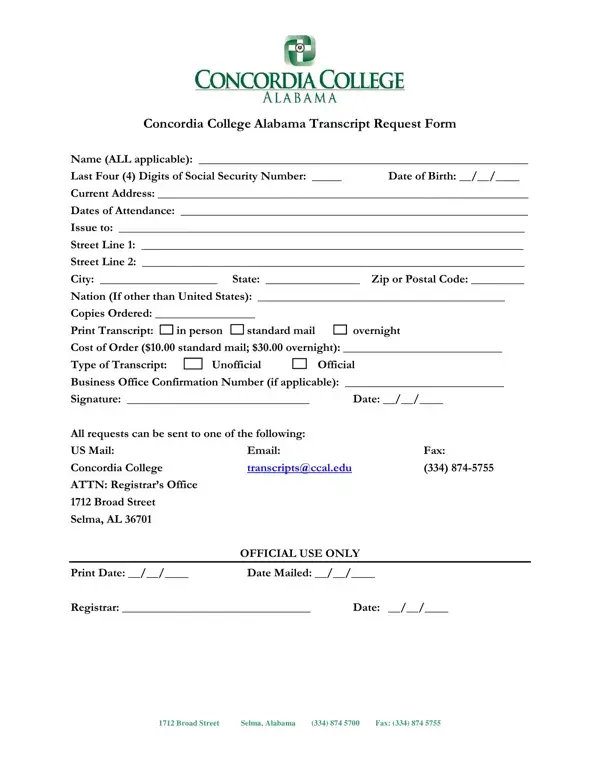
The Concordia College Selma Transcript Request form allows former students of Concordia College Alabama to order official or unofficial academic transcripts. You need this form whether you are applying to graduate school, seeking employment, or verifying your academic credentials. The form requires your full name, last four digits of your Social Security number, date of birth, current address, and dates of attendance at Concordia College Alabama.
Concordia College Alabama offers two transcript types. An official transcript carries the registrar's seal and signature and costs $10.00 for standard US Mail delivery or $30.00 for expedited overnight service. An unofficial transcript is for personal reference only and does not carry an official seal. Indicate your choice on the form and provide payment information, including a Business Office confirmation number if applicable.
Once completed, you can submit the Concordia College Selma Transcript Request form three ways: by US Mail to Concordia College ATTN Registrar's Office, Selma AL; by email to transcriptsccaledu; or by fax. Each method is listed on the form with complete contact details. Allow additional processing time when submitting by mail.
If you need transcripts from other Alabama institutions, FormsPal offers similar forms. The AAMU Transcript Request Form covers Alabama A&M University records. For general transcript ordering, see the College Transcript Request Form. You can also use the Application for Transcript for other institutions.
| Question | Answer |
|---|---|
| Form Name | Concordia College Selma Transcript Request Form |
| Form Length | 1 pages |
| Fillable? | No |
| Fillable fields | 0 |
| Avg. time to fill out | 15 sec |
| Standard Transcript Fee | $10.00 |
| Overnight Transcript Fee | $30.00 |
| Submission Methods | US Mail, Email, Fax |
| Other names | concordia college selma alabama transcript, concordia college teaching transcripts, concordia university wisconsin official transcript, transcript concordia college |