
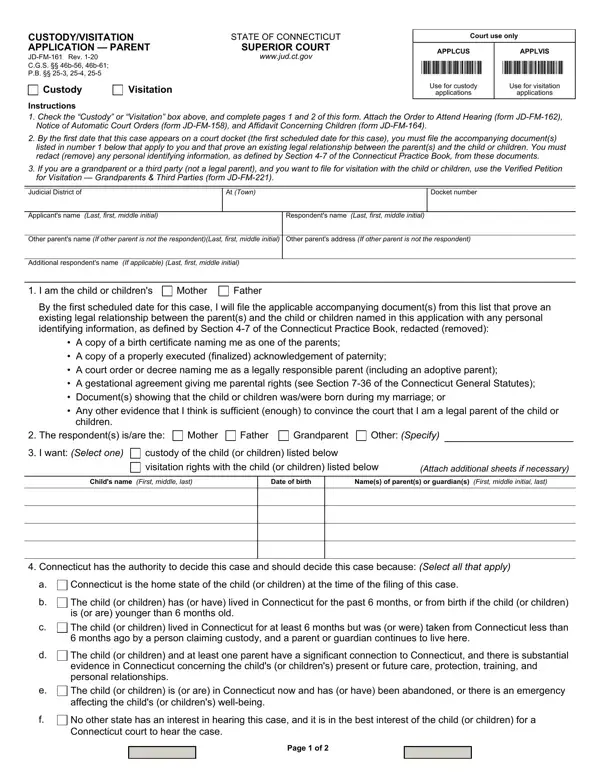
Connecticut Custody Application Form (JD-FM-161) Details

The Connecticut Custody Application Form (JD-FM-161, Rev. 1-20) is the official Connecticut Superior Court document for parents and eligible third parties to formally request child custody or visitation rights.

Who needs this form: Parents seeking sole or joint legal custody, parents requesting visitation rights, and qualifying third parties such as grandparents with a significant relationship to the child must file Form JD-FM-161 in Connecticut Family Division court.

What the form covers: The application includes the type of relief requested (custody or visitation), your legal relationship to the child, Connecticut jurisdictional basis under the UCCJEA, financial support details, HUSKY Health insurance information, and a proposed parenting plan. For custody requests, the form addresses decision-making responsibility, physical custody arrangements, and child support including provisions for post-secondary education. Visitation requests specify the access schedule sought.

Required attachments: Most applicants must attach a copy of the child's birth certificate. Include a paternity acknowledgment or court order if paternity is not listed on the birth certificate. Any prior custody or visitation orders from another state must be disclosed under UCCJEA requirements.

For related documents, see the Temporary Custody Form for emergency custody needs or the Affidavit of Parental Rights Form for additional parental documentation.

QuestionAnswer
Form NameConnecticut Custody Application Form
Form NumberJD-FM-161
Form Length2 pages
Fillable?Yes (online via FormsPal)
Avg. time to fill out15 min
CourtConnecticut Superior Court, Family Division
Other namesCT custody application, JD-FM-161, CT visitation form, Connecticut child custody form

How to Edit Connecticut Custody Application Form Online for Free

How to Fill Out the Connecticut Custody Application Online

Complete Form JD-FM-161 for free using our PDFinity online editor. FormsPal makes it simple to fill out, sign, and download Connecticut custody forms without installing any software.

Step 1: Open the Connecticut Custody Application Form

Click the orange "Get Form" button above to open Form JD-FM-161 directly in our PDF editor.

Step 2: Edit and Complete the Form

Use the online tool to type your answers, add your signature, and attach supporting documents. You can customize text, insert images, and digitally sign the completed form.

Filling In Each Section

The Connecticut Custody Application contains several required fields. Complete each section carefully:

1. Start with the applicant information, including the blanks shown below:

Tips to complete Connecticut custody application stage 1

2. Next, fill in the relationship and request fields: A copy of a birth certificate, children, The respondents are the, Mother, Father, Grandparent, Other Specify, I want Select one, custody of the child or children, visitation rights with the child, Attach additional sheets if, Child's name First middle last, Date of birth, Names of parents or guardians, and Connecticut has the authority to.

Date of birth, custody of the child or children, and Connecticut has the authority to in Connecticut custody application

3. This section covers: The child or children and at least, No other state has an interest in, and Page of. Complete all blanks.

Connecticut custody application section 3 completion guide

4. Complete the financial section: State of Connecticut, Financial Support Select one, HUSKY Health Insurance Select one, Yes, Do not know, If you checked yes for Financial, The applicant respondent or any, Connecticut Select one, Yes City or town, Do not know, If you checked yes send a copy of, Claim for Relief, and For Custody The Applicant asks the. Take your time with each blank in this section.

Filling in part 4 of the Connecticut custody application

5. For the final section, complete: Joint legal custody, A parenting responsibility plan, children, Regarding physical custody, Primary residence with, A parental physical access, Regarding child support If custody, Child Support, An order for the educational, For Visitation The Applicant asks, Signature of Applicant or, Print name of person signing at, Date signed, and Address. An incomplete form may be rejected by the court.

Part 5 of the Connecticut custody application form

Review all fields before submitting. Double-check the Child Support section to avoid errors.

Step 3: Save and Download

Click "Done" to save your Connecticut Custody Application (JD-FM-161). Your form is stored in your FormsPal account and ready to download. For related Connecticut family law forms, see our Temporary Custody Form, Divorce Decree Form, and Child Support Certification.

Frequently Asked Questions About Form JD-FM-161

What is the Connecticut Custody Application Form?

Form JD-FM-161 is the official Connecticut Superior Court document used to apply for child custody or visitation rights. It is required in all Connecticut Family Division custody proceedings and is also called the CT Custody Application or Connecticut child custody form.

Who can file a Connecticut Custody Application?

Parents, legal guardians, and certain third parties (such as grandparents) who have a significant relationship with the child may file this form. The applicant must demonstrate Connecticut jurisdiction over the case.

What documents do I need with Form JD-FM-161?

You typically need the child's birth certificate, any existing custody or visitation orders, and documentation proving your legal relationship to the child. If paternity is not listed on the birth certificate, include a signed acknowledgment or court order. For additional parental documentation, see the Affidavit of Parental Rights Form.

Where do I file the completed Connecticut Custody Application?

Submit the signed form at the clerk's office of your local Connecticut Superior Court, Family Division. Keep a copy for your records. For child support matters, see the Agreed Motion to Terminate Child Support.