
You can prepare your pension waiver application quickly with our PDFinity® PDF editor. Our editor is updated regularly to provide the best user experience possible. Follow these steps to complete and download your form:
What to Prepare Before You Start
Gather the following information before you open the form. Having everything ready saves time and helps avoid submitting an incomplete application:
- The retiree's full legal name and retirement date
- The retiree's retirement system and member identification number
- The name and address of the appointing authority (the employer)
- A written description of the position's duties
- The minimum qualifications for the job
- Records of all recruitment efforts, including job posting locations, advertising dates, and salary ranges
- An explanation of why no non-retired candidate was selected
- The proposed start date and expected duration of re-employment
The form requires specific details about the recruitment process. Vague or general answers are the most common reason applications are returned for revision. Concrete facts and dates make a stronger submission.
Step 1: First, access the tool by pressing the "Get Form Button" at the top of this page.
Step 2: The editor lets you modify the PDF in several ways. Add text, correct existing content, and insert a signature. All tools are available directly in the browser. No software download is required.
This form needs specific information in each field. Take your time with each section:
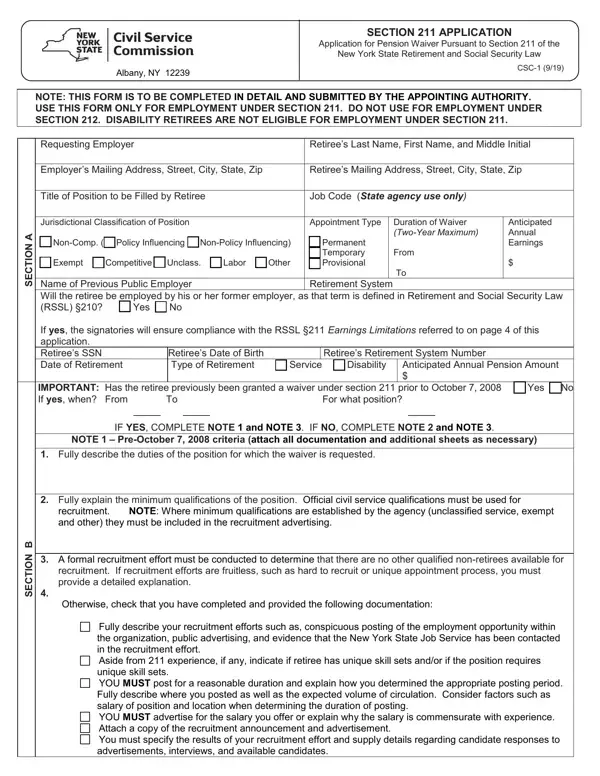
1. Start with the opening section, which collects the applicant and employer details:
This section asks for the retiree's name, contact information, and retirement date. It also asks for the name and address of the appointing authority. Fill in each field carefully. Check that the retirement date is exact and that all names are spelled correctly. Errors in this section can delay processing.
2. The next section covers the duty description, qualification requirements, and recruitment documentation:
This is the most detailed part of the form. Start by writing a clear description of the position's duties. Then explain the minimum qualifications a candidate must meet. In the recruitment section, document every effort made to find a non-retired candidate. Include where you advertised, how long the position was open, the salary range used in advertisements, and why no suitable candidate was found. Thorough documentation in this section gives the application its best chance of approval.
3. The third section covers the retiree's qualifications and the one-year rule:
In this section, describe how the retiree is qualified for the role. If the retiree is seeking employment within one year of their retirement date, select "Yes" and enter the exact retirement date. Then explain the circumstances that make immediate rehire necessary and how the proposed position differs from the former one. If the answer is "No," skip ahead to the next question as directed on the form.
4. The fourth section asks you to select a justification for re-hiring the retiree:
You must choose one of two justifications. Option A: there is an urgent need for the retiree's specific skills or experience. Option B: no qualified non-retired candidates are available. Select the option that fits your situation and write a detailed supporting explanation. This section also requires a full listing of where the position was posted and for how long. Attach additional sheets if needed to complete the narrative.
5. The final section is the certification and signature area:
The appointing authority certifies that all information provided is accurate. The retiree certifies their qualifications and agrees to the terms of re-employment. Both signatures are required. A form with a missing signature will be returned without review. Read every section once more before signing.
Step 3: Once all fields are complete, click "Done" to finish. Create a free account at FormsPal to download your completed form or send it by email. Your document is saved in your personal account for future access. FormsPal keeps all personal information private and secure.
Common Mistakes to Avoid
These errors are frequent and can delay or prevent approval:
- Incomplete recruitment narrative: This is the most common issue. Provide exact dates, locations, and salary figures for every posting and advertisement. Explain why each candidate who applied was not selected.
- Missing signatures: Both the appointing authority and the retiree must sign. One missing signature means the form cannot be submitted for review.
- Wrong form for Section 212 situations: If the retiree's earnings will stay under the annual Section 212 cap, this application is not required. Confirm with your HR office which law applies to your case before filing.
- Filing after employment begins: The waiver must be approved before the retiree starts work. Retroactive approvals are not available. File early and allow time for the Commission's review process.
- Incorrect retiree classification: Disability retirees are not eligible under Section 211. Verify the type of retirement before filing this application.
Frequently Asked Questions
How long does the review process take?
The New York State Civil Service Commission reviews each application individually. Processing times vary based on the completeness of the submission. Allow several weeks from the filing date before scheduling the retiree's start date. Submitting a complete and detailed form reduces the chance of follow-up requests for additional information.
Can a waiver be renewed after two years?
Yes. After the two-year waiver period ends, the employer can file a new application to continue the arrangement. The renewal follows the same process. Updated documentation of the retiree's qualifications and the continued public need for their services must be included with the new filing.
What happens if the application is denied?
If the Commission denies the waiver, the retiree cannot be re-employed under Section 211. The employer may request reconsideration if new information is available. It is also worth checking whether the retiree qualifies under Section 212 for limited earnings without a formal application. An HR consultant or employment attorney can help assess the options.
Does the retiree need to complete any part of the form?
Yes. The retiree provides their personal information and signs the certification section. The employer's HR team completes most of the form, but the retiree's signature is required before submission. Both the employer and the retiree should review the completed form together before signing.
Can an employer submit the form on behalf of multiple retirees at once?
No. A separate application must be filed for each retiree. Each waiver is tied to a specific retiree, a specific position, and a specific re-employment period. Bundling multiple retirees into a single form is not accepted by the Commission.
Related Forms
These forms are used in New York State civil service and public employment processes alongside this application:
- CSC Form 211 - Used to report annual earnings to the retirement system when re-employed under Section 211.
- CSC Form - General civil service application for New York State personnel transactions.
- CSC Form No. 41 - Used for leave of absence requests and other civil service personnel actions in New York State.
- Civil Service 55-b Form - New York State's non-competitive appointment form for persons with disabilities.
- CSC-SCC-1279 - Another civil service document used in New York State public employment procedures.
