Please rate Current Event Report

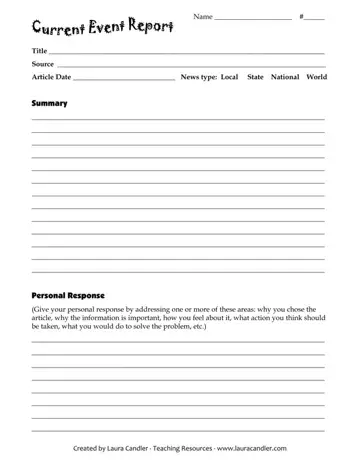
A current event report form is a structured one-page classroom tool designed to develop media literacy and critical thinking in K-12 students. Created by educator Laura Candler, the form guides students through a five-part analysis of any news article from a newspaper, magazine, or credible online source. It typically takes 10 to 15 minutes to complete.
The form is organized into five sections that guide students from fact-gathering to personal reflection:
This type of structured report is used across elementary, middle, and high school classrooms, with the form being suitable for students in grades 3 through 12. Social studies teachers assign it on a weekly or biweekly basis to connect lesson content to real-world events. English language arts teachers use it to develop reading comprehension and summary writing skills. Science and health teachers assign these reports to help students track new discoveries and public health developments in those fields.
The form is also used in homeschool settings, after-school programs, and enrichment courses where media literacy is a curriculum focus. Parents and tutors working with students on current events often rely on structured forms like this one to give responses a consistent format and keep students accountable to a standard set of reflection questions.
Structured news-response exercises build three core competencies that benefit students across all subjects:
Completing this exercise once a week over a school year exposes students to more than 30 distinct news stories across local, national, and global topics. Teachers who assign weekly news reports consistently note that students show measurable improvement in distinguishing facts from opinions after four to six weeks of regular practice.
Almost any factual news story from a reliable source works well with this form. Strong examples include:
Avoid opinion editorials, blog posts, and social media posts as primary sources, since the form is designed around objective news reporting rather than commentary or speculation.
Students and first-time users often make the same errors when completing this form for the first time. Avoiding these pitfalls leads to stronger, more useful reports:
Before filling out the form, read the chosen article at least twice. On the first read, focus on understanding the main idea. On the second read, take brief notes on the five W's: Who, What, When, Where, and Why. Use those notes to write a clear, concise summary. In the personal response section, avoid vague statements. Instead, connect the article's topic to a specific community issue, a class topic, or a personal experience to make the reflection meaningful and specific.
Choose articles from established news outlets to ensure accuracy and credibility. Local newspapers, national daily papers, and public broadcasting news sites are reliable sources for articles appropriate for this form.
| Question | Answer |
|---|---|
| Form Name | Current Event Report |
| Form Length | 1 pages |
| Fillable? | No |
| Fillable fields | 0 |
| Avg. time to fill out | 15 sec |
| Other names | current event paper template, current events report, currrent events repoport com, current events fill in the blank |
Current Event Report isn’t the one you’re looking for?
Please rate Current Event Report
