
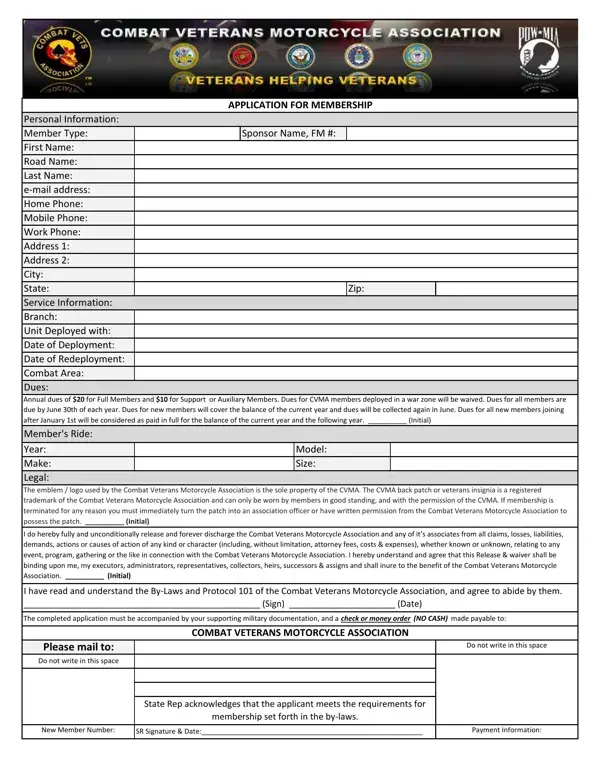
The Combat Veterans Motorcycle Association (CVMA) application form is the official document for new membership in this nationwide organization. It gathers your full name, mailing address, phone number, and email as contact information. The form also collects your branch of military service, years of service, deployment dates, and specific area of combat. All applicants must meet the eligibility criteria for this combat veteran motorcycle club.
CVMA offers three membership categories. Regular membership is open to active-duty and discharged combat veterans who served in a designated combat zone. Life membership requires a one-time payment in place of annual dues and grants permanent membership with no annual renewal. Deployed membership is available for active-duty military personnel, allowing them to defer dues payments until they return from service.
All applicants must attach military documentation confirming their combat service history. Dues payment by check or money order must accompany the completed form. You must also initial the liability waiver, which releases CVMA from liability for injuries during association activities. The form contains terms governing the CVMA emblem and back patch trademarks, reserved for approved members only. Applicants must sign a final affirmation confirming they will follow the CVMA By-Laws and Protocol.
A state representative reviews your completed application and assigns a new member number upon approval. Contact your local CVMA chapter for the correct mailing address, current dues amounts, and chapter meeting schedule.
| Question | Answer |
|---|---|
| Form Name | Cvma Application Form |
| Form Length | 1 page |
| Fillable? | Yes |
| Fillable fields | 40 |
| Avg. time to fill out | 15 sec |
| Other names | cvma motorcycle life member application form, how to join combat veterans motorcycle association, combat veterans motorcycle association application, cvma life membership application |
Cvma Application Form isn’t the one you’re looking for?