Da 4655 R Form PDF Details

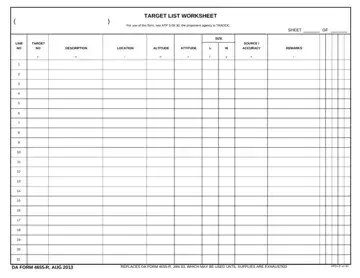
Embedded within the structure of military operations and detailed planning is the DA Form 4655-R, a crucial document designed for the meticulous task of listing targets. Known formally as the Target List Worksheet, it serves a fundamental role in enabling military personnel to organize and prioritize potential targets during operations. Guided by the protocols outlined in ATP 3-09.30, the Training and Doctrine Command (TRADOC) stands as the proponent agency responsible for the form's governance. This document, intricate in nature, is structured to capture various dimensions of each target, including but not limited to size, location, description, altitude, and the precision needed for successful engagement. The form's layout is meticulously designed to foster clarity and efficiency, facilitating a systematic approach to action. From a holistic perspective, the DA Form 4655-R, last updated in August 2013, took the place of its predecessor from January 1983, marking an evolution in the procedural approach to recording and addressing targets, with a clear directive towards enhancing the logistical and strategic aspects of military operations.

The worksheet is primarily used by fire support teams, field artillery officers, and battalion S3 operations staff. It supports mission planning by allowing commanders to assess, rank, and assign engagement priorities to high-value and time-sensitive targets before and during operations.

Key data recorded on each row of the form includes:

Personnel working with fire support documentation often reference the DA 67-9-1 OER Support Form and the DA Form 87 Certificate of Training alongside this worksheet.

QuestionAnswer
Form NameDa 4655 R Form
Form Length1 pages
Fillable?No
Fillable fields0
Avg. time to fill out15 sec
Other namesda form 4655 r fillable, ttlodac, list worksheet, you da 4655 form

How to Edit Da 4655 R Form Online for Free

This PDF editor makes it easy to complete the Target List Worksheet online without printing. Follow these steps to fill it out accurately.

Step 1: Click the orange "Get Form Now" button to open the form in the online editor.

Step 2: On the editing page, use the toolbar to enter the required target information. Type in the target number, location using an 8- or 10-digit MGRS grid, target type, description, size, altitude, and recommended engagement priority for each row.

writing list worksheet part 1

Step 3: Complete the header fields: DA FORM R AUG, REPLACES DA FORM R JAN WHICH MAY, and APD LC v. These identify the form version and issuing unit.

part 2 to completing list worksheet

Step 4: When finished, click the "Done" button to download the completed form as a PDF to your device.

Step 5: Keep at least two copies of each completed form, one for your unit files and one for the fire support element or command post.

Tips for Accurate Completion

Always verify grid coordinates against your current map datum before recording target locations. Use the time on target (TOT) column to coordinate fires with adjacent units and deconflict airspace. Cross-reference target descriptions with available intelligence reports for accuracy. When working with related army forms, you may also need the Army Leaders Book Form or the DA 1156 Form for complementary field records.

Frequently Asked Questions

What is the DA 4655 R Form used for?

It is the official U.S. Army Target List Worksheet, used by fire support teams to document, rank, and track targets during combat operations.

Is this form fillable online?

Yes. Click "Get Form Now" above to open the fillable version in the PDF editor and complete it directly in your browser.

Which ATP governs the Target List Worksheet?

ATP 3-09.30 governs the form, with TRADOC as the proponent agency responsible for its administration and updates.

How many pages is this form?

The form is one page. Complete one worksheet per operation or fire support mission, adding a row for each individual target identified.

Watch Da 4655 R Form Video Instruction

Please rate Da 4655 R Form

1 Votes
If you believe this page is infringing on your copyright, please familiarize yourself with and follow our DMCA notice and takedown process - click here to proceed .