
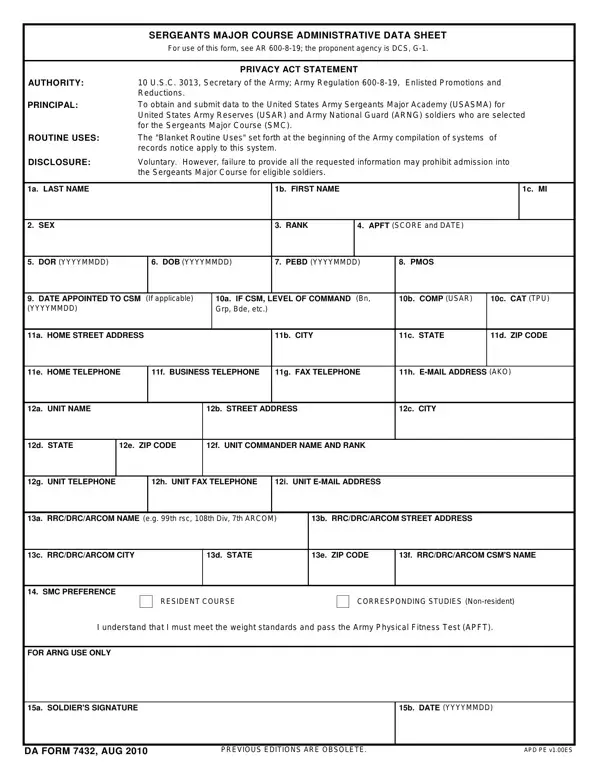
The DA Form 7432, the Sergeants Major Course (SMC) Administrative Data Sheet, is an official U.S. Army document that collects the enrollment data needed by the United States Army Sergeants Major Academy (USASMA) when processing new course candidates. It is issued under the authority of 10 U.S.C. 3013, Secretary of the Army, and governed by Army Regulation 600-8-19 (Enlisted Promotions and Reductions). This form is separate from the general promotion packet and focuses specifically on administrative data for course logistics.
Who must complete DA Form 7432? Soldiers in the U.S. Army Reserves (USAR) and Army National Guard (ARNG) who have received official notification of competitive selection for the Sergeants Major Course are required to submit this form. Active component soldiers may also be directed to complete the DA 7432 as part of their SMC enrollment application. Your unit's Personnel Officer (S1) or Human Resources Specialist will provide submission timelines and any additional unit-specific requirements.
What information does the form collect? The DA Form 7432 captures several categories of administrative data needed to process SMC enrollment. Personal identification details include full name, Social Security Number (SSN), date of birth, and current rank. Unit assignment information includes the unit of assignment, duty station, home station address, and unit identification code (UIC). Educational background, both civilian and military, is also documented to give USASMA staff an overview of each incoming candidate.
Submission process. Once completed, the DA Form 7432 is submitted through the soldier's chain of command. The Brigade or Battalion S1 office reviews the application for accuracy before forwarding it to higher headquarters. The completed enrollment package, which includes this administrative data sheet, is then sent to USASMA. Confirm all deadlines with your unit because late or incomplete forms may result in losing your assigned SMC slot.
Why timely submission matters. While the form lists completion as voluntary, missing the deadline will in practice prevent enrollment. SMC attendance is a requirement for promotion to Sergeant Major (SGM), so a missed submission can affect a soldier's entire promotion timeline. Treat this document as mandatory if you intend to attend the Sergeants Major Course.
For other Army administrative forms and documents, see the DA Form 87 (Certificate of Training), the Army OER Support Form DA 67-9-1, or the Army Bonus PDF forms if you qualify for bonus incentives connected to your SMC attendance.
| Question | Answer |
|---|---|
| Form Name | Da 7432 Form |
| Form Length | 1 pages |
| Fillable? | No |
| Fillable fields | 0 |
| Avg. time to fill out | 15 sec |
| Other names | form 7432 data, sergeants sheet fillable, online printable puzzles, printable fill in word puzzles |
| Form Purpose | SMC enrollment administrative data |
| Issuing Agency | U.S. Army (10 U.S.C. 3013) |
| Governing Regulation | Army Regulation 600-8-19 |
Da 7432 Form isn’t the one you’re looking for?