
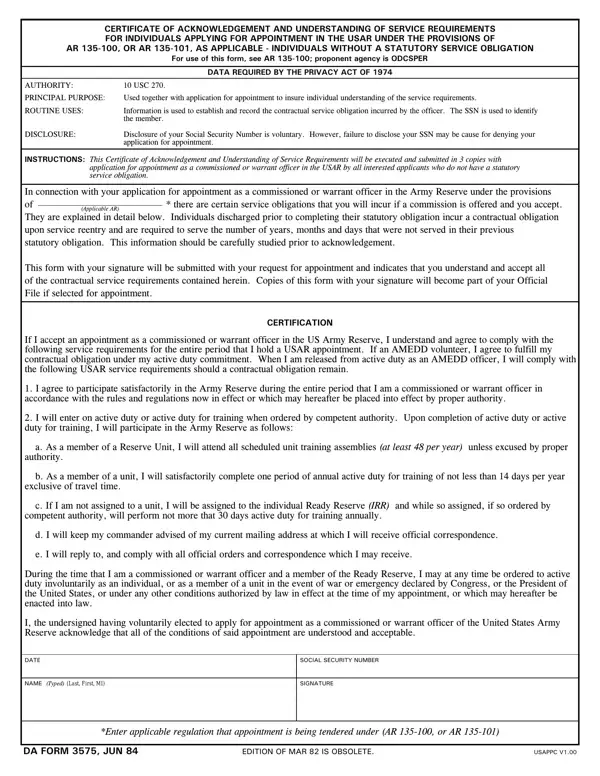
The DA Form 3575 is the Certificate of Acknowledgement and Understanding of Service Requirements. The U.S. Army uses this form for individuals applying for a commissioned or warrant officer appointment in the United States Army Reserve (USAR). It applies to applicants who do not have an existing statutory service obligation. The Army requires this form under AR 135-100 and AR 135-101.
Any applicant pursuing a USAR officer appointment without a current statutory service obligation must complete this form. This includes candidates for both commissioned officer and warrant officer positions. The Privacy Act of 1974 governs the collection of personal information on this form, including your Social Security Number (SSN). Providing your SSN is voluntary. However, declining to provide it may delay or prevent your appointment from moving forward.
The form outlines the specific duties you commit to as a USAR officer candidate. These include satisfactory participation in Army Reserve training exercises. You must also complete all required duty periods and maintain regular contact with your commanding officer. You agree to follow all official orders during your service commitment.
Once you sign the form, your obligations become a binding agreement. The signed form documents that you have read and understood these requirements before your appointment is finalized.
You must prepare three signed copies of the completed DA Form 3575. All three copies must accompany your officer application package. The form becomes a permanent part of your official personnel file after submission. Officers applying through the warrant officer application packet process should also review DA Form 87, another Army administrative certificate commonly submitted in the same package.
| Question | Answer |
|---|---|
| Form Name | Da Form 3575 |
| Form Length | 1 page |
| Fillable? | Yes |
| Fillable fields | 5 |
| Avg. time to fill out | 15 sec |
| Other names | da form 3575, USAPPC, 3575, da form 3574 |
Da Form 3575 isn’t the one you’re looking for?