
Da Form 1306 PDF Details

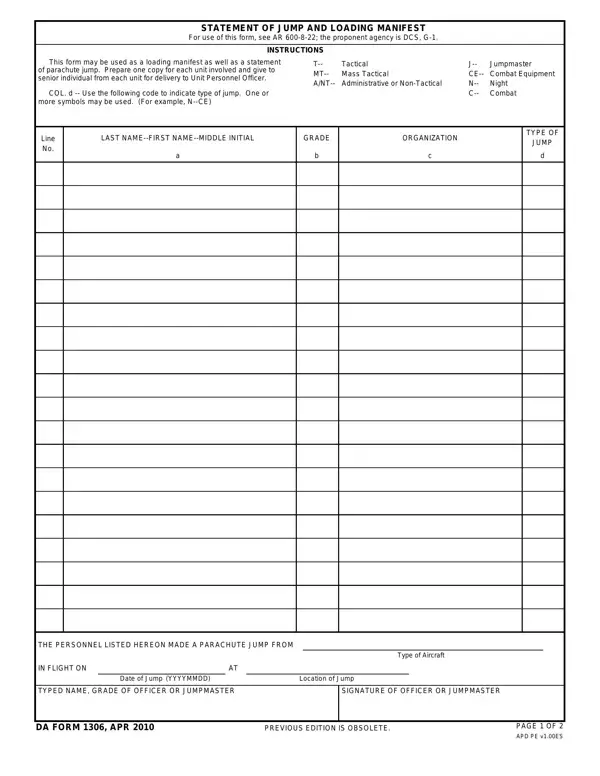
This form serves as a pivotal tool within military operational protocols, functioning as both a critical loading manifest and a comprehensive statement of parachute jumps. Its governance under AR 600-8-22, with the DCS, G-1 as the proponent agency, underscores its significance in ensuring streamlined processes in jump operations.

The manifest records each parachutist's name, rank, organization, and the nature of the jump – distinguishing between tactical, mass tactical, combat equipment, administrative or non-tactical, night, and combat jumps through designated codes. It also captures the aircraft type, date, and location of the jump, along with the authoritative signatures of the officers or jumpmasters overseeing the operation.

By mandating the preparation of one copy for each unit involved, to be handed over to the senior individual from each unit for delivery to the Unit Personnel Officer, this form ensures a methodical approach toward personnel management and accountability in parachute operations. This structured documentation facilitates operational efficiency and serves as a vital record for attributing service and valor in administrative considerations and historical archiving.

QuestionAnswer
Form NameDa Form 1306
Form Length2 pages
Fillable?No
Fillable fields0
Avg. time to fill out30 sec
Other nameshow to da 1306, da form 1306 pdf, da 1306 form, da form 1306

How to Edit Da Form 1306 Online for Free

Use our online editor to complete every field of the DA 1306 before printing or downloading the final version. The steps below walk you through each section of the form.

Step 1: Record the Date and Operation Details

Enter the date of the jump in the top section. Identify the headquarters directing the operation and note the type of jump using one of the standard codes printed on the form: T for Tactical, MT for Mass Tactical, CE for Combat Equipment, A/NT for Administrative or Non-Tactical, N for Night, and C for Combat. Write the aircraft type and the designated jump location or drop zone.

Step 2: List All Parachutists

In the roster table, enter each participant's last name, first name, middle initial, rank, and organization. Every parachutist gets a separate row. Confirm each name against your unit roster before submitting to avoid discrepancies in personnel records.

Step 3: Mark Jump Type and Qualifying Details

For each listed individual, place the applicable jump type code in the column provided. If the jump qualifies as a combat or service jump, mark the appropriate indicator. Note any special equipment carried during the operation. This information is used for award recommendations and service credit governed by AR 600-8-22.

Step 4: Obtain the Required Signatures

The completing officer or jumpmaster signs and prints their name and grade at the bottom of the manifest. Their signature certifies the accuracy of every entry and confirms that all personnel were properly manifested for the operation.

Step 5: Distribute Copies to Each Unit

Prepare one copy for each unit represented on the manifest. Give each copy to the senior individual from that unit, who delivers it to the Unit Personnel Officer for processing. Retain the original in your operations file for documentation purposes.

Related DA Forms for Airborne Operations

The following forms are commonly used alongside the 1306 in Army airborne and personnel administration workflows:

  • DA Form 87 – Certificate of Training, documenting completed parachute or airborne training
  • DA Form 638 – Recommendation for Award, used to recommend recognition for combat or service jumps
  • DA Form 31 – Request and Authority for Leave, used in personnel administrative processing
  • DA Form 2062 – Hand Receipt, often required when issuing parachute or airborne equipment