
You're able to complete this Army PDF document online using FormsPal's editor at no cost. No downloads or installations are required. Learning the form's structure before you start helps ensure all processing requirements are met accurately. Follow the three steps below to get started.
Step 1: Click the orange "Get Form" button at the top of this page. This opens the document in the FormsPal PDF editor where you can review and work through each section.
Step 2: The checklist is divided into several sections covering different categories of required Army documents. Work through each section carefully and confirm or note the status of each item:
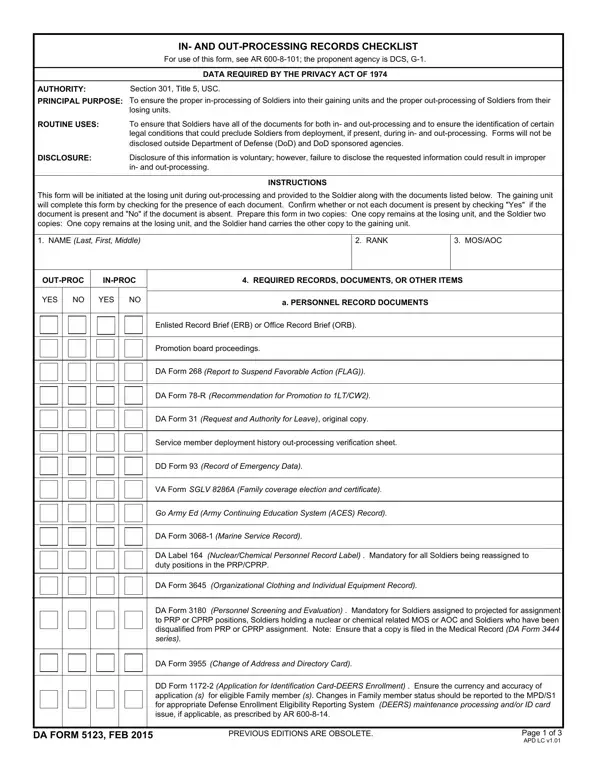
1. The first section of the form covers personnel record documents. You will see checkboxes for items such as the Enlisted Record Brief, Officer Record Brief, reenlistment data, personal clothing request, language proficiency certificates, and family care plan documents.
2. The next section addresses organizational clothing documents, change of address forms, and supplemental Army paperwork. Go through each listed item and confirm whether the document is present or has been provided to the unit.
3. Continue through the personnel-related section, which covers items such as individual flight records, jump records, and questionnaires for national security. Ensure all required items in this section are accounted for before moving on.
4. The health section covers pre-deployment health assessments, adult preventive care forms, medical protection system data, and emergency data labels. It also includes dental records and anthrax vaccine immunization records. Verify all health-related documents are current before proceeding.
5. The final section covers deployment readiness items including personnel reliability program records, electronic profile cross-checks, MOS administrative retention reviews, and HIV screening verification. Complete all fields to ensure full compliance before submitting the document.
Step 3: Once you've reviewed all checklist sections, click "Done" to save the completed form. You can then download the PDF from your FormsPal account. FormsPal does not store or share any personal information you enter.
Related Army forms for unit processing
Related Army forms on FormsPal: the DA Form 5123-1 covers the in- and out-processing variant, DA Form 87 is used for unit achievement certificates, the Military Power of Attorney covers PCS moves, and the DD Form 214 applies to soldiers completing final separation out-processing.
Common questions about Army in- and out-processing
What documents are required for Army in-processing?
In-processing requires a range of Army forms and personal documents including your ERB or ORB, medical and dental records, family care plan, personal clothing records, and other unit-specific paperwork. The checklist provides a complete list of requirements so you know what to gather before reporting.
What happens if required documents are missing during processing?
Missing documents can delay a soldier's in- or out-processing and affect unit readiness. The checklist is designed to identify any gaps early so they can be resolved before the official transition date, avoiding last-minute compliance issues.
How long does Army out-processing typically take?
Army out-processing timelines vary by installation, but soldiers typically begin 30 to 90 days before a permanent change of station move. Starting early ensures all documents are gathered and any compliance issues are addressed well before the reporting date.
Who needs to complete this Army processing form?
Active duty soldiers changing duty stations, separating from service, or returning from deployment use this checklist during in- or out-processing. Unit commanders and S1 personnel officers confirm all required documents are present before the official transition date, ensuring full compliance.
