
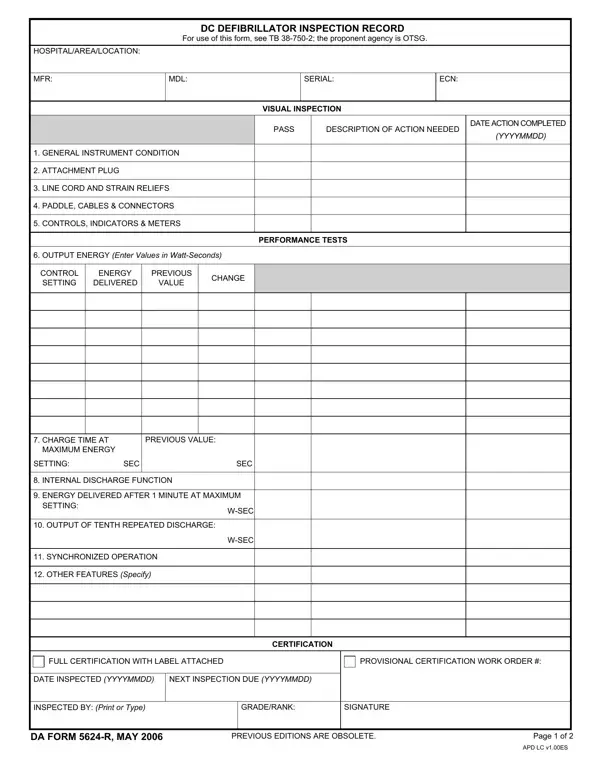
The DA Form 5624 R is the U.S. Army's official defibrillator inspection record, designed for use in military hospitals and medical treatment facilities. It provides a standardized framework for documenting visual inspections and performance tests on defibrillator units, helping authorized medical staff confirm that each device operates within required safety specifications before deployment in patient care settings.
Military healthcare professionals, biomedical equipment technicians, and inspection officers complete the defibrillator inspection record during each scheduled inspection cycle. The form is required whenever a defibrillator undergoes routine preventive maintenance checks or is first brought into active service. Medical unit commanders and equipment custodians retain completed copies as part of the facility's ongoing maintenance records and equipment accountability files.
Inspectors use the form to record the manufacturer's name, model designation, and serial number for precise unit identification. The inspection record tracks both the visual condition of components (including attachment plugs, line cords, paddles, cables, and connectors) and critical performance metrics such as output energy levels and charge times. Internal discharge function results, synchronized operation verification, and any other feature evaluations are also captured during each inspection cycle.
Based on test results, inspectors grant either full certification or provisional certification with required corrective work noted. Full certification with an affixed label confirms the unit meets or exceeds manufacturer specifications and is cleared for active duty. Provisional certification documents any deficiencies found and specifies the corrective actions needed before the defibrillator can be returned to full active service. All certification decisions must be supported by the test data recorded in the form.
The form captures the inspection date and the next inspection due date, both entered in YYYYMMDD format, ensuring consistent maintenance cycles across all units in the facility. These records support regulatory compliance, assist during audits, and help medical commanders quickly identify equipment that requires attention before it is used in an emergency. Completed forms should be filed in the unit's equipment maintenance folder and retained according to Army records management requirements.
Medical maintenance officers often use the defibrillator inspection record alongside other Army documentation. If you work with military medical equipment records, you may also need the DA Form 5019 R for preventive maintenance checks or the Army Certificate DA Form 87 for personnel certifications related to authorized duties.
| Question | Answer |
|---|---|
| Form Name | Da Form 5624 R |
| Form Length | 2 pages |
| Fillable? | No |
| Fillable fields | 0 |
| Avg. time to fill out | 30 sec |
| Other names | da form 5624, defibrillator inspection record |
| Form Category | Military Medical / Equipment Maintenance |
| Issuing Authority | U.S. Army |
Da Form 5624 R isn’t the one you’re looking for?