
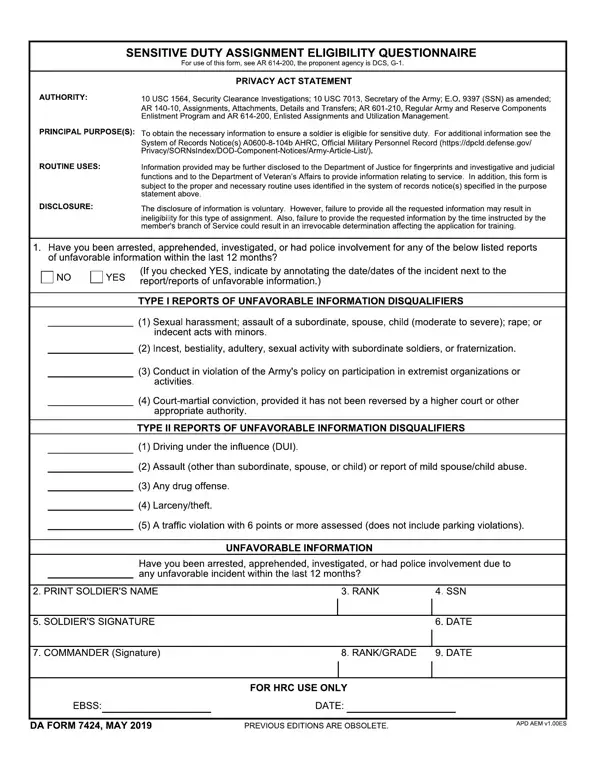
The DA Form 7424, officially the Sensitive Duty Assignment Eligibility Questionnaire, screens U.S. Army service members for positions requiring elevated trust and security responsibility. These roles include Army Recruiting Command positions, roles involving classified information access, and other high-responsibility assignments.
Army officials use the questionnaire to assess whether a soldier is suitable for a sensitive duty role. It covers a wide range of personal history topics, including:
Answering truthfully is a legal obligation. False statements or omissions may result in disqualification from the assignment and potential consequences under Army regulations.
Soldiers being considered for sensitive duty assignments must complete the questionnaire before their assignment is approved. This includes candidates for Army recruiting roles, positions involving access to classified materials, and special assignment categories that require heightened personal accountability.
Existing sensitive duty personnel may also be asked to complete updated questionnaires at regular intervals to confirm continued eligibility.
After submission, designated Army personnel review each response. Answers that raise concern may trigger a more detailed background investigation. The process is confidential. Only authorized personnel review what you disclose. A thorough, honest response is always viewed more favorably than a vague or incomplete one.
Depending on the type of role, you may also need these documents alongside the DA 7424:
Contact your unit's personnel office if you are unsure which forms apply to your assignment. Having everything organized in advance reduces delays.
Before filling out the questionnaire, gather all relevant records: dates of past incidents, names of foreign contacts, financial account details, and legal documentation. Read each question carefully and answer based on the full time period the document specifies.
When in doubt about whether something needs to be disclosed, include it. Army reviewers evaluate context. A complete answer is always the right choice. You may also want to review your personnel file for consistency before you submit.
After the completed questionnaire reaches the reviewing authority, a trained official evaluates each response. The process is straightforward for applicants who have prepared honestly. Most submissions are reviewed and processed without complication.
In some cases, a response may prompt a follow-up request for additional documentation or clarification. This is normal and does not automatically indicate a problem. Respond promptly and completely to any follow-up requests. Delays in responding can slow the overall assignment timeline.
If the review process raises significant concerns, the assigning authority may conduct a more thorough background investigation before making a final determination. Throughout this process, the soldier's privacy rights and rights to due process under Army regulations remain in effect.
Service members who receive an unfavorable determination have the right to review the decision and submit an appeal through the appropriate Army channels. Consulting with a military legal assistance attorney can be helpful if you have questions about your rights or the outcome of your eligibility review.
| Question | Answer |
|---|---|
| Form Name | Da Form 7424 |
| Form Length | 1 page |
| Fillable? | Yes |
| Fillable fields | 24 |
| Avg. time to fill out | 15 sec |
| Other names | da 7424 pdf, 7424 sensitive duty, 7424 sensitive duty form, da 7424 form fillable |
Da Form 7424 isn’t the one you’re looking for?