Please rate Dd 2883 Form

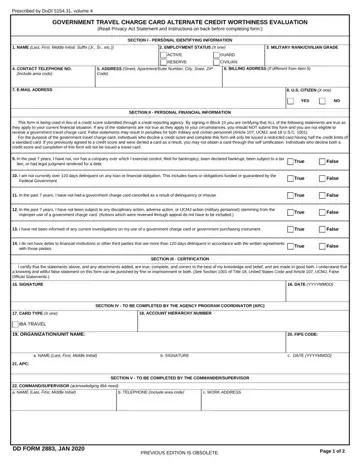
The DD Form 2883 plays a crucial role in the management of Government Travel Charge Cards by providing an alternate credit worthiness evaluation for applicants who choose not to or cannot use traditional credit scores for verification. Mandated by the Department of Defense Instruction (DoDI) 5154.31, Volume 4, this form serves as a comprehensive tool to assess the financial integrity and reliability of an individual seeking to obtain a government travel charge card. Its structure encompasses sections for personal identifying information, financial statements affirmation, certification by the applicant, and final approvals by relevant agency personnel. Specifically, it requires applicants to attest to their financial history and current status, including any bankruptcy filings, delinquencies, or misuse of government charge cards in the past seven years. Additionally, the form outlines the consequences of submitting false information, demonstrating the seriousness with which the Department of Defense approaches the issuance of these financial instruments. By offering an alternative to traditional credit score evaluations, the DD Form 2883 ensures that those serving in various capacities—active duty, guard, reserve, and civilian employees—can access government travel charge cards while maintaining financial accountability and trustworthiness.
| Question | Answer |
|---|---|
| Form Name | Dd 2883 Form |
| Form Length | 2 pages |
| Fillable? | No |
| Fillable fields | 0 |
| Avg. time to fill out | 30 sec |
| Other names | dd2883, irs form 2883, dd2883 form pdf, dd2883 army |
Dd 2883 Form isn’t the one you’re looking for?
Please rate Dd 2883 Form
