
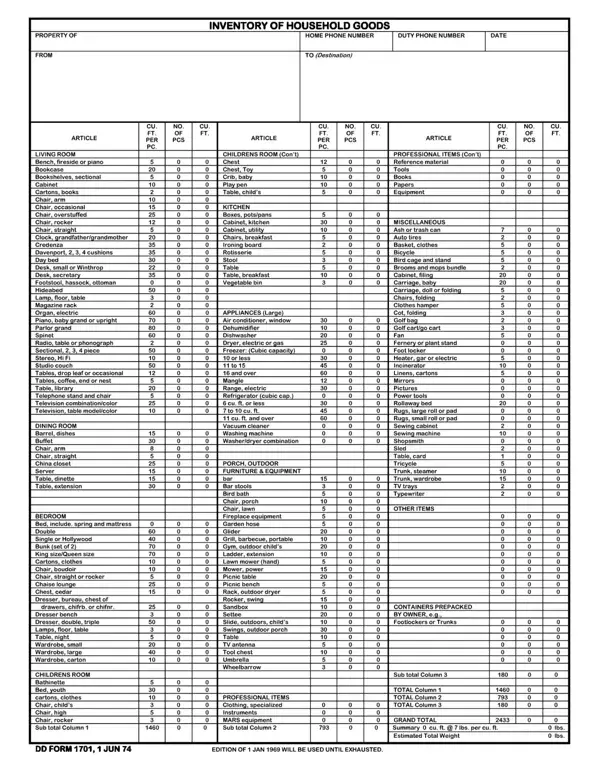
The DD 1701, released by the Department of Defense on June 1, 1974, is the standard form for documenting personal property during military relocations. Service members and professionals managing household goods shipments rely on this form to record the name, phone numbers, shipment date, and destination for each move.
The inventory lists common household goods including furniture, appliances, kitchen items, and decor. Each entry requires the total quantity and cubic foot measurements. Page two covers appliances, identified by type, make, and year, and notes any items requiring service. The total estimated weight of the shipment is recorded at the bottom of page one.
Filing the completed form protects personal property during PCS, Temporary Duty (TDY), or evacuation transport. Service members who submit this inventory before their move date can file a government claim if items are lost or damaged. For related forms, see our Personal Effects Inventory and the Household Goods Descriptive form. Other related government forms include DD Form 1351-2 and DD Form 149.
| Question | Answer |
|---|---|
| Form Name | DD Form 1701 |
| Form Length | 3 pages |
| Fillable? | Yes |
| Fillable fields | 0 |
| Avg. time to fill out | 5 min |
| Other names | DD 1701, inventory of household goods, personal effects inventory, form dd 1701 |