
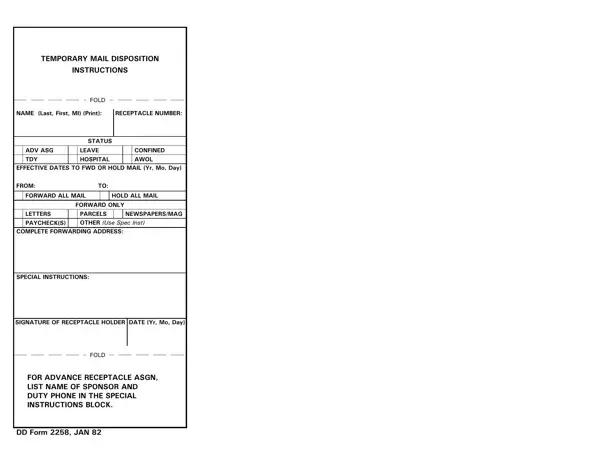
Use FormsPal's free PDF editor to complete your mail disposition instructions in a few minutes. Once finished, you can save the completed form as a PDF file or export it as a JPG image for email sharing or digital submission. Follow the steps below to get started.
Step 1: Click the "Get Form" button at the top of this page to open the form in the editor.
Step 2: Use the editor tools to fill in your information. You can type text into all editable fields, add a digital signature, and customize the layout before saving. The editor also lets you export your finished document as a JPG or PDF file once you are done.
Filling out this form requires careful attention to detail. Make sure all required fields are complete before moving to the next section.
1. Begin with the top section of the form. Enter your name, receptacle number, and duty status. Choose the correct status type: Active Duty, Leave, TDY, or Hospitalized. Then enter the effective dates that cover your full period of absence.
2. Complete the second section of the form. Fill in the SIGNATURE OF RECEPTACLE HOLDER, FOLD, FOR ADVANCE RECEPTACLE ASGN LIST, and DD Form JAN fields as applicable. If you are requesting advance receptacle assignment, provide your sponsor's name and duty phone number in the designated field.
Pay close attention to the DD Form JAN and FOR ADVANCE RECEPTACLE ASGN LIST fields, as these are the most commonly missed areas on this form.
Step 3: Review all entries carefully. When everything looks correct, click the "Done" button to finalize. Create a free FormsPal account to save your progress and return to edit the document anytime. Your data stays private and is never shared.
After completing the form, download it as a PDF to print and submit in person, or save it as a JPG file to attach to an email or submit through your unit's approved digital channels. Other military forms that service members often need alongside this one include the DD Form 93 (Record of Emergency Data) and the DD Form 2656 (Data for Payment of Retired Personnel).
Frequently Asked Questions
What is DD Form 2258 used for?
This form directs military post office staff on how to handle your mail while you are away from your duty station. You can request that they hold all mail, forward it to another address, or route only specific categories such as paychecks, letters, and official correspondence.
Can I download the completed form as a JPG?
Yes. After filling out the form in the FormsPal editor, you can download it as a standard PDF or export it as a JPG image. The JPG format is convenient when you need to send the form as an email attachment or upload it to a digital submission portal.
How far in advance should I submit this form?
Submit the form to your installation's post office at least one to two business days before your departure date. Early submission ensures your mail handling instructions take effect on time.
Where do I submit the completed form?
Return the completed form to the post office at your home installation. Staff will process your request and begin applying your chosen mail disposition instructions on the effective start date you listed.
