Please rate Dd Form 282

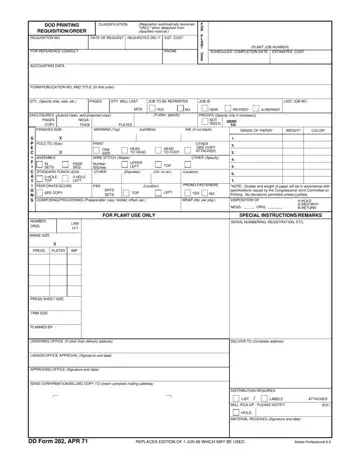
In the intricate world of governmental documentation and requisition, the DD Form 282 plays a critical role, yet its importance often goes unnoticed by the uninitiated. This form, designated as the Department of Defense Printing Classification Requisition/Order, serves as a bridge between the need for printed materials and their execution and delivery within the vast expanse of military operations. At its core, the form outlines detailed requisition information—ranging from the identification of printed materials by form and publication number to the quantity and specifics of the print job such as paper grade, weight, color, and finishing details. It also includes scheduling data like the requested delivery date and estimated cost, underscoring the logistical planning necessary for military readiness. Moreover, the form provides space for special instructions or remarks, ensuring that specific needs or exceptions are communicated clearly. The stipulation that a requisition becomes "Unclassified" when detached from classified material underscores the stringent security protocols integral to military operations. Additionally, by specifying the disposition of original materials such as whether to hold, destroy, or return them, the DD Form 282 addresses the critical aspect of information security. Though the document may appear as a routine bureaucratic formality, its fields encapsulate a complex process of requisitioning, classifying, and managing printed materials, reflecting an intersection of logistical precision, operational security, and administrative efficiency vital to the Department of Defense’s mission success.
| Question | Answer |
|---|---|
| Form Name | Dd Form 282 |
| Form Length | 1 pages |
| Fillable? | No |
| Fillable fields | 0 |
| Avg. time to fill out | 15 sec |
| Other names | request, dd form 282, daps, print |
Dd Form 282 isn’t the one you’re looking for?
Please rate Dd Form 282
