
How to Fill Out the DFA SNAP 2 PDF Form
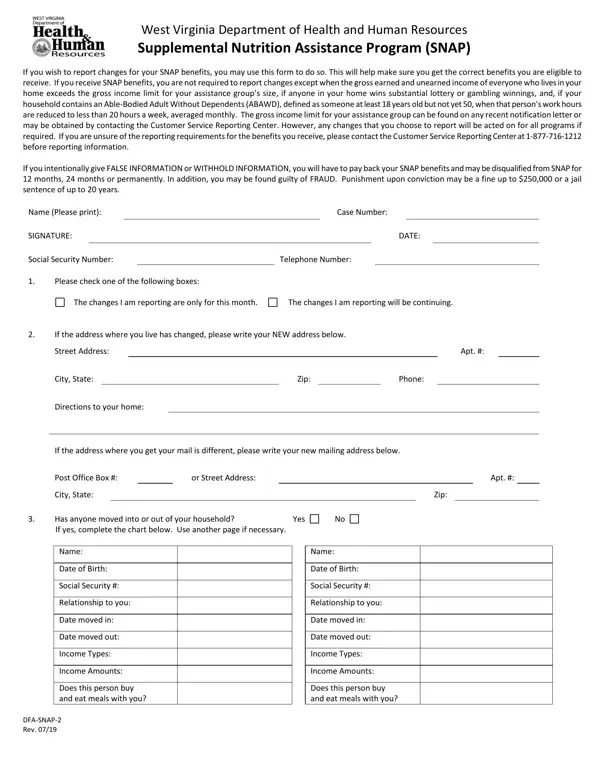
The West Virginia DFA SNAP 2 PDF form is a two-page change report that SNAP recipients submit to the Department of Health and Human Resources when their household situation changes. Follow these steps to complete and submit the form correctly.
Step-by-Step Instructions
Step 1: Gather your information. Before you fill in the PDF form, collect your SNAP case number, current mailing address, and details about the change you need to report. For income changes, have your pay stubs, employer name, and new income amount ready. For household changes, have the full name and date of birth of each person joining or leaving the home.
Step 2: Choose the type of change. The West Virginia form includes checkboxes for the category of change. Check every box that applies to your situation. Categories include household composition, income and earnings, mailing address, shelter expenses, utility costs, and court-ordered child support payments.
Step 3: Fill in your household information. Enter your full legal name, SNAP case number, county, and current address. If your address has changed, write both the old and new addresses so DHHR can update their records.
Step 4: Describe the change in detail. Provide the effective date of the change, the previous situation, and the updated information. For income changes, include the source, amount per pay period, and how often you are paid. For household changes, specify whether a member joined or left, and the date the change occurred.
Step 5: Sign and date the form. Your signature certifies that all information you provided is accurate and complete. West Virginia law requires truthful reporting. Providing false information may result in disqualification from the SNAP program, repayment of benefits received in error, monetary fines, or criminal prosecution.
Step 6: Submit to your local DHHR office. Mail the completed PDF form to your West Virginia county DHHR office, deliver it in person, or ask your caseworker about available electronic submission options. Submit as soon as possible after the change occurs.
When to File a Change Report
West Virginia SNAP policy requires households to report certain changes within 10 days. Failure to report on time may result in an overpayment that DHHR will require you to repay. File the form when any of the following occur:
- Household gross income rises above the SNAP eligibility threshold
- A household member receives substantial lottery or gambling winnings
- An ABAWD member's work hours drop below 20 hours per week on average
- A person moves into or out of your household
- Your mailing address or residence changes
- Shelter costs or utility expenses change significantly
- Court-ordered child support payments change in amount
- Asset values change in a way that may affect your eligibility
You may also use the form to report temporary changes. A temporary change might be a one-month drop in income or a short-term increase in shelter expenses. Mark the form accordingly so DHHR can apply the change for the correct benefit period.
How to Complete the Form Online
FormsPal offers a free online PDF editor so you can fill out the West Virginia SNAP 2 form directly in your browser. Open the PDF form on our site, type your information into the form fields, review your entries, and download the completed PDF document. You can then print and mail it or deliver it to your local West Virginia DHHR office. No software installation is required to use the free PDF editor.
Related SNAP and Benefits Change Forms
- SNAP Application Form - Apply for Supplemental Nutrition Assistance Program benefits
- Change Report DHS-2240 - Benefits change report form used in other states
- Interim Change Report Form - Report mid-period changes to state assistance benefits
- Welfare Change Report Form - Report changes affecting other welfare benefit programs
- Oregon SNAP Change Report - SNAP change report form for Oregon residents
Frequently Asked Questions
What is the DFA SNAP 2 form used for?
The form is a change report for West Virginia SNAP recipients. It notifies the West Virginia DHHR about changes in income, household members, address, shelter expenses, or other circumstances that may affect your monthly SNAP benefits.
How many pages is the PDF form?
The PDF form is 2 pages. Page 1 collects identifying information and describes the type of change. Page 2 provides space for income details, expense information, and asset values.
Is the form available as a free PDF download?
Yes. The West Virginia DFA SNAP 2 PDF form is available to view, fill out, and download for free on FormsPal. Use our free online PDF editor to complete the form without downloading additional software.
How long does it take to fill out the form?
Most West Virginia SNAP recipients can fill out the two-page PDF form in under five minutes once they have their case number and updated household information ready. The process is straightforward and each section is clearly labeled.
What happens if I do not report a change on time?
If West Virginia DHHR discovers an unreported change that led to higher benefits than you were entitled to receive, they may require you to repay the difference. Intentional failure to report may also result in disqualification from the SNAP program or criminal penalties. Report changes promptly to avoid these consequences.
Can I submit the completed PDF form by mail?
Yes. Print the completed PDF form and mail it to your local West Virginia DHHR county office. Allow extra time for mail delivery to ensure your change is processed before it affects your next benefit calculation. You may also deliver the form in person at the county office.
