
DMV 116 Form PDF Details

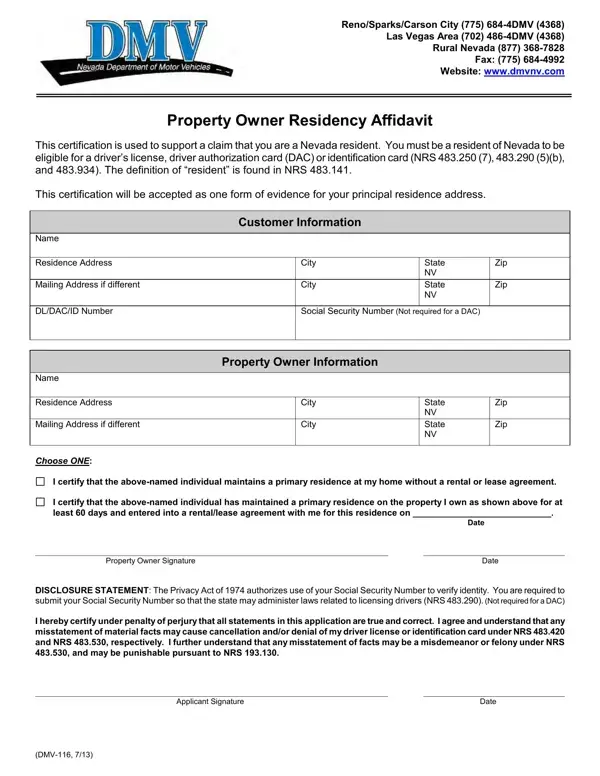
In the state of Nevada, establishing residency is a critical step for anyone who seeks to obtain a driver's license, driver authorization card (DAC), or identification card. The Property Owner Residency Affidavit, also known as the DMV 116 form, emerges as an indispensable document in this process, offering a pathway for individuals to substantiate their Nevada residency. Notably, the form caters to those who do not have a conventional rental or lease agreement but still need to prove their residency status. It allows property owners to affirm that the said individual maintains a primary residence at their property, either with or without a formal agreement, thus fulfilling one of the requirements set forth by Nevada statutes. In addition to providing spaces for both the resident's and property owner's information, this certification also mandates the disclosure of a Social Security Number (SSN) for identity verification purposes, though it's explicitly stated that this requirement does not extend to DAC applicants. With provisions for both affirmations—the absence of a rental or lease agreement or its presence for at least 60 days—the form encompasses a wide range of residency situations. Implicit in the completion of this form is an agreement to the conditions laid down by the state, including the potential for penal repercussions in the event of misrepresentation, underscoring the seriousness with which Nevada treats the accuracy of residency declarations.

QuestionAnswer
Form Name DMV 116 Form
Form Length 1 pages
Fillable? No
Fillable fields 0
Avg. time to fill out 15 sec
Other names NRS, 1974, 486-4DMV, DMV-116

How to Edit DMV 116 Form Online for Free

dmvnv can be filled out online in no time. Simply open FormsPal PDF editor to do the job right away. To make our editor better and simpler to use, we continuously develop new features, bearing in mind feedback from our users. Getting underway is easy! All you need to do is follow the next easy steps below:

Step 1: Press the "Get Form" button above. It'll open our tool so that you could begin filling out your form.

Step 2: Once you open the editor, you will see the form made ready to be filled in. In addition to filling out various fields, you might also perform many other things with the form, specifically adding your own text, changing the initial textual content, adding illustrations or photos, signing the PDF, and more.

As for the blanks of this specific document, this is what you should consider:

1. The dmvnv needs specific details to be entered. Make sure the subsequent blank fields are filled out:

certification conclusion process detailed (portion 1)

2. When the first part is filled out, go on to enter the relevant details in these - DLDACID Number, Social Security Number Not, Name, Residence Address, Mailing Address if different, Choose ONE, Property Owner Information, City, City, State NV State NV, Zip, Zip, I certify that the abovenamed, I certify that the abovenamed, and Date.

Step no. 2 for filling out certification

People often make errors while filling in Date in this part. You should definitely revise everything you enter here.

3. Completing DISCLOSURE STATEMENT The Privacy, Applicant Signature, Date, and DMV is essential for the next step, make sure to fill them out in their entirety. Don't miss any details!

Filling out part 3 in certification

Step 3: Soon after rereading the fields, press "Done" and you're good to go! Get the dmvnv as soon as you join for a 7-day free trial. Immediately get access to the pdf form within your personal account page, together with any modifications and changes being conveniently kept! We do not sell or share the details you provide when working with forms at FormsPal.