
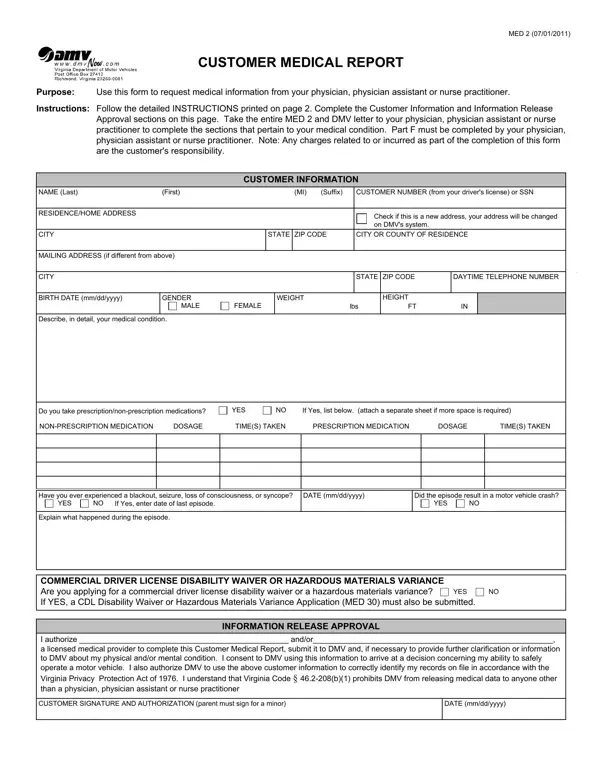
2011 can be completed online without difficulty. Just use FormsPal PDF editor to get it done in a timely fashion. The editor is consistently improved by our staff, acquiring handy functions and becoming better. Should you be seeking to start, here is what it requires:
Step 1: First, open the tool by clicking the "Get Form Button" at the top of this webpage.
Step 2: With the help of our advanced PDF editing tool, you can actually accomplish more than simply fill out blank form fields. Express yourself and make your forms seem high-quality with custom text added in, or optimize the original content to perfection - all comes with the capability to incorporate stunning pictures and sign the file off.
This document requires particular data to be entered, hence you need to take whatever time to fill in what's expected:
1. When submitting the 2011, be certain to include all of the important blank fields within its corresponding section. It will help speed up the process, allowing your information to be handled fast and properly.
2. Once this array of fields is done, you need to include the needed details in Have you ever experienced a, YES, DATE mmddyyyy, Did the episode result in a motor, YES, Explain what happened during the, COMMERCIAL DRIVER LICENSE, YES, INFORMATION RELEASE APPROVAL, I authorize andor a licensed, CUSTOMER SIGNATURE AND, and DATE mmddyyyy in order to move on further.
3. This next segment is focused on NAME Last, First, Suffix, BIRTH DATE mmddyyyy, CUSTOMER NUMBER or SSN, Customer Medical Report, MED Page, The Department of Motor Vehicles, Based on the examination that you, PART A NEUROLOGICAL, Length of time individual has been, Have you examined this individual, EXAMINATION DATE mmddyyyy, YEARS, and MONTHS - type in all of these blank fields.
4. Filling in Was the last medication blood, YES, BLOOD TEST RESULTS, Does the patient have any motor, Does the patient have any other, YES, Does the patient have any chronic, YES, Is the patient prescribed, YES, Does the patient have the use of, YES, Does the patient suffer from, YES, and Current blood levels of is key in this next part - be certain to don't hurry and take a close look at every blank!
As to YES and YES, make sure that you review things in this section. Both of these are the key ones in the page.
5. And finally, the following final section is precisely what you'll have to finish prior to finalizing the PDF. The blank fields at issue are the following: Does the patient have full range, YES, Is adaptive equipment recommended, YES, Does the patient require a driver, YES, an independent certified driver, a DMV Examiner, or both, and Go to Part F.
Step 3: Before submitting the form, make sure that blanks are filled out as intended. As soon as you believe it is all fine, click on “Done." Get your 2011 after you join for a 7-day free trial. Conveniently gain access to the pdf file within your FormsPal cabinet, along with any modifications and adjustments being conveniently kept! FormsPal is committed to the confidentiality of all our users; we make sure all personal information going through our tool stays confidential.
