
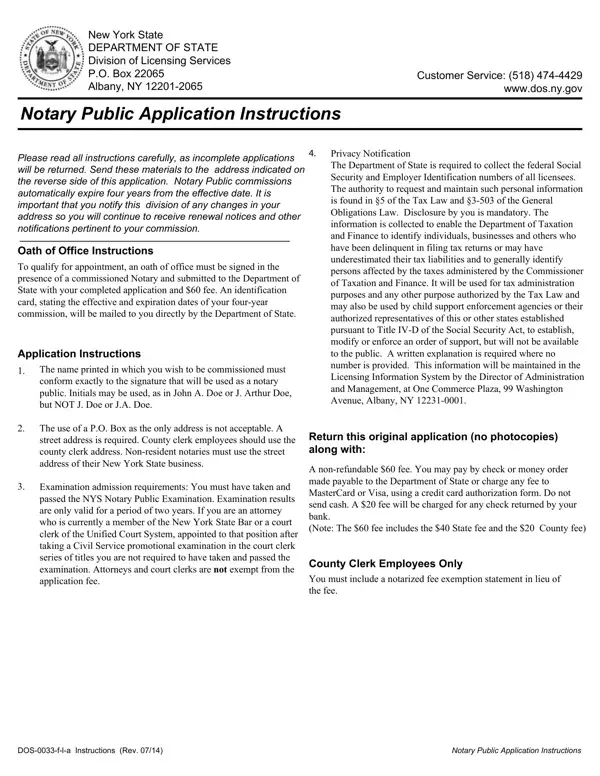
Dos 0033 F L A Form PDF Details

The process of becoming a Notary Public in New York involves a series of steps detailed in the DOS 0033 F L A form provided by the New York State Department of State Division of Licensing Services. This form contains comprehensive instructions for applicants, beginning with a mandate to read all sections carefully to avoid the inconvenience of having an incomplete application returned. Highlighting the form's complexities, it covers everything from the basic submission requirements, such as the $60 fee and a completed application, to specific details like the need for your name to conform to your signature and the prohibition against using only a P.O. Box as your address. It also touches on the importance of the Oath of Office, which must be signed in the presence of a commissioned Notary. Furthermore, the form includes a detailed Privacy Notification section, explaining the legal justification for collecting personal information such as Social Security and Employer Identification numbers and how this information might be used, especially in relation to tax and child support enforcement. The instructions also cover exemptions for certain professionals like attorneys and court clerks, who, despite their roles, are not exempt from the application fee. Addressing the logistical aspects, it requires a street address for New York State business for non-resident notaries and emphasizes the automatic expiration of Notary Public commissions four years from the effective date, highlighting the importance of notifying the division of any address changes to continue receiving pertinent notifications.

QuestionAnswer
Form NameDos 0033 F L A Form
Form Length2 pages
Fillable?No
Fillable fields0
Avg. time to fill out30 sec
Other namesnys notary public, new york state notary public application, nys notary application form, new york notary get

How to Edit Dos 0033 F L A Form Online for Free

In case you need to fill out dos 0033 f a, you won't need to download any applications - just try using our PDF tool. Our tool is continually developing to give the very best user experience achievable, and that is because of our dedication to continuous enhancement and listening closely to customer feedback. All it takes is a couple of easy steps:

Step 1: Just hit the "Get Form Button" in the top section of this site to launch our form editing tool. There you will find everything that is necessary to work with your document.

Step 2: After you launch the tool, you'll see the form ready to be filled in. In addition to filling out various blanks, it's also possible to perform several other things with the PDF, particularly adding your own words, modifying the initial textual content, inserting images, signing the form, and more.

It is easy to finish the form following our practical guide! This is what you want to do:

1. While submitting the dos 0033 f a, make certain to incorporate all of the important blanks in the corresponding part. This will help to hasten the process, making it possible for your information to be handled quickly and appropriately.

Stage no. 1 for filling in become a notary in nys

2. Once your current task is complete, take the next step – fill out all of these fields - Are there any criminal charges, YES NO, If yes you must submit a copy of, I subscribe and affirm under the, Applicant Signature X, Date, OATH OF OFFICE, FOR OFFICE USE ONLY, APPT DATE, UNIQUE ID, LAST NAME, FIRST NAME, MIDDLE, NYS HOME ADDRESS if your legal, and CITY with their corresponding information. Make sure to double check that everything has been entered correctly before continuing!

Part no. 2 in filling out become a notary in nys

It is possible to make an error when filling out your Date, hence make sure that you take another look before you finalize the form.

Step 3: Prior to submitting this document, double-check that all form fields are filled in the proper way. Once you think it is all good, click on “Done." Try a free trial plan with us and get immediate access to dos 0033 f a - downloadable, emailable, and editable in your FormsPal cabinet. At FormsPal.com, we strive to make sure all of your details are kept protected.