Ds 174 Application For Employment PDF Details

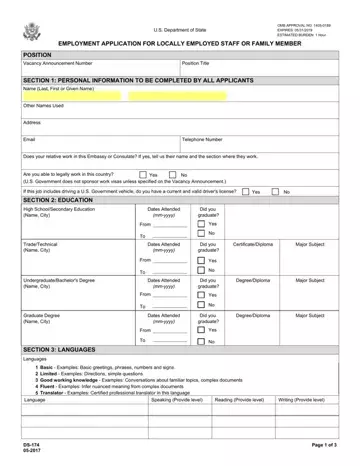
Applying for a position within the U.S. Department of State or at a U.S. Mission abroad is a critical step for many individuals seeking employment. The DS-174 Application for Employment form serves as a comprehensive tool for both locally employed staff and family member applicants. This form, approved by the Office of Management and Budget (OMB), outlines a detailed process for applicants to provide personal information, education history, language proficiency, work experience, and citizenship status. Applicants are required to disclose their ability to work legally in the country, their education background, language skills in speaking, reading, and writing, as well as detailed work experience including duties, responsibilities, and reasons for leaving previous jobs. Moreover, the form has specific sections for U.S. citizens, including their status as a family member of a direct hire, preference eligible veterans, or those with unique affiliations such as the Foreign Service Family Reserve Corps. Each section is designed to gather precise information to evaluate the applicant's eligibility and qualifications for vacancies, ensuring fairness and equality in the employment process. The DS-174 Application for Employment is not just a form but a gateway for potential candidates to secure positions that match their skills and qualifications while adhering to the principles of equal opportunity employment.

QuestionAnswer
Form NameDs 174 Application For Employment
Form Length4 pages
Fillable?No
Fillable fields0
Avg. time to fill out1 min
Other nameshttps eforms states gov forms ds174 pdf, form ds 174, us application employment, ds 174 form

How to Edit Ds 174 Application For Employment Online for Free

Filling out form ds 174 is a breeze. Our team designed our PDF software to make it simple to operate and enable you to prepare any PDF online. Listed below are steps you will want to adhere to:

Step 1: The first thing should be to press the orange "Get Form Now" button.

Step 2: After you have accessed the form ds 174 editing page you can find the whole set of options you'll be able to perform regarding your file in the upper menu.

If you want to prepare the file, provide the data the software will request you to for each of the appropriate areas:

ds 174 fields to fill out

Include the necessary details in the SECTION EDUCATION, High SchoolSecondary Education, Dates Attended mmyyyy, Did you graduate, From, Yes, TradeTechnical Name City, Dates Attended mmyyyy, Did you graduate, CertificateDiploma, Major Subject, From, Yes, UndergraduateBachelors Degree Name, and Dates Attended mmyyyy section.

Finishing ds 174 step 2

Provide the considerable information on the Basic Examples Basic greetings, Speaking Provide level, Reading Provide level, Writing Provide level, and Page of segment.

part 3 to completing ds 174

Within the section Paid and Voluntary Please begin, Job Title, From mmyyyy, To mmyyyy, Yearly Salary Local currency, Hours per Week, Employer Name Address and Phone, Supervisory Responsibilities, Supervisor Name, Yes, Main Duties and Responsibilities, Reason for leaving, Job Title, From mmyyyy, and To mmyyyy, include the rights and responsibilities of the sides.

Filling out ds 174 stage 4

End by reviewing these sections and preparing them as required: Employer Name Address and Phone, Supervisory Responsibilities, Supervisor Name, Yes, Main Duties and Responsibilities, Reason for leaving, Job Title, From mmyyyy, To mmyyyy, Yearly Salary Local currency, Hours per Week, Employer Name Address and Phone, Supervisory Responsibilities, Supervisor Name, and Yes.

part 5 to entering details in ds 174

Step 3: Press the button "Done". The PDF document may be transferred. You can save it to your computer or email it.

Step 4: Create duplicates of the form - it may help you keep clear of possible future worries. And fear not - we do not reveal or view your information.

Watch Ds 174 Application For Employment Video Instruction

Please rate Ds 174 Application For Employment

2 Votes
If you believe this page is infringing on your copyright, please familiarize yourself with and follow our DMCA notice and takedown process - click here to proceed .