
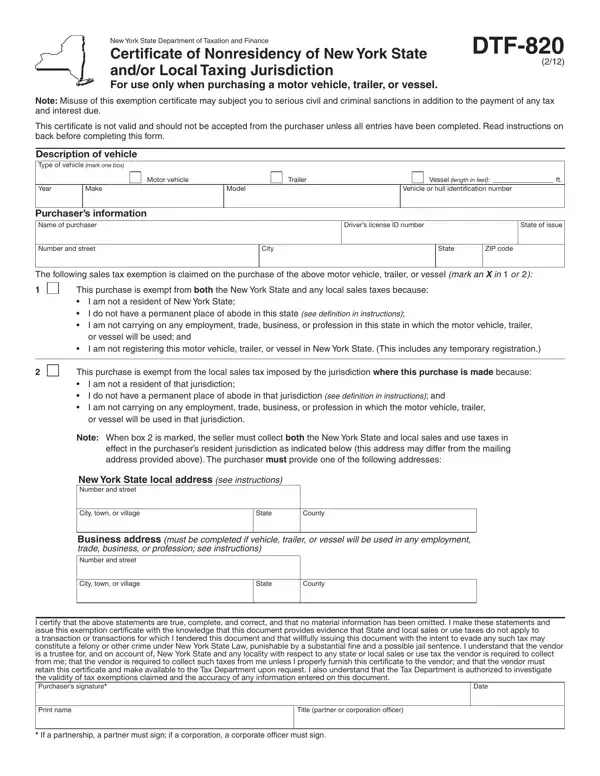
In navigating the complexities of tax exemptions in New York State, individuals looking to purchase a motor vehicle, trailer, or vessel encounter an essential document: the DTF-820 form, officially titled as the Certificate of Nonresidency of New York State and/or Local Taxing Jurisdiction. This form is specifically designed for those who do not reside within the boundaries of New York or any of its local taxing jurisdictions, offering a pathway to exempt themselves from state and local sales taxes under certain conditions. Binding for purchases of specific items such as motor vehicles, trailers, or vessels, the DTF-820 encapsulates a straightforward yet critical legal requirement for qualifying nonresidents. It mandates thorough completion and adherence to strict guidelines to substantiate the claim of nonresidency. The exemption hinges on a number of conditions detailed within the form like the absence of a permanent place of abode in the state, non-participation in local employment or business ventures, and the lack of intention to register the purchased item in New York State. Misuse or inaccurate filing of this form can lead to severe penalties, including criminal charges, signifying the importance of its correct and judicious application. Furthermore, it emphasizes the role of sellers in collecting sales tax from residents or those not qualifying under the specified exemptions, underlining a shared responsibility between buyer and seller in upholding tax regulations.
| Question | Answer |
|---|---|
| Form Name | Dtf 820 Form |
| Form Length | 2 pages |
| Fillable? | No |
| Fillable fields | 0 |
| Avg. time to fill out | 30 sec |
| Other names | dtf 820 3 01 form, dtf 820 form, dtf820 pdf, fillable dtf 820 new york |
Dtf 820 Form isn’t the one you’re looking for?