
Employee Election Form PDF Details

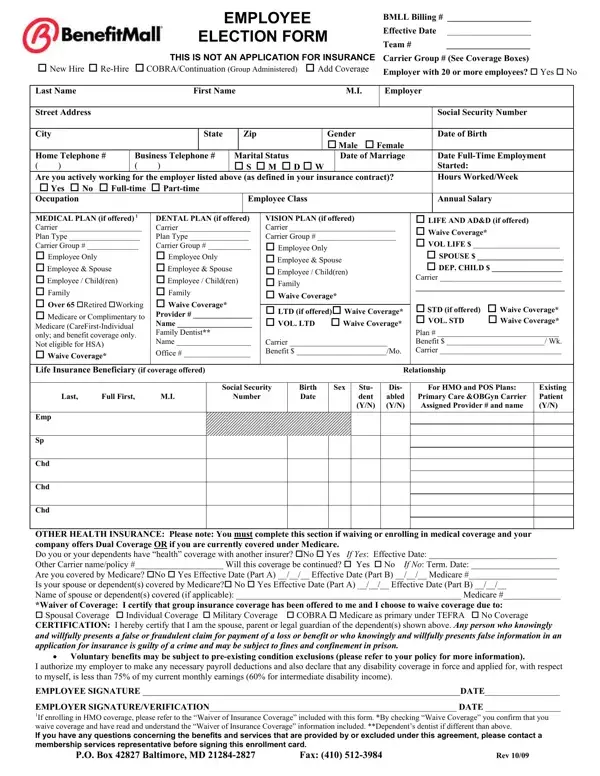
The Employee Election Form stands as a comprehensive document that streamlines the enrollment process for employer-provided benefits, catering to the varying needs of employees through a structured selection mechanism. It captures essential personal and employment information, including name, address, social security number, and employment status, along with specific details related to insurance coverage options such as medical, dental, vision, and life insurance. The form presents the choice to either enroll in or waive these coverages, supporting each decision with necessary information about existing coverages or reasons for waiver. For those navigating through changes in employment or personal circumstances, it outlines conditions for special enrollment periods. This ensures employees have the opportunity to adjust their benefits in alignment with their current needs, whether due to changes in marital status, loss of previously held coverage, or transitions involving dependents' coverage. By integrating sections for voluntary benefits and the acknowledgment of potential consequences for providing false information, the form balances employee autonomy with the need for accountability and informed decision-making. As it caters to both new and rehiring employees, including those eligible for COBRA/Continuation coverage, the Employee Election Form acts as a crucial tool in managing employer-employee interactions regarding benefit elections, maintaining compliance, and ensuring both parties are well-informed about the coverage options and the implications of their elections.

QuestionAnswer
Form NameEmployee Election Form
Form Length2 pages
Fillable?No
Fillable fields0
Avg. time to fill out30 sec
Other namesbenefitmall employee election form, irs form for employees elect out of an employer 401 k plan template, benefit mall election form health insurance, benefit enrollment form template

How to Edit Employee Election Form Online for Free

With the online PDF editor by FormsPal, you can complete or change benefit enrollment form template here and now. In order to make our tool better and simpler to use, we consistently work on new features, with our users' suggestions in mind. Starting is simple! Everything you need to do is follow the next easy steps down below:

Step 1: Open the form inside our tool by pressing the "Get Form Button" at the top of this webpage.

Step 2: The tool offers you the opportunity to customize most PDF forms in a range of ways. Transform it by adding customized text, adjust original content, and include a signature - all at your fingertips!

It really is an easy task to complete the document using out detailed tutorial! Here is what you want to do:

1. You should complete the benefit enrollment form template properly, therefore take care while filling in the parts comprising these specific fields:

Ways to fill in employee coverage election letter step 1

2. Soon after finishing this part, go on to the next stage and complete all required details in these blanks - MEDICAL PLAN if offered Carrier, DENTAL PLAN if offered Carrier, Office, VISION PLAN if offered Carrier, cid LIFE AND ADD if offered cid, Life Insurance Beneficiary if, Last Full First MI, Social Security, Number, Birth Date, Sex, Stu dent YN, Dis abled YN, For HMO and POS Plans, and Primary Care OBGyn Carrier.

How to fill out employee coverage election letter stage 2

Concerning Stu dent YN and Primary Care OBGyn Carrier, make sure that you review things in this section. Those two are surely the most significant fields in the PDF.

3. This next part is considered pretty straightforward, OTHER HEALTH INSURANCE Please note, Voluntary benefits may be subject, I authorize my employer to make, EMPLOYEE SIGNATURE DATE, EMPLOYER SIGNATUREVERIFICATION, PO Box Baltimore MD Fax, and Rev - these empty fields will need to be filled in here.

Filling out section 3 in employee coverage election letter

Step 3: Prior to addressing the next stage, you should make sure that blank fields have been filled in properly. Once you confirm that it is correct, press “Done." Get hold of your benefit enrollment form template when you join for a 7-day free trial. Immediately gain access to the pdf file from your FormsPal account page, with any modifications and changes being all synced! We do not share any details you enter whenever completing forms at FormsPal.