
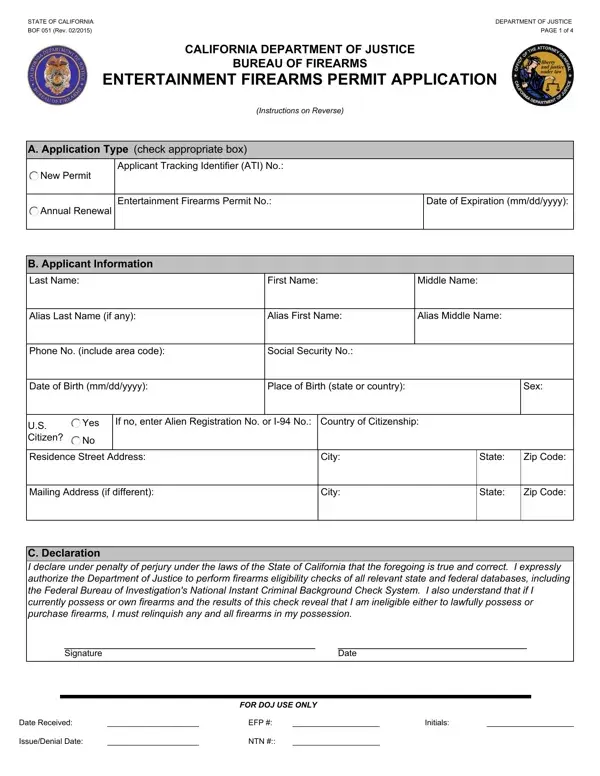
Entertainment Firearms Permit Form PDF Details

In the rapidly evolving landscape of the entertainment industry, the capacity to utilize firearms for theatrical or production purposes requires a carefully regulated process, encapsulated by the Entertainment Firearms Permit (EFP) Application as provided by the California Department of Justice. Through this document, applicants are ushered through an extensive procedure beginning with their personal information, including aliases and pertinent identifiers, which underscores the department's commitment to thorough vetting. Furthermore, the form delineates specific instructions for new applicants, emphasizing the necessity of fingerprint submission to both state and federal databases—an integral step to ensure that individuals seeking access to firearms are meticulously screened for eligibility. Renewal applicants, conversely, enjoy a streamlined process, evidencing a balance between rigorous oversight and operational efficiency. The EFP's stringent framework, highlighted by its detailed submission requirements and the accompanying privacy notice, not only safeguards the public but also ensures that the creative use of firearms is conducted under a legal and ethical umbrella. This approach reflects a broader commitment to public safety while accommodating the unique needs of the entertainment sector. Thus, the Entertainment Firearms Permit form embodies a critical interface between law enforcement objectives and artistic endeavors.

QuestionAnswer
Form NameEntertainment Firearms Permit Form
Form Length4 pages
Fillable?No
Fillable fields0
Avg. time to fill out1 min
Other nameshow to entertainment firearms permit, entertainment california renewal, firearms permit doj online, firearms doj n get

How to Edit Entertainment Firearms Permit Form Online for Free

Whenever you intend to fill out how to entertainment firearms permit, you won't have to download and install any sort of applications - simply try our PDF editor. FormsPal professional team is ceaselessly endeavoring to enhance the editor and make it much better for people with its multiple features. Make the most of the current revolutionary opportunities, and find a heap of unique experiences! With a few easy steps, you may start your PDF journey:

Step 1: Click the "Get Form" button above. It is going to open up our editor so that you can start completing your form.

Step 2: The editor lets you modify almost all PDF files in many different ways. Change it by adding customized text, correct original content, and include a signature - all when you need it!

This form will need particular information to be filled out, thus you must take your time to enter precisely what is required:

1. Firstly, when filling out the how to entertainment firearms permit, begin with the section containing following blanks:

A way to fill in firearms doj n get part 1

2. Once your current task is complete, take the next step – fill out all of these fields - Residence Street Address, Mailing Address if different, City, City, State, Zip Code, State, Zip Code, C Declaration I declare under, Signature, Date, Date Received IssueDenial Date, EFP NTN, Initials, and FOR DOJ USE ONLY with their corresponding information. Make sure to double check that everything has been entered correctly before continuing!

firearms doj n get completion process explained (part 2)

You can potentially make an error when filling in the EFP NTN, therefore make sure to take another look prior to deciding to send it in.

3. The third stage is generally simple - fill in every one of the empty fields in Collection and Use of Personal, Providing Personal Information All, Access to Your Information You may, Possible Disclosure of Personal, The information you provide may, In response to a Public Records, and To another government agency as to finish this segment.

Providing Personal Information All, Access to Your Information You may, and Collection and Use of Personal of firearms doj n get

4. This next section requires some additional information. Ensure you complete all the necessary fields - Applicant Submission, CA ORI Code assigned by DOJ, Entertainment Firearms Permit, Entertainment Firearms Permit, Contributing Agency Information, Department of Justice Bureau of, Mail Code fivedigit code assigned, PO Box Street Address or PO Box, Sacramento City, Applicant Information, Last Name, Other Name AKA or Alias Last, Date of Birth, Firearms Licensing and Permit, and CA State - to proceed further in your process!

Applicant Submission, Firearms Licensing and Permit, and Sacramento City of firearms doj n get

5. While you draw near to the end of the document, you will find a few extra points to complete. Specifically, Home Address Street Address or PO, Your Number, NA OCA Number Agency Identifying, Misc Number, City, Other Identification Number, Level of Service, DOJ, FBI, State, ZIP Code, If resubmission list original ATI, Original ATI Number, Employer Additional response for, and NA Employer Name should be done.

firearms doj n get writing process explained (step 5)

Step 3: Just after taking one more look at your fields and details, press "Done" and you are good to go! Make a free trial subscription with us and acquire direct access to how to entertainment firearms permit - download, email, or change inside your personal cabinet. FormsPal guarantees protected document completion devoid of personal data recording or any type of sharing. Rest assured that your data is secure here!