
Faa 8410 1 Form PDF Details

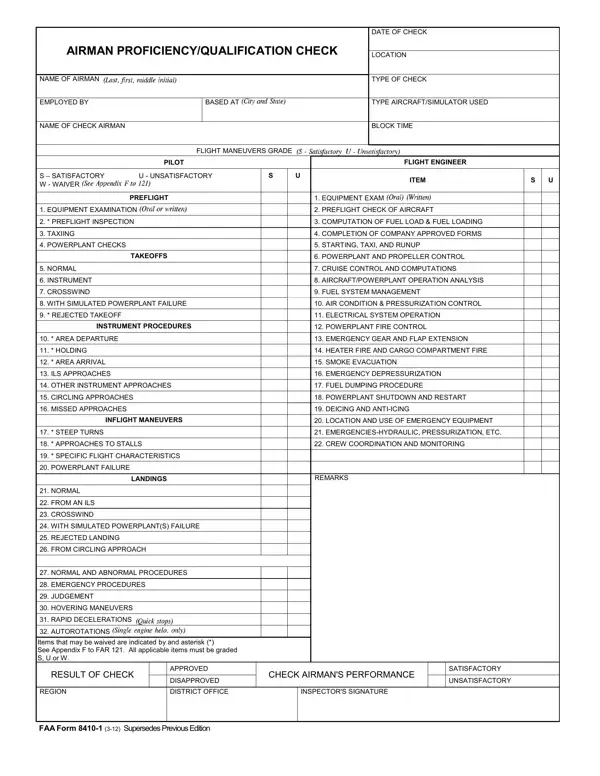
The FAA Form 8410-1, also known as the Airman Proficiency/Qualification Check form, serves as a crucial document in the aviation industry, meticulously designed to assess the skills and proficiency of airmen. This form encompasses a wide array of components aimed at evaluating an airman's competence in handling various critical and routine operational procedures. From preflight equipment examination to intricate flight maneuvers and emergency response capabilities, the form ensures a comprehensive check of the airman's practical knowledge and readiness. With sections dedicated to assessing the performance across different stages of flight – including takeoffs, landings, and in-flight maneuvers – as well as the ability to manage aircraft systems like fuel, electrical, and emergency systems, the form plays a pivotal role in maintaining the highest standards of safety and efficiency in the aviation sector. The structured grading system, marked as Satisfactory (S), Unsatisfactory (U), or Waiver (W), allows for a clear and concise assessment of the airman's proficiency. Items eligible for a waiver are clearly noted, offering flexibility in certain contexts. This detailed evaluation culminates in a result that either approves or disapproves the airman’s performance, a decision that is meticulously recorded by the examining authority, underscoring the form's integral role in upholding the rigorous standards expected of aviation professionals.

QuestionAnswer
Form NameFaa 8410 1 Form
Form Length1 pages
Fillable?No
Fillable fields0
Avg. time to fill out15 sec
Other names8410 1, 1 8410, 8410 1 form, faa form 8410 1

How to Edit Faa 8410 1 Form Online for Free

Using the online PDF editor by FormsPal, you can easily fill in or alter faa form 8410 here and now. FormsPal team is focused on making sure you have the absolute best experience with our tool by consistently presenting new capabilities and enhancements. Our editor is now much more intuitive as the result of the newest updates! So now, filling out PDF forms is a lot easier and faster than ever before. This is what you'd have to do to start:

Step 1: Click the "Get Form" button above on this page to get into our editor.

Step 2: As soon as you access the PDF editor, you will find the form all set to be filled out. Apart from filling out various fields, it's also possible to perform other actions with the PDF, specifically adding custom words, modifying the original text, inserting images, signing the document, and much more.

This PDF doc will require you to provide some specific details; in order to guarantee accuracy and reliability, please make sure to heed the suggestions further on:

1. Before anything else, when filling out the faa form 8410, start with the form section containing next blank fields:

Step no. 1 for submitting 8410 1

2. Once your current task is complete, take the next step – fill out all of these fields - EQUIPMENT EXAM PREFLIGHT CHECK, REMARKS, INSTRUMENT PROCEDURES, AREA DEPARTURE HOLDING AREA, INFLIGHT MANEUVERS, STEEP TURNS APPROACHES TO, LANDINGS, NORMAL FROM AN ILS CROSSWIND, and NORMAL AND ABNORMAL PROCEDURES with their corresponding information. Make sure to double check that everything has been entered correctly before continuing!

Part no. 2 in submitting 8410 1

3. This third part is usually easy - complete all the blanks in NORMAL AND ABNORMAL PROCEDURES, RESULT OF CHECK, REGION, APPROVED DISAPPROVED DISTRICT, CHECK AIRMANS PERFORMANCE, INSPECTORS SIGNATURE, SATISFACTORY UNSATISFACTORY, and FAA Form Supersedes Previous to finish this part.

Part # 3 of submitting 8410 1

It is easy to make errors while filling in your APPROVED DISAPPROVED DISTRICT, hence make sure you look again before you submit it.

Step 3: Prior to finishing this document, check that all form fields have been filled out as intended. Once you think it is all good, click on “Done." After starting a7-day free trial account here, it will be possible to download faa form 8410 or send it through email right off. The PDF document will also be readily available through your personal account with all of your edits. We do not share the information you provide while filling out documents at our site.