
Form 105 Ta PDF Details

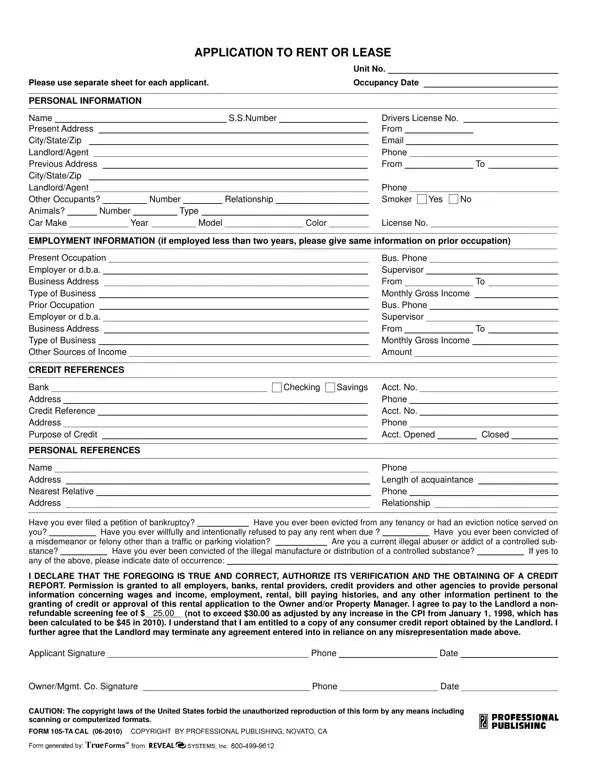
Filling out the Form 105-TA, commonly referred to as the Application to Rent or Lease, is a critical step for anyone looking to secure a rental property. This comprehensive form gathers vital personal and financial information from prospective tenants to assess their eligibility. Immediate details such as name, social security number, driver's license number, current and previous addresses, along with contact information for current and previous landlords or agents, are requested to establish identity and rental history. Further, it inquires about potential other occupant details, smoking preference, pet ownership, vehicular information, and employment details, including income sources, to provide a well-rounded financial profile. Notably, the form also delves into credit history, asking for bank and credit references to gauge financial reliability. Personal references and any history of bankruptcy, eviction, unpaid rent, misdemeanor, felony convictions, or illegal substance abuse complete a thorough background check, emphasizing the applicant's overall character and reliability. The declaration at the end of the application form requires applicants to attest to the accuracy of the information provided and authorizes verification through a credit report, indicating a mutual understanding of transparency and honesty. By submitting this form, along with the specified screening fee, applicants agree to allow landlords serious consideration of their eligibility for tenancy, marking a pivotal step in the leasing process.

QuestionAnswer
Form NameForm 105 Ta
Form Length1 pages
Fillable?No
Fillable fields0
Avg. time to fill out15 sec
Other names105 professional publishing, form 105 publishing, form 105 ta, proffessional publishing corporation form 105

How to Edit Form 105 Ta Online for Free

You are able to complete form 105 professional without difficulty in our PDFinity® online tool. To make our tool better and more convenient to use, we consistently implement new features, bearing in mind suggestions coming from our users. With a few basic steps, it is possible to start your PDF editing:

Step 1: Press the orange "Get Form" button above. It is going to open up our pdf editor so that you can start filling out your form.

Step 2: Once you access the tool, you will notice the form made ready to be filled out. Besides filling out different blank fields, you could also perform several other things with the Document, specifically writing your own text, editing the original text, inserting graphics, placing your signature to the PDF, and a lot more.

So as to complete this PDF document, ensure that you type in the required information in every single blank:

1. While completing the form 105 professional, be certain to include all important blank fields in its corresponding part. This will help speed up the work, allowing your details to be handled efficiently and appropriately.

Writing section 1 of professional publishing form 105

2. Your next part is usually to complete these fields: CREDIT REFERENCES, Bank Address Credit Reference, PERSONAL REFERENCES, Name Address Nearest Relative, Checking Savings Acct No, Phone Acct No Phone Acct Opened, Closed, Phone Length of acquaintance Phone, Have you ever filed a petition of, Have you ever been evicted from, Have you ever been convicted of, Have you ever willfully and, and I DECLARE THAT THE FOREGOING IS.

Part number 2 for submitting professional publishing form 105

3. This part will be easy - complete all of the blanks in Applicant Signature Phone, OwnerMgmt Co Signature Phone, Date, Date, CAUTION The copyright laws of the, and FORM TA CAL COPYRIGHT BY to complete this segment.

The best ways to fill in professional publishing form 105 part 3

You can easily make an error when completing the Date, so make sure that you take a second look before you submit it.

Step 3: Before finishing the file, make certain that all blank fields are filled out properly. When you are satisfied with it, click “Done." After creating a7-day free trial account at FormsPal, you will be able to download form 105 professional or send it via email right off. The PDF will also be readily accessible in your personal account menu with all of your edits. We don't share the information you use while working with forms at FormsPal.