
Form 15B PDF Details

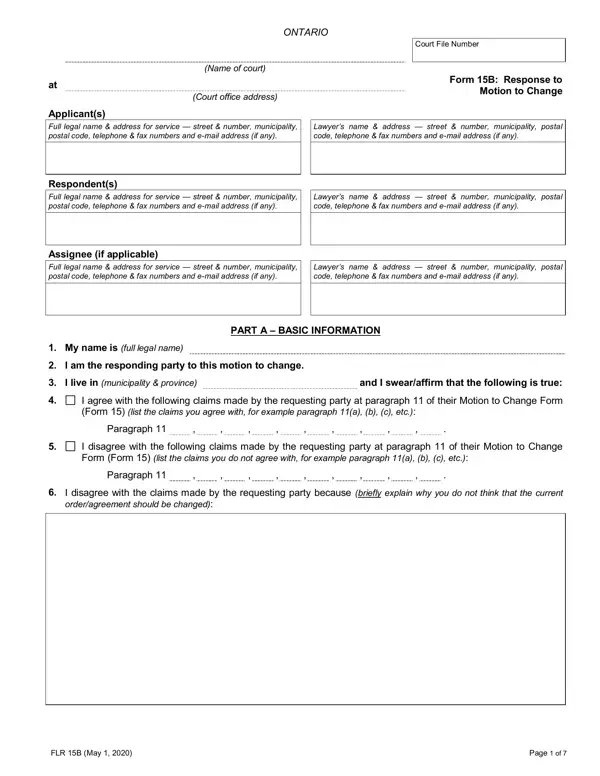
In the intricate landscape of family law, the Form 15B, or the Response to Motion to Change, serves as a critical document filed in Ontario courts. This form enables individuals, referred to as respondents, to formally address a request to amend a previous court order or agreement, primarily concerning child custody, access, and support, as well as spousal support. The form requires respondents to provide comprehensive personal and legal information, including their full legal name, contact information, and whether they have legal representation. It is segmented into various parts, each designed to systematically gather the respondent's agreement or disagreement with the claims made by the applicant, detailed explanations of their stance, any factual disputes, and what specific changes they are advocating for if any. The form also delves into financial matters, urging respondents to disclose income details if the motion involves child or spousal support alterations, thereby enabling the court to make an informed decision. Moreover, Form 15B prompts respondents to elucidate why they believe the current court order or agreement should or should not undergo the requested modifications, highlighting the significance of changed circumstances since the original agreement or order was enacted. Through Form 15B, the legal system ensures that both parties have a fair opportunity to present their case, thereby fostering a balanced and equitable resolution process.

QuestionAnswer
Form NameForm 15B
Form Length7 pages
Fillable?No
Fillable fields0
Avg. time to fill out1 min 45 sec
Other namesresponse to motion to change, ontario court 15b form, response motion to change, form 15b small claims court

How to Edit Form 15B Online for Free

You can prepare form 15 b without difficulty using our online editor for PDFs. Our tool is continually evolving to provide the best user experience attainable, and that's because of our commitment to continual development and listening closely to feedback from customers. It just takes a few basic steps:

Step 1: Press the "Get Form" button above. It's going to open up our tool so that you could begin completing your form.

Step 2: With the help of this handy PDF tool, you're able to do more than simply fill out blanks. Edit away and make your documents look high-quality with customized textual content put in, or optimize the original input to perfection - all supported by an ability to insert almost any images and sign the file off.

It really is easy to finish the document following our helpful tutorial! This is what you must do:

1. Fill out the form 15 b with a selection of necessary fields. Gather all the important information and make sure there's nothing overlooked!

Completing segment 1 in response to motion to change

2. Immediately after the previous section is completed, go to enter the suitable details in these - I live in municipality province, and I swearaffirm that the, I agree with the following claims, Form list the claims you agree, Paragraph, I disagree with the following, Form Form list the claims you do, Paragraph, I disagree with the claims made, and orderagreement should be changed.

response to motion to change completion process shown (part 2)

3. This next portion will be focused on Form B, Response to Motion to Change, page, Court File Number, I also disagree with the following, and explain what information you do - type in these blanks.

Filling in segment 3 of response to motion to change

4. Completing I am asking that the motion to, If this motion to change includes, I am the, support payor, support recipient, I have attached a completed, Children Community and Social, The order has not been assigned to, The order has been assigned to a, attachments on the government, c Since the orderagreement for, Child Support Service dated, d Please give information about, partys income should be their, and please attach is vital in this fourth section - be sure to don't rush and take a close look at each and every blank!

Completing section 4 of response to motion to change

Always be very mindful while filling in If this motion to change includes and d Please give information about, as this is the section in which most people make mistakes.

5. To finish your form, this particular part requires several extra fields. Typing in Form B, Response to Motion to Change, page, Court File Number, PART B CHANGES THAT THE, Note Do not complete this Part if, I want to change the following, child custody child support table, child access, spousal support, other give details, list type of expenses, I want to change the following, each term and the wording of the, and a Current term will certainly conclude the process and you're going to be done in a short time!

Filling in section 5 of response to motion to change

Step 3: Once you've reviewed the details you given, press "Done" to conclude your document creation. Make a 7-day free trial account with us and get direct access to form 15 b - download or modify from your FormsPal cabinet. Here at FormsPal, we do everything we can to make sure that your details are stored secure.