
Form 2101 Texas PDF Details

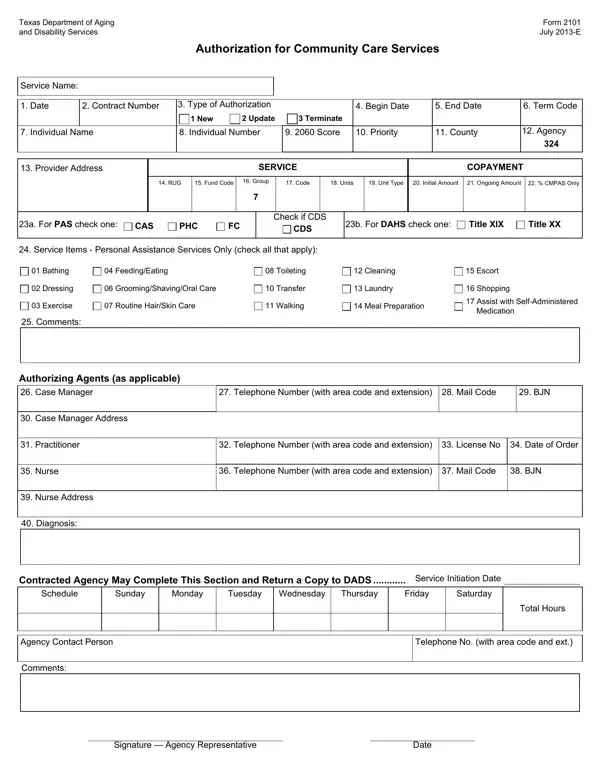
The Texas Department of Aging and Disability Services provides a significant document known as Form 2101, which serves a crucial role in the authorization process for community care services. Issued in July 2013, this form is a comprehensive tool designed to facilitate various administrative tasks, including the initiation, update, or termination of services for individuals in need. It meticulously collects essential information such as service name, dates, contract numbers, and type of authorization, effectively streamlining the coordination between service recipients and providers. The form also delves into specifics like individual name and number, the scoring system (2060 Score), priority, county, and agency details, ensuring that each case is treated with the attention it deserves. Further, it includes a service copayment section, service items applicable specifically to personal assistance services, and a detailed authorization section for agents, showcasing its all-encompassing nature. Such detailed attention to the nuanced needs of service recipients and the clear communication it fosters with service providers underscores the form’s vital role in the efficient delivery of community care services across Texas.

QuestionAnswer
Form NameForm 2101 Texas
Form Length1 pages
Fillable?No
Fillable fields0
Avg. time to fill out15 sec
Other namesCAS, form 2101 dads, dads form 2101, 23a

How to Edit Form 2101 Texas Online for Free

BJN can be filled in online in no time. Just open FormsPal PDF tool to get it done fast. Our team is dedicated to providing you the best possible experience with our editor by consistently adding new functions and improvements. With these updates, using our editor becomes easier than ever! Starting is effortless! All you should do is follow the next easy steps below:

Step 1: Hit the "Get Form" button above. It is going to open up our pdf tool so that you can begin filling out your form.

Step 2: Once you access the file editor, you'll notice the document all set to be filled out. Other than filling out different fields, it's also possible to do other sorts of things with the form, that is putting on any textual content, modifying the initial textual content, inserting illustrations or photos, placing your signature to the form, and a lot more.

It will be straightforward to fill out the form using out detailed guide! This is what you should do:

1. Complete the BJN with a number of major fields. Gather all the important information and be sure absolutely nothing is missed!

Step no. 1 in submitting dads form 2101

2. After the first part is completed, proceed to type in the relevant information in these: Case Manager, Telephone Number with area code, BJN, Case Manager Address, Practitioner, Telephone Number with area code, Nurse, Telephone Number with area code, BJN, Nurse Address, Diagnosis, Contracted Agency May Complete, Schedule, Sunday, and Monday.

Case Manager, Practitioner, and Nurse Address inside dads form 2101

It's easy to get it wrong when filling out your Case Manager, and so ensure that you reread it before you decide to finalize the form.

3. This third part is typically pretty easy, Signature Agency Representative, and Date - all these form fields will need to be filled out here.

dads form 2101 writing process outlined (stage 3)

Step 3: Look through the details you've entered into the blank fields and press the "Done" button. Obtain your BJN once you subscribe to a 7-day free trial. Quickly get access to the pdf form within your personal cabinet, along with any edits and adjustments automatically preserved! We don't share or sell any details that you enter while dealing with forms at FormsPal.