
Form 2635 PDF Details

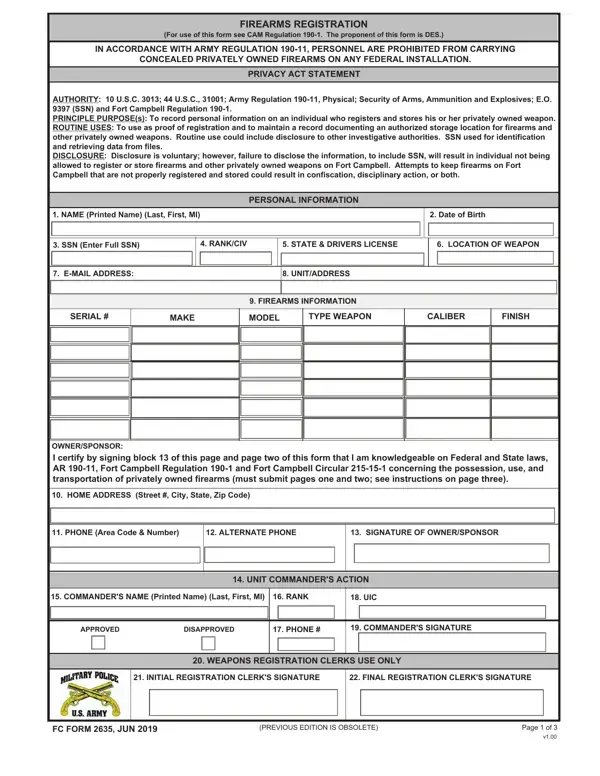
In an environment where safety and legal compliance are paramount, the FC Form 2635 serves as a crucial tool for the registration of privately owned firearms on Fort Campbell. By adhering to army regulation 190-11 and further reinforced by Fort Campbell Regulation 190-1 and other related guidelines, this form meticulously gathers personal information and firearm details to manage and document the authorization for storage locations on the federal installation. The form's introduction underscores the prohibition of carrying concealed firearms within the premises, reinforcing the commitment to security. A thorough privacy act statement accompanies the form, outlining the authority underpinning its issuance, the principal purposes of collecting such information, and the routine uses which include but are not limited to aiding investigative authorities. It places a significant emphasis on the voluntary nature of disclosure while candidly communicating the repercussions of nondisclosure, which could extend to the inability to register firearms, potential confiscation, or disciplinary action. Additionally, the form delves into eligibility criteria, explicitly barring individuals under certain legal or mental health conditions from registering weapons. The procedural aspect is addressed with clear instructions on completing the form, whether manually or digitally, and underscores the pivotal role of the unit commander in the approval process. This compendium of regulations, instructions, and protocols encapsulated in FC Form 2635 is indicative of a comprehensive approach to ensure a safe and legally compliant environment for firearm registration and possession on Fort Campbell.

QuestionAnswer
Form NameForm 2635
Form Length3 pages
Fillable?No
Fillable fields0
Avg. time to fill out45 sec
Other namesfort campbell gun registration, form fc 2635 firearm, 2635, form fc 2635 fillable

How to Edit Form 2635 Online for Free

If you desire to fill out form fc 2635, there's no need to download and install any software - simply try using our online PDF editor. We at FormsPal are focused on giving you the best possible experience with our editor by regularly introducing new capabilities and upgrades. With these improvements, working with our editor gets better than ever before! Here is what you'll need to do to start:

Step 1: Press the orange "Get Form" button above. It'll open up our editor so you could start filling out your form.

Step 2: Once you open the editor, you will see the document made ready to be filled in. Aside from filling out various blanks, you can also perform some other things with the form, such as adding your own text, editing the original text, inserting illustrations or photos, affixing your signature to the form, and a lot more.

This PDF form requires particular details to be filled out, thus you should take whatever time to provide what is expected:

1. When filling out the form fc 2635, make sure to include all necessary blanks within its corresponding part. It will help to expedite the work, making it possible for your details to be handled fast and accurately.

The best ways to prepare dd form2635 part 1

2. Once your current task is complete, take the next step – fill out all of these fields - COMMANDERS NAME Printed Name Last, RANK, UIC, UNIT COMMANDERS ACTION, APPROVED, DISAPPROVED, PHONE, COMMANDERS SIGNATURE, WEAPONS REGISTRATION CLERKS USE, INITIAL REGISTRATION CLERKS, FINAL REGISTRATION CLERKS, FC FORM JUN, PREVIOUS EDITION IS OBSOLETE, and Page of with their corresponding information. Make sure to double check that everything has been entered correctly before continuing!

Filling out section 2 of dd form2635

A lot of people generally make some errors when filling out Page of in this area. Ensure you go over everything you enter right here.

3. Completing NAME, SIGNATURE, DATE, FC FORM JUN, PREVIOUS EDITION IS OBSOLETE, and Page of is essential for the next step, make sure to fill them out in their entirety. Don't miss any details!

dd form2635 completion process outlined (stage 3)

Step 3: Go through the information you have inserted in the blank fields and press the "Done" button. Right after getting a7-day free trial account at FormsPal, you'll be able to download form fc 2635 or email it promptly. The document will also be readily accessible through your personal cabinet with all of your edits. FormsPal offers protected form tools without data record-keeping or any type of sharing. Feel comfortable knowing that your information is safe here!