
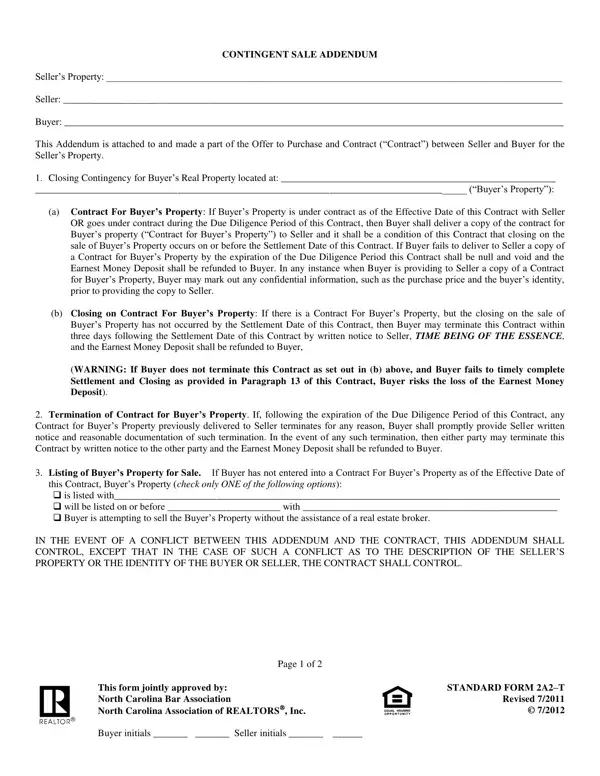
When navigating the complexities of real estate transactions, the 2A2 T form, known as the Contingent Sale Addendum, plays a crucial role in scenarios where a buyer's purchase of a seller's property is dependent on the sale of the buyer's own property. This form, a critical addendum to the Offer to Purchase and Contract, outlines the conditions under which the buyer must sell their existing property to proceed with the purchase. It sets forth specific clauses related to the closing contingency for the buyer's property, including the requirement for the buyer to provide a copy of the contract for their property once it goes under contract, and the ability to terminate the purchase contract if the buyer's property sale does not close by the set settlement date. Furthermore, it addresses what happens if the buyer's property contract terminates after the due diligence period or if the buyer's property was not listed for sale by the contract's effective date. Designed to protect both the buyer and seller while ensuring transparency throughout the transaction process, adherence to this form is essential for a smooth transition. Jointly approved by the North Carolina Bar Association and the North Carolina Association of REALTORS®, it underscores the need for legal consultation if any party is unsure about the form's stipulations or how it applies to their specific situation.
| Question | Answer |
|---|---|
| Form Name | Form 2A2 T |
| Form Length | 2 pages |
| Fillable? | No |
| Fillable fields | 0 |
| Avg. time to fill out | 30 sec |
| Other names | 2a2 addendum, contingent sale addendum form 2a2 t, nc contingent sale, contingent sale addendum |
Form 2A2 T isn’t the one you’re looking for?