
Form 7162 PDF Details

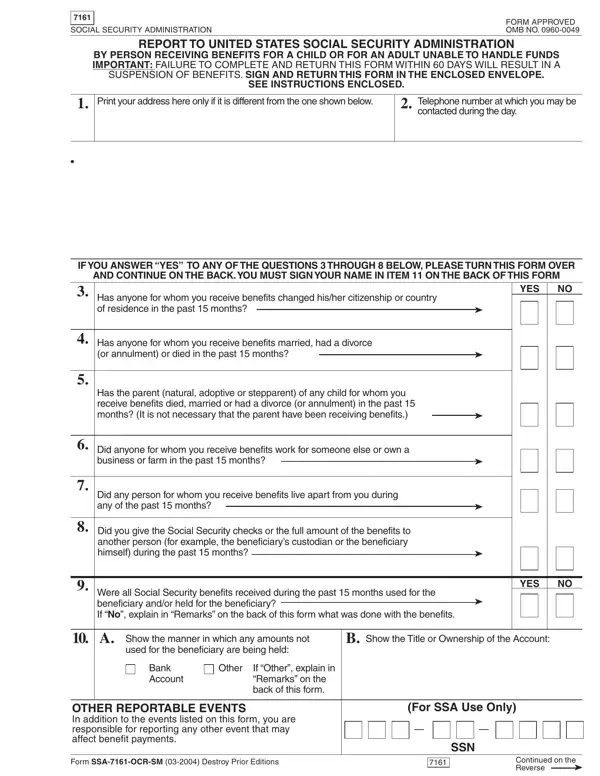
Managing Social Security benefits on behalf of another person is a responsibility laden with both moral and legal obligations, underscored by the completion and submission of specific forms like the SSA-7161-OCR-SM, commonly referred to as the 7162 form. This form serves as a critical report to the United States Social Security Administration from individuals receiving benefits for a child or for an adult incapable of handling their own funds. It highlights the importance of timely communication with the Social Security Administration regarding major life events that could influence benefit eligibility and distribution. Events such as changes in citizenship, marital status, employment, living arrangements, and the handling of received Social Security checks are meticulously covered. The form mandates the reporting within a 60-day window, underscoring the urgency and significance of these events in maintaining the integrity and appropriate allocation of benefits. Further, it serves as a safeguard ensuring that benefits are used in the best interest of the beneficiary, requiring detailed explanations for any funds not directly used for their immediate welfare. Failure to complete and return this form within the specified timeframe may result in a suspension of benefits, emphasizing the crucial role this form plays in the continuous support and well-being of the beneficiary. In addition, the declaration section towards the end of the form underscores the gravity of providing truthful and accurate information, reminding the payee of the legal implications of perjury or fraudulent reporting.

QuestionAnswer
Form NameForm 7162
Form Length2 pages
Fillable?No
Fillable fields0
Avg. time to fill out30 sec
Other namessm 2307 form, sm answered any blank, form 7161, form ocr any online

How to Edit Form 7162 Online for Free

Through the online editor for PDFs by FormsPal, it is possible to complete or modify ssa 7161 form right here and now. FormsPal is dedicated to giving you the perfect experience with our editor by constantly adding new features and improvements. With all of these updates, using our tool gets easier than ever before! In case you are looking to get going, here is what it takes:

Step 1: Just hit the "Get Form Button" above on this page to start up our pdf form editor. This way, you will find everything that is necessary to fill out your file.

Step 2: This tool lets you change almost all PDF files in many different ways. Enhance it by adding customized text, adjust what is originally in the document, and include a signature - all within several clicks!

To be able to fill out this PDF document, make sure you type in the information you need in every single field:

1. While filling out the ssa 7161 form, be sure to include all needed blank fields in the associated part. This will help to expedite the process, allowing your information to be handled swiftly and properly.

Part number 1 for completing form sm 03

2. Once your current task is complete, take the next step – fill out all of these fields - Has the parent natural adoptive or, Did anyone for whom you receive, Did any person for whom you, Did you give the Social Security, Were all Social Security benefits, YES, Show the manner in which any, Show the Title or Ownership of the, Bank Account, Other, If Other explain in Remarks on the, OTHER REPORTABLE EVENTS In, and For SSA Use Only with their corresponding information. Make sure to double check that everything has been entered correctly before continuing!

form sm 03 conclusion process described (portion 2)

Always be really careful while filling out Did anyone for whom you receive and Show the Title or Ownership of the, because this is where a lot of people make errors.

3. Your next part is straightforward - fill out all the form fields in OTHER REPORTABLE EVENTS In, Form SSAOCRSM Destroy Prior, SSN, and Continued on the Reverse in order to complete this segment.

form sm 03 writing process outlined (portion 3)

4. It's time to proceed to this next section! Here you will get these a Name of person, citizenship, acquired, of residence, began, If you answered Yes to question, a Name of person, b Check which event occurred, c Date event, Marriage Divorce, Annulment Death, occurred, If you answered Yes to question, a Name of parent, and b Check which event occurred empty form fields to do.

form sm 03 completion process explained (portion 4)

5. Lastly, the following final subsection is what you should complete before finalizing the form. The fields at issue include the following: a Name of beneficiary who did not, b Date bene, c Reason for leaving, with you with you, ficiary left, d Date beneficiary, returned, e If you listed someone in a above, Include ZIP code, If you answered Yes to question, Remarks, IMPORTANT I declare under penalty, Signature or mark of payee Note If, Date, and Signature of witness.

How to complete form sm 03 step 5

Step 3: Be certain that the information is correct and then press "Done" to continue further. Join FormsPal now and immediately gain access to ssa 7161 form, prepared for download. All adjustments you make are kept , which enables you to customize the pdf later anytime. FormsPal guarantees your data confidentiality by having a secure system that never records or shares any personal information used in the file. Rest assured knowing your paperwork are kept protected whenever you work with our editor!