
Form 71A PDF Details

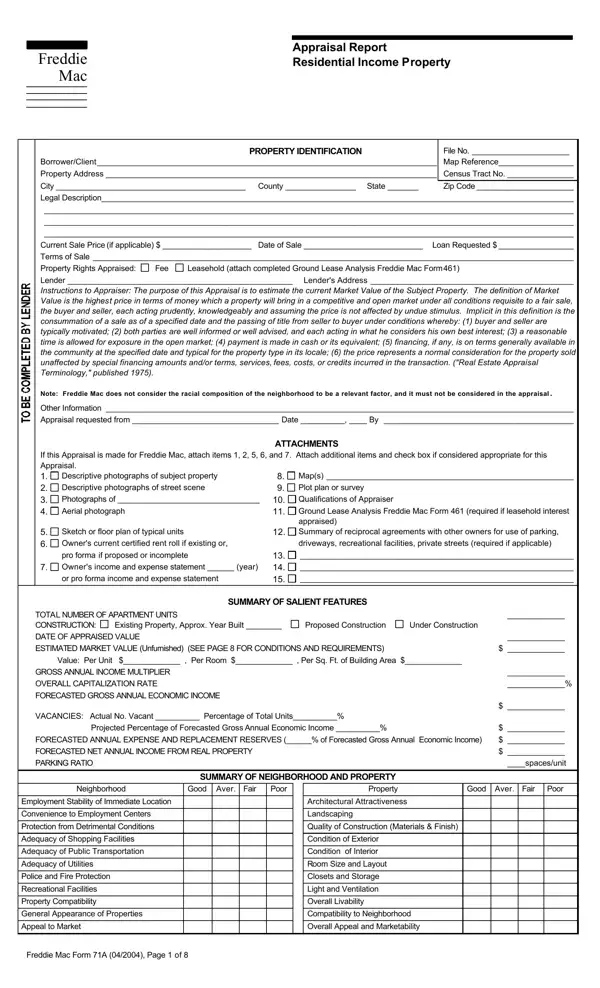
The Freddie Mac Form 71A is a comprehensive appraisal report designed for residential income properties. This document serves a crucial role in the real estate and mortgage industries by providing an in-depth analysis of a property's value, factoring in its income-generating potential. It includes an array of vital information beginning with the property identification that encompasses the borrower or client details, property address, and legal description, alongside the current sale price if applicable, and the requested loan details. The form delves deep into the property's characteristics, including the type of property rights being appraised, which could be fee simple or leasehold, and requires a thorough ground lease analysis if the latter. The core objective outlined in the instructions to the appraiser is to estimate the current market value of the subject property, abiding by a clear definition of market value that emphasizes a fair sale without external undue stimulus. The form strictly prohibits any consideration of the racial composition of the neighborhood in the appraisal process, aligning with fair housing and lending laws. Additionally, the document prompts appraisers to attach relevant attachments, including photographs, maps, rent rolls, income, and expense statements to provide a holistic view of the property's financial standing and physical condition. Other sections cover the neighborhood and marketing area's details, site and improvement descriptions, cost approach valuations, and comparable rental data, all aiming to culminate in an accurate estimation of the property’s market value.

QuestionAnswer
Form NameForm 71A
Form Length8 pages
Fillable?No
Fillable fields0
Avg. time to fill out2 min
Other namesfhlmc 71a, 71a form, form 71a101, form 71a

How to Edit Form 71A Online for Free

appraisal residential income can be filled out online effortlessly. Simply make use of FormsPal PDF editor to perform the job fast. Our editor is continually evolving to deliver the very best user experience possible, and that is due to our dedication to constant development and listening closely to testimonials. Starting is effortless! All you have to do is stick to the next simple steps below:

Step 1: Open the PDF doc in our editor by hitting the "Get Form Button" in the top area of this webpage.

Step 2: When you access the online editor, there'll be the form prepared to be filled in. In addition to filling out different blank fields, you could also do several other things with the Document, that is adding custom textual content, changing the original textual content, inserting illustrations or photos, affixing your signature to the form, and a lot more.

This PDF form will require some specific details; to ensure consistency, make sure you take into account the tips down below:

1. It is advisable to fill out the appraisal residential income properly, so take care when filling out the sections comprising all these blank fields:

form 71a101 completion process outlined (part 1)

2. The next part is usually to complete all of the following blanks: City County State Zip Code, Other Information Appraisal, ATTACHMENTS, If this Appraisal is made for, Maps Qualifications of, Descriptive photographs of subject, Plot plan or survey, Sketch or floor plan of typical, Summary of reciprocal agreements, driveways recreational facilities, appraised, SUMMARY OF SALIENT FEATURES, Under Construction, Proposed Construction, and Existing Property Approx Year.

How you can fill out form 71a101 part 2

As for Proposed Construction and If this Appraisal is made for, make certain you get them right here. These two could be the key ones in this form.

Step 3: Just after proofreading your filled in blanks, hit "Done" and you are good to go! Try a 7-day free trial plan at FormsPal and get immediate access to appraisal residential income - readily available inside your personal account page. FormsPal is devoted to the personal privacy of our users; we make sure all personal information entered into our tool remains confidential.