

Form BFS-103 at a glance
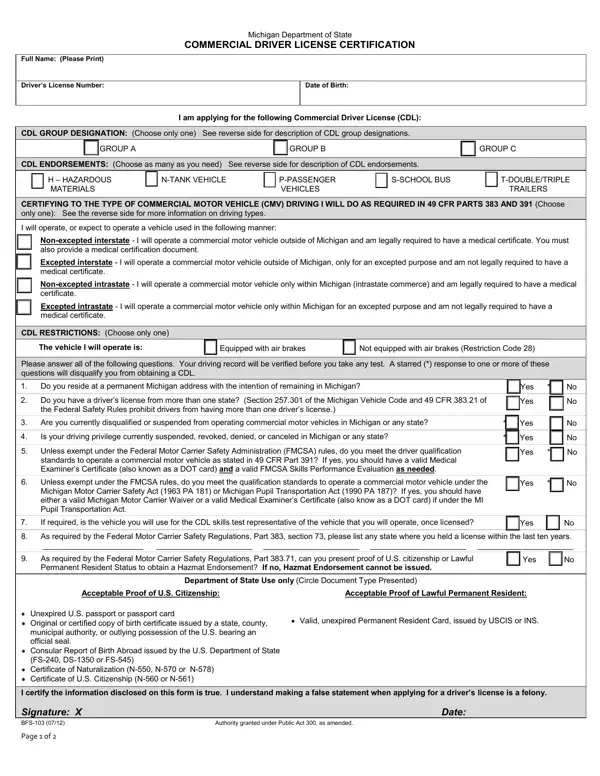
What it is: BFS-103 is the Michigan Department of State Commercial Driver's License Certification.
Who signs: Under the certification, sign at Signature and enter the Date.
Use it when applying for a commercial driver's license.
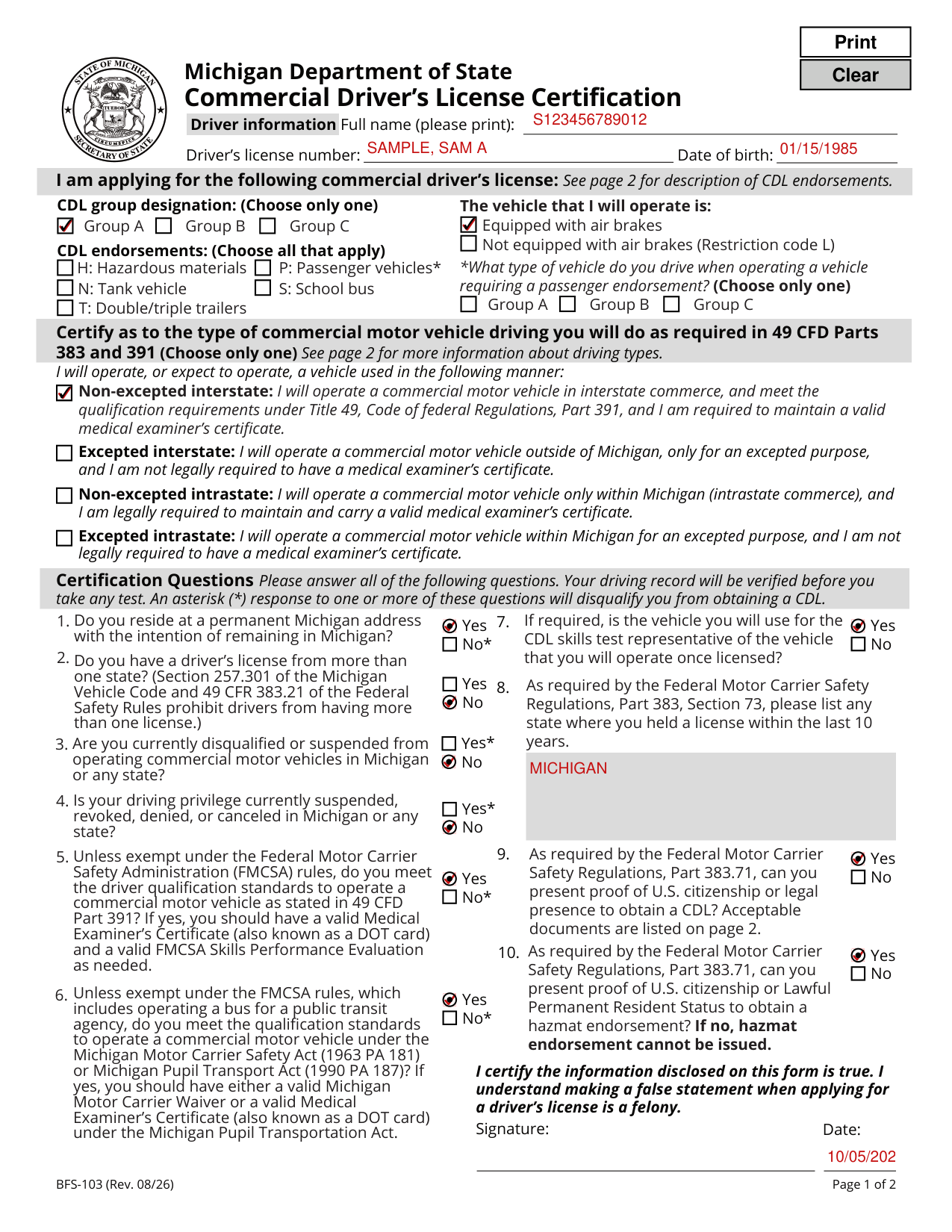
A filled-in Form BFS-103 example: a driver applies for a Group A CDL
How to fill out Form BFS-103, box by box
Driver information

Under Driver information, enter your Full name (please print), Driver's license number and Date of birth.
CDL group designation

CDL group designation: (Choose only one) Group A, Group B or Group C.
Group A: A vehicle towing a vehicle or trailer with a gross vehicle weight rating (GVWR) of 10,001 pounds or more when the gross combination weight rating is 26,001 pounds or more.
Group B: A vehicle with a GVWR of 26,001 pounds or more. Group B allows for towing trailers or other vehicles with a GVWR of 10,000 pounds or less.
Group C: Any single vehicle, or combination of vehicles, that meets neither the definition of Group A nor that of Group B, but is either designed to transport 16 or more passengers including the driver, or is used in the transportation of materials found to be hazardous and require the motor vehicle to be placarded under the Hazardous Materials Regulations (49 CFR Part 172, Subpart F).
The vehicle that I will operate is

The vehicle that I will operate is: Equipped with air brakes or Not equipped with air brakes (Restriction code L).
CDL endorsements

CDL endorsements: (Choose all that apply) H: Hazardous materials, N: Tank vehicle, P: Passenger vehicles, S: School bus and T: Double/triple trailers.
H: Hazardous materials; Needed to carry hazardous materials in amounts requiring a placard or any quantity of material listed as a select agent or toxin in 42 CFR Part 73.
N: Tank vehicles; Needed to haul liquids or liquefied gases in permanently mounted cargo tanks rated at 119 gallons or more or portable cargo tanks rate at 1,000 gallons or more.
P: Passenger vehicles; Needed to operate any vehicle designed to transport 16 passengers or more, including the driver.
S: School bus; Needed to operate any commercial motor vehicle used to transport pre-primary, primary, or secondary school students from home to school, school to home, or to and from school sponsored events.
T: Double/Triple trailers; Needed when towing two or more trailers with a single power unit.
Passenger vehicle type

P: Passenger vehicles*: What type of vehicle do you drive when operating a vehicle requiring a passenger endorsement? (Choose only one) Group A, Group B or Group C.
Certify as to the type of commercial motor vehicle driving
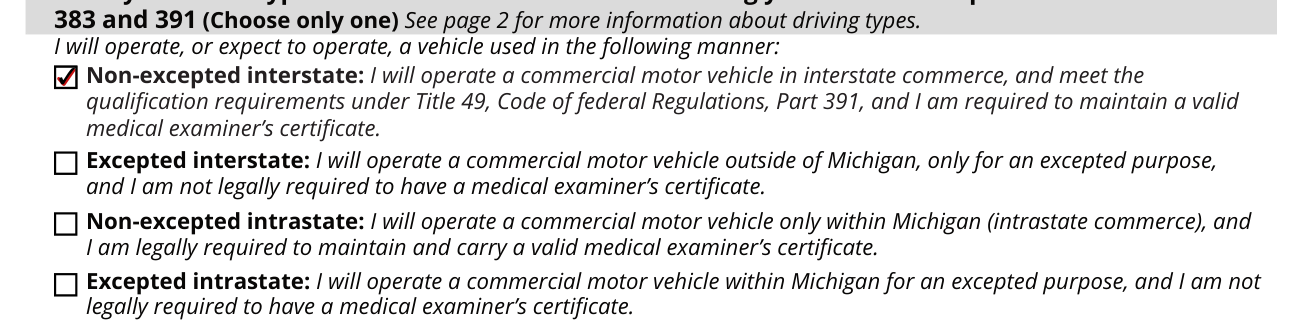
Certify as to the type of commercial motor vehicle driving you will do as required in 49 CFD Parts 383 and 391 (Choose only one).
Note: Operation of a commercial motor vehicle within state lines is considered interstate commerce if the origin and/or destination of the load requires crossing state lines.
Non-excepted interstate: I will operate a commercial motor vehicle in interstate commerce, and meet the qualification requirements under Title 49, Code of federal Regulations, Part 391, and I am required to maintain a valid medical examiner's certificate.
If your medical certificate indicates that your CDL driving privilege must be accompanied by an FMCSA Skills Performance Evaluation and/or an FMCSA waiver/exemption, then you must carry this documentation with you along with your medical certificate while operating a commercial motor vehicle.
Excepted interstate: I will operate a commercial motor vehicle outside of Michigan, only for an excepted purpose, and I am not legally required to have a medical examiner's certificate.
Non-excepted intrastate: I will operate a commercial motor vehicle only within Michigan (intrastate commerce), and I am legally required to maintain and carry a valid medical examiner's certificate.
The K restriction (intrastate only) will display on your commercial driver's license.
Excepted intrastate: I will operate a commercial motor vehicle within Michigan for an excepted purpose, and I am not legally required to have a medical examiner's certificate.
Certification Questions
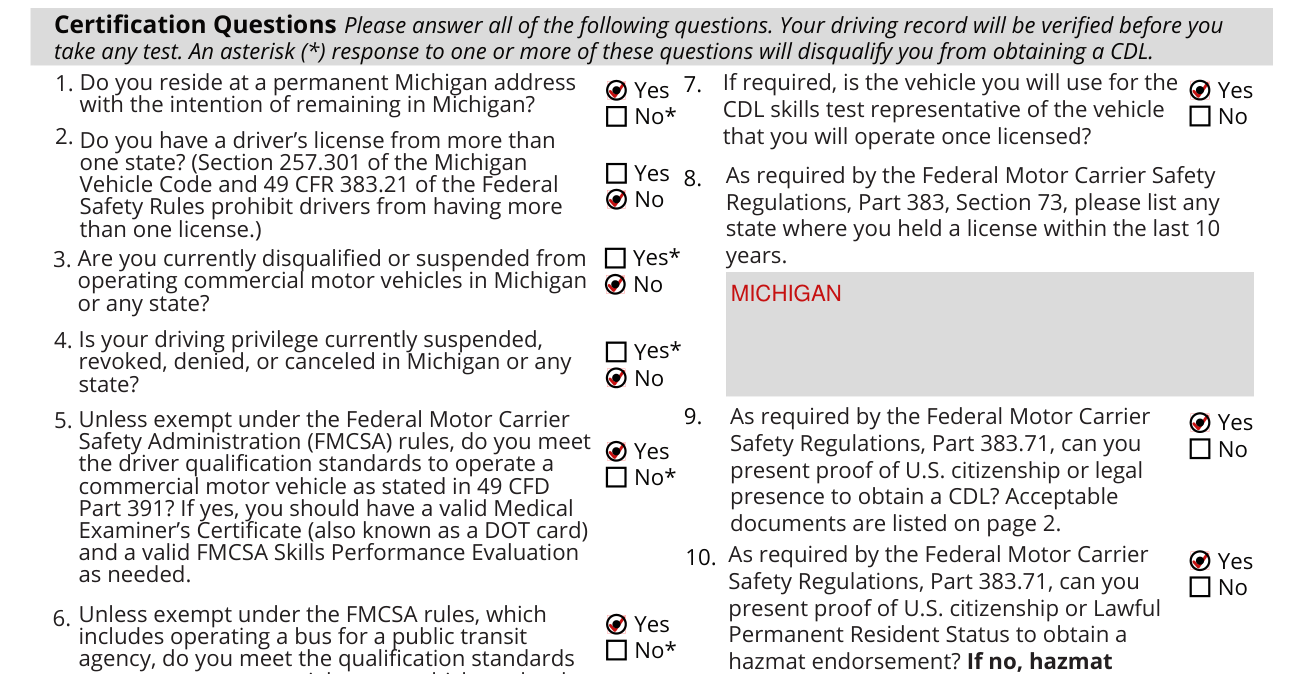
Please answer all of the following questions. Your driving record will be verified before you take any test. An asterisk (*) response to one or more of these questions will disqualify you from obtaining a CDL.
1. Do you reside at a permanent Michigan address with the intention of remaining in Michigan?
2. Do you have a driver's license from more than one state? (Section 257.301 of the Michigan Vehicle Code and 49 CFR 383.21 of the Federal Safety Rules prohibit drivers from having more than one license.)
Are you currently disqualified or suspended from operating commercial motor vehicles in Michigan or any state?
4. Is your driving privilege currently suspended, revoked, denied, or canceled in Michigan or any state?
5. Unless exempt under the Federal Motor Carrier Safety Administration (FMCSA) rules, do you meet the driver qualification standards to operate a commercial motor vehicle as stated in 49 CFD Part 391? If yes, you should have a valid Medical Examiner's Certificate (also known as a DOT card) and a valid FMCSA Skills Performance Evaluation as needed.
6. Unless exempt under the FMCSA rules, which includes operating a bus for a public transit agency, do you meet the qualification standards to operate a commercial motor vehicle under the Michigan Motor Carrier Safety Act (1963 PA 181) or Michigan Pupil Transport Act (1990 PA 187)? If yes, you should have either a valid Michigan Motor Carrier Waiver or a valid Medical Examiner's Certificate (also known as a DOT card) under the Michigan Pupil Transportation Act.
7. If required, is the vehicle you will use for the CDL skills test representative of the vehicle that you will operate once licensed?
As required by the Federal Motor Carrier Safety Regulations, Part 383, Section 73, please list any state where you held a license within the last 10 years.
As required by the Federal Motor Carrier Safety Regulations, Part 383.71, can you present proof of U.S. citizenship or legal presence to obtain a CDL? Acceptable documents are listed on page 2.
As required by the Federal Motor Carrier Safety Regulations, Part 383.71, can you present proof of U.S. citizenship or Lawful Permanent Resident Status to obtain a hazmat endorsement? If no, hazmat endorsement cannot be issued.
Michigan Department of State use only (Circle document type presented) Acceptable proof of U.S. citizenship: Unexpired U.S. passport or passport card; Original or certified copy of birth certificate issued by a state, county, municipal authority, or outlying possession of the U.S. bearing an official seal; Consular Report of Birth Abroad issued by the U.S. Department of State (FS-240, DS-1350 or FS-545); Certificate of Naturalization (N-550, N-570 or N-578); Certificate of U.S. Citizenship (N-560 or N-561).
Acceptable proof of legal presence for non-U.S. citizens: Valid, unexpired Permanent Resident Card, issued by USCIS or INS.
Signature and date

By signing and entering the Date you certify that the information disclosed on this form is true, and you understand that making a false statement when applying for a driver's license is a felony.
Sources
[1] Form BFS-103 (Rev. 08/26), Commercial Driver's License Certification, Michigan Department of State (the Official source link on this page).