
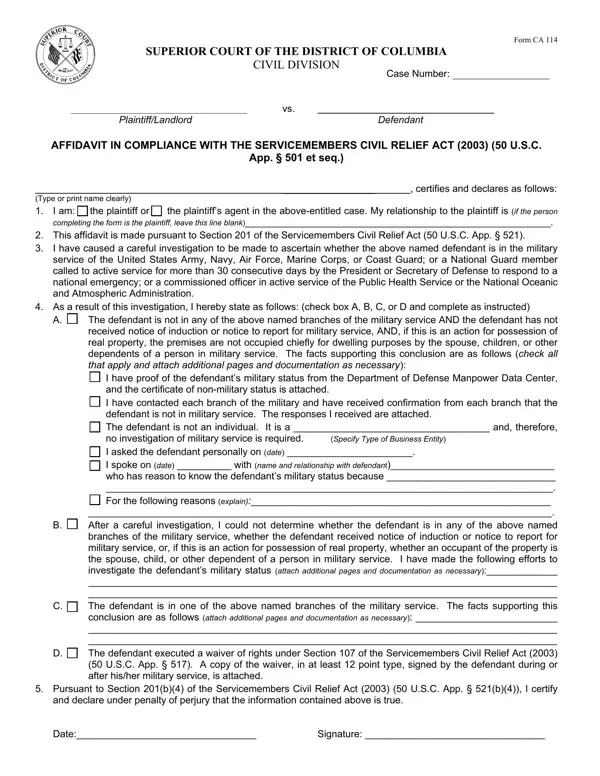
In the landscape of legal documentation and compliance, the Form CA 114 stands as a critical instrument within the Superior Court of the District of Columbia, Civil Division. This form serves as an affidavit in compliance with the Servicemembers Civil Relief Act (SCRA) of 2003. Individuals or agents acting on behalf of plaintiffs in civil cases are required to complete it to assert the military status of the defendant. Its principal aim is to protect members of the U.S. Armed Forces, including the Army, Navy, Air Force, Marine Corps, Coast Guard, National Guard members on active duty, commissioned officers of the Public Health Service, and the National Oceanic and Atmospheric Administration from certain legal actions and proceedings. This level of protection ensures that servicemembers can focus on their essential duties without undue stress from legal entanglements. By requiring a thorough investigation into the defendant's military status, Form CA 114 compels the plaintiff or plaintiff’s agent to either confirm the non-military status of the defendant, ascertain their active military service, or, in some cases, acknowledge the inability to determine their status, thereby invoking specific protections under the SCRA. This process involves checking with various branches of the military, considering any notices of induction or reports for service, and understanding the occupancy of real property concerning servicemembers and their dependents. Furthermore, the form accommodates situations where the defendant has expressly waived rights under the act. Every statement made within this affidavit carries the weight of perjury if falsely declared, underscoring the form's significance in maintaining the integrity of legal proceedings involving servicemembers.
| Question | Answer |
|---|---|
| Form Name | Form Ca 114 |
| Form Length | 2 pages |
| Fillable? | Yes |
| Fillable fields | 36 |
| Avg. time to fill out | 15 sec |
| Other names | SERVICEMEMBERS, Oceanic, certify, seq |
Form Ca 114 isn’t the one you’re looking for?