
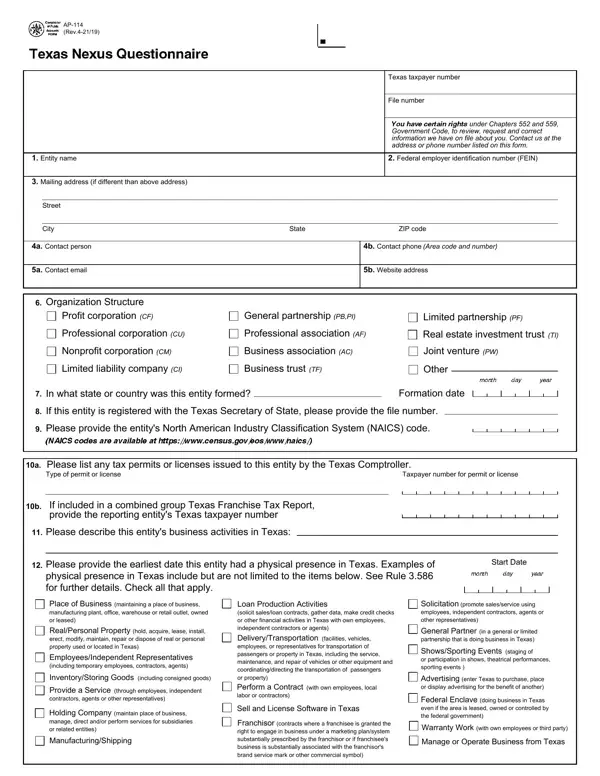
The AP-114 is the Texas Comptroller nexus questionnaire for the franchise tax. Businesses and companies complete this form to report whether they have a taxable connection, or nexus, with Texas. The form covers entity identification, business operations, physical presence in Texas, financial thresholds, and ownership details. Any business that may have a Texas nexus obligation under Texas law should review this form and file it promptly.
The Texas Comptroller requires any business with a potential franchise tax nexus in Texas to complete the AP-114 questionnaire. This includes corporations, limited liability companies (LLCs), partnerships, and other companies conducting business in Texas. Common situations that require filing the AP-114 questionnaire form include:
The AP-114 questionnaire form organizes its questions across several main areas. The form first collects basic information: legal name, federal employer identification number (FEIN), NAICS code, and contact details. The Texas nexus questionnaire then asks about operations in Texas, including loan production, sales solicitation, and service delivery. The AP-114 form also examines physical presence in Texas, such as office locations, storage facilities, or employees based in Texas. Finally, the questionnaire requests information about any owners, members, or partners with significant interests.
The Texas Comptroller uses this nexus questionnaire to determine whether a business owes franchise tax and how to calculate the tax base. Accurate and thorough responses help companies avoid penalties and ensure that their records remain in trust with Texas public authorities. Filing the AP-114 Texas nexus questionnaire on time is a critical step for any Texas franchise tax compliance program.
Texas nexus is determined by reviewing the AP-114 nexus questionnaire responses submitted to the state Comptroller. Physical presence in the state establishes nexus when a business maintains a Texas office, employs staff in Texas, or stores property in Texas. Economic nexus rules require entities with gross receipts above the statutory threshold to complete the nexus questionnaire, regardless of physical presence. Businesses in either category must update their nexus status by submitting the required AP-114 questionnaire to the Texas Comptroller.
Once the Comptroller reviews the completed nexus questionnaire, qualifying entities receive a formal request to file franchise tax forms and returns. Required returns include the annual franchise tax report, the no-tax-due request, and supplemental schedules for combined group members. Business entities should check the online status page on the Comptroller's website for current filing requirements, payment deadlines, and instructions for each required form. The page also provides instructions for submitting a request to update the nexus questionnaire records when circumstances change.
When entities make ownership adjustments, open new locations, or experience changes in Texas-sourced revenue, they must submit a new or updated nexus questionnaire to the state Comptroller. A written request or online submission keeps the entity's nexus status current and accurate. Reviewing the Comptroller's online page for the AP-114 nexus questionnaire provides the instructions and required forms needed to complete the update. Keeping nexus questionnaire records current protects entities from penalties and ensures that required franchise tax payment obligations are accurately reflected in the Comptroller's system.
What is the purpose of the AP-114 questionnaire?
The AP-114 is a Texas nexus questionnaire issued by the Texas Comptroller of Public Accounts. It helps Texas identify companies that may have a franchise tax nexus based on their presence and operations in Texas.
Do I need to file corrections after submitting the AP-114 form?
Yes. If your company's circumstances change, such as opening a new Texas office, adding employees, or increasing Texas gross receipts, you should file new information to reflect the current status. These changes keep your nexus questionnaire status current and your records up to date with Texas public authorities.
Is the AP-114 the same as a franchise tax return?
No. The AP-114 Texas nexus questionnaire is used to establish nexus, not to calculate or pay tax. Once nexus is confirmed, Texas companies file separate franchise tax forms and returns.
For related Texas tax forms, see the Nexus Questionnaire, the Nexus Application Form, and the Texas Sales Tax Exemption Certificate.
| Question | Answer |
|---|---|
| Form Name | AP-114 Texas Nexus Questionnaire |
| Form Length | 2 pages |
| Fillable? | No |
| Fillable fields | 0 |
| Avg. time to fill out | 30 sec |
| Issuing Authority | Texas Comptroller of Public Accounts |
| Form Category | Franchise Tax Nexus Questionnaire |
| Updated | Periodically by Texas Comptroller |
| Other names | Printable ..., 2012 Form TX Comptroller AP-114 Fill Online |
Ap 114 Form isn’t the one you’re looking for?