Please rate Form Certificate Necessity

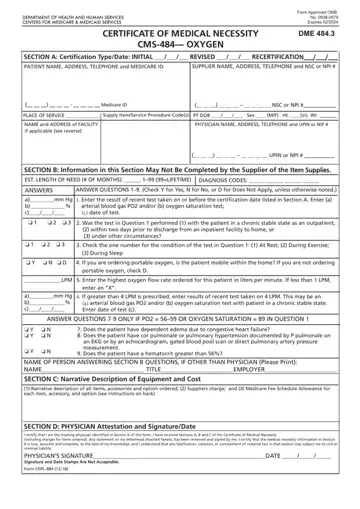
The Certificate of Medical Necessity (CMN) Form CMS-484 primarily targets the provision and documentation of oxygen and oxygen equipment, underscoring its pivotal role in the healthcare and medical equipment sector. Approved by the OMB and set to expire in February 2024, this form requires meticulous input from healthcare professionals, including physicians and suppliers. A vital component of the Centers for Medicare & Medicaid Services, it encapsulates sections ranging from patient and supplier information to detailed medical necessity and equipment descriptions. The form meticulously records patient identifiers, the physician's certification, and estimated needs, aligning with diagnosis codes and the stipulated medical regimen, such as oxygen flow rates. Furthermore, it encompasses a narrative section detailing the equipment and associated costs, reinforcing transparency and accountability in medical provisioning. Notably, the physician’s attestation consolidates the form’s integrity, ensuring the information is accurate and substantiates the medical necessity of the prescribed oxygen therapy. This form not only facilitates the approval process for Medicare coverage but also serves as a comprehensive documentation tool that bridges the gap between clinical need and the administrative facets of healthcare provision.
| Question | Answer |
|---|---|
| Form Name | Form Certificate Necessity |
| Form Length | 2 pages |
| Fillable? | No |
| Fillable fields | 0 |
| Avg. time to fill out | 30 sec |
| Other names | medicare form certificate, blank certificate of medical necessity, medical necessity dme, health form necessity |
Form Certificate Necessity isn’t the one you’re looking for?
Please rate Form Certificate Necessity
